
Hello, I got message about reaching the 200 MB quota when trying to upload a picture.
I was surprised, as I use mostly only tasks without attachments, so I cannot possibly imagine, how I could reach the 200 MB quota just by means of the text tasks.
Where can I find, which task takes how much space? Ideally to sort them by the space they take?
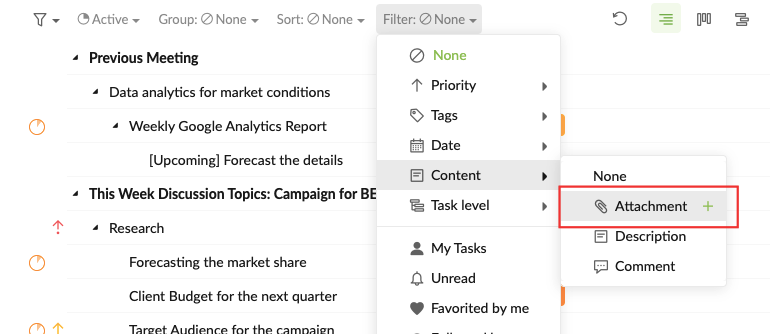
Hi Juraj - Unfortunately, we don't have way to see which tasks take up most of the storage quota. However, you can use the filter option to filter out the tasks with attachments in each project then remove the attachments individually to free up some quota. Hope this helps.
Peggy, 2021年9月23日
Thank you. And is there any way to find out, how much of the quota is used per user or per organization? It would really help.
Juraj, 2021年9月24日
Hi Juraj - Another reason that this problem is happening is probably because the file size you were trying to upload is larger than 200MB. Could you please let us know whether it was the same image you uploaded both times? (The first time when the error message appeared and the second time when the image was successfully uploaded.)
Peggy, 2021年9月24日
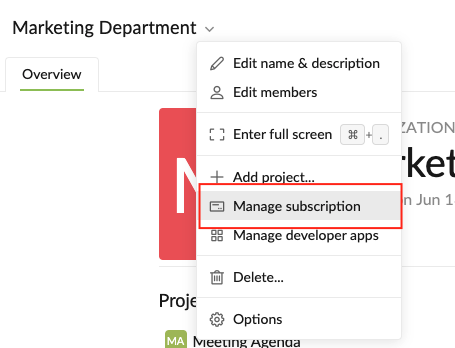
Hi Juraj - You can find out how much storage quota has been used for each organization in the My Subscription page (click on the Profile icon at the upper right corner). Or you can go to the View/Manage Subscription page by clicking the down arrow next the organization name at the top.
Unfortunately, finding out how much quota is used per user is not available.
Peggy, 2021年9月27日
Hi Juraj - We are sorry to say that we weren't able to reproduce this issue on our side. Could you please kindly let us know if this happens again so our tech team can look further into it?
To answer your question, the quotas for the shared organziations will not count into your personal (My Tasks) quota.
Peggy, 2021年9月24日
Yes, it was the same picture,and was max 3 MB of size. I have more organizations in Quire, as I collaborate with others and they have invited me to share their organization - do these shared organizations count into my personal quota?
Juraj, 2021年9月24日
@Peggy
|t's strange, because it did not find any (which seems legit, because I usually do not use attachments). It found nothing even among the All tasks.
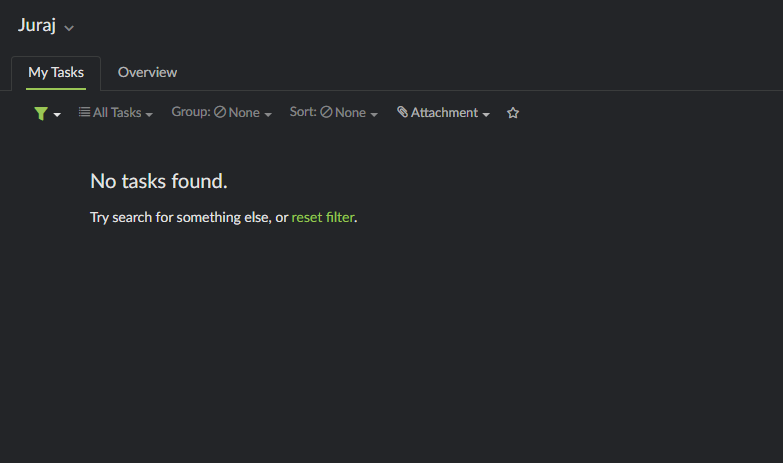
But afterwards, I suddenly could upload. It's quite strange behaviour. Is there any possibility to find out at least how much of the overal quota is left?
Juraj, 2021年9月24日
Great thank you, this will help.
Juraj, 2021年9月27日