
Hi!
today we had some unexpected behaviour of an overdue task without an assigned owner. The task showed up under My Tasks, because I created it.
The expected behaviour would be the task would show up at everyone their tasks, who was member of that project or is following that project or task.
The project in this case is a department action list. As it doesn't matter who executes the specific task, i want everyone to be notified of the task going over due., giving the opportunity to complete the task by the first person available.
😃
Crystal, Aug 2, 2017
That's great. If those persons could also be notified under "my tasks" about a task going over due it would be even better 😃
Ivo Meisen, Jul 24, 2017
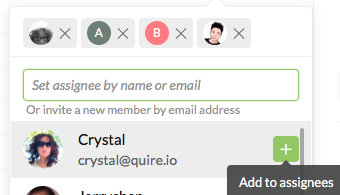
Hi Ivo, Our logic is that if a task is not assigned to anyone, it is nobody’s responsibility but most likely the one who created it. This can be especially true when the project is personal, and that there is no one else except the creator in it (does not make sense to assign all tasks to himself for them to appear under My Tasks). Have you thought about having everyone on the team to "favorite" (aka ❤ ) the task, or adding them to the task (aka multiple assignees), so the first person available can pick it up?
Crystal, Jul 21, 2017
Hi Crystal, indeed. Please notify anyone who is following or favorited a task.
Ivo Meisen, Jul 24, 2017
Hi Ivo, In that case, you need to assign the task to these people. That is, in order for them to see the task fall under their "My Tasks" AND be notified when it is overdue, they need to be the task's assignees.
Crystal, Jul 25, 2017
Hi Ivo, The person who follows or favorited a task, will be notified of any updates, or changes made to the task. Is this what you were asking?
Crystal, Jul 21, 2017
Hi Crystal, thanks for the explanation. For us that wouldn't be logical. What about also informing eveeryone who is actively following that specific task and / or project?
Ivo Meisen, Jul 21, 2017
Hi Ivo, When you add a person as a follower of a task/project, or that person has favorited a task, he or she will automatically be notified of any updates made to the task/project. 😃
Crystal, Jul 24, 2017
ok
Ivo Meisen, Aug 1, 2017