
Maybe I'm doing this wrong. I have one stays called backlog which is things to do but not part of my current plan. I'd like to use overview to see just things in to do or higher. Even better is to exclude tasks that are done. But the filter for status only lets me choose one instead of multiple statuses. Request:
A) a feature request to filter multiple statuses B) an explanation of how to track backlog items separate from my immediate short term plan.
Via Quire Android
Hi @zpetschek, Our mobile app has been updated. In the mobile app, you can now filter multiple statuses. Please give it a try and let us know if there are any issues. Thank you.
Golda, Mar 4, 2022
Hi @zpetschek, Yes, you can save the filter customization by clicking the Filter icon > find the customization that you want to save in Recent history > click the edit icon at the right > Save as...
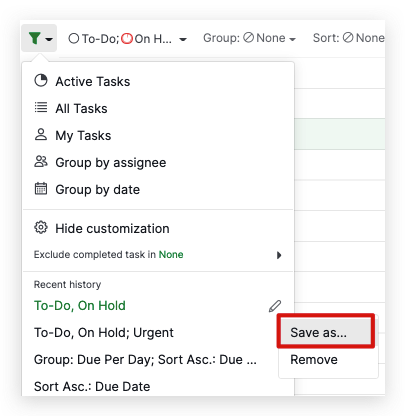
Hope this helps.
Golda, Feb 23, 2022
That is what I was looking for. I found it on the desktop version of Quire. I was mainly looking on the mobile app. Thanks!
zpetschek, Feb 24, 2022
Thanks. This helps. Is there a way to save this view as a default? It's a lot of clicks to set it up each time.
zpetschek, Feb 19, 2022
Hi @zpetschek, You can filter multiple statuses in the Filter bar. First, you need to click Customize in the Filter icon. After that, you can choose to filter one status, then you can click on the plus icon next to the other statuses. This way you can see the tasks based on the statuses that you selected. Hope this helps.
Golda, Feb 18, 2022