
Please separate tasks/projects updates from reminders so it is possible to disable sound from just one of them in android settings.
Android 8.1
Hi @Grox, Our mobile team is working on this. However, I cannot provide you with the exact time when it will be available. Once this is released, I'll make sure to let you know. Thank you!
Golda, May 17, 2022
Hi @Grox, You can now customize the notifications in the mobile app. Please update to the latest app version (version 7.87).
To customize, please go to your Project Setting and scroll down to the Notification section > Task activities. There are four options that you can choose from Editing, Status, Schedule, and Assignees. I hope this helps.
If there are any other questions, please feel free to contact us. Thank you.
Golda, Apr 21, 2022
Hi @Raisag, not entirely what i am looking for. I wish to get all of these notifications. But sound-less. So only time reminders are giving a sound.
Grox, Apr 21, 2022
Hi @Grox, Currently, we do not have the option to customize the sound of the notifications. However, I will pass your feedback to our Product Team to discuss it further. I will keep you posted when we have any updates. Thank you
Golda, Apr 22, 2022
Hello @Raisag I saw "Reminder" option was added like back 1-1,5 weeks ago. Sadly it is still not effective. Reminders use "Quire" notification category still. Is there any expected time when it would be functional?
Grox, May 13, 2022
Hi Grox,
Unfortunately, we don't have an update for this request just yet. I will make sure to notify you once the feature is added in the future. Thank you for your patience.
Peggy, Jun 6, 2022
Hi Grox, The sound of notifications can now be separated. You can now set the task reminders (tasks with date and time) to have sound notifications, and all the other notifications (i.e., other members editing the task name, etc.) can be set to be silent.
This is how you can do it: Go to Apps > choose Quire > Notifications (please note that different android phones may have different mobile settings).
You will see two options Quire and Reminder. Reminder is for a task with a start date and time, due date and time, and overdue tasks. Quire is for other notifications.
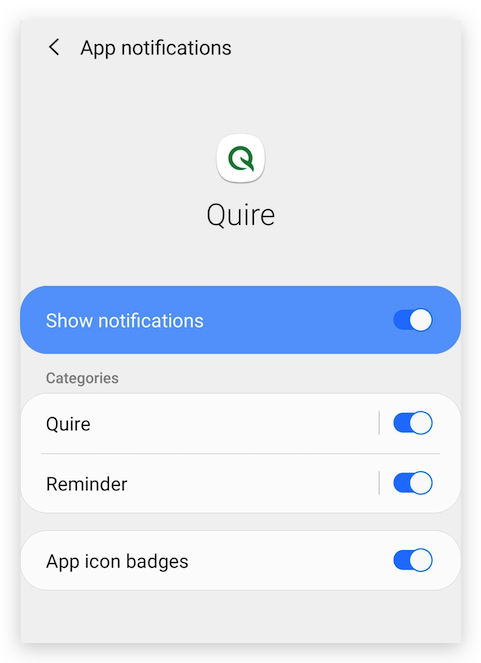
Please select the Quire option and choose silent if you would not want to receive sound notifications for all general task notifications.
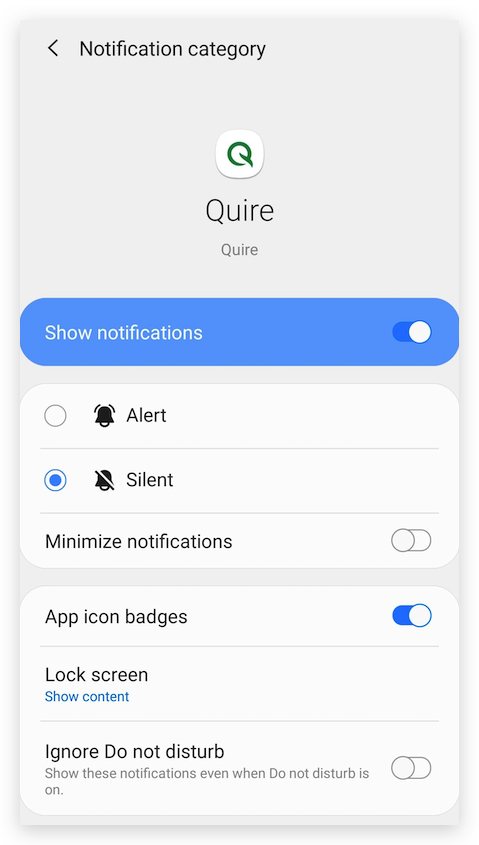
Golda, Jan 3, 2023
Hi @Raisag Is there any update about it?
It is kind of mandatory feature for private life tasks for me. I am running two Professional Quire organisations - company and private. So I am unable to keep sounds globally, otherwise I would be flooded. In same time lack of sounds for private life tasks (reminders 30 minutes before) is really disturbing.
Grox, Jun 3, 2022