
While it got nice done with "None" section while grouping tasks, which is great time saver for me, would be nice as well to add also all empty sections (may be option in groping window) based on grouping (tags/sublists/etc.).
That would speed up newly created projects or those who have tasks quickly completed.
An example: I have project for new flat with 3 sublists (buying, polishing, equipment), 2 last are using tags based on room. While ideas are being gathered, some rooms are empty and it may take a while longer to add new tasks there (must add it to None, assign task, refresh grouping). May be also not comfortable once tasks from certain room are done, but something new appears later.
Hi @Grox , Thank you for your suggestions! I will bring your feedback to our Product Team to discuss it further. I will keep you posted if we have any updates.
Golda, Apr 25, 2022
Hi @Grox, I want to let you know that now we have an option to show or hide the empty groups when in Group mode. You can try it and let me know if you have any questions. Thank you
Golda, May 9, 2022
Hello @Raisag It is flawless. Thank you. May it come later to mobile app too?
Also, would it be to possible to be rather per-project/filter setting instead global? While using some global tags, that in fact doesn't apply for all projects, it is kinda complex while grouping by sublists + tags at once.
Grox, May 9, 2022
Hi Grox, we will pass your feedback to our team, but we wouldn't be able to give you a certain answer about this. We will try to explain how this setting is affecting your workflow to our team. Keep you posted if we have any updates.
Peggy, Jun 6, 2022
May be better to display it there btw:
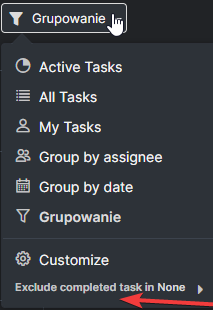
Grox, Jun 7, 2022
Hi @Grox, I'm writing to let you know that now Show or Hide empty groups is available in the mobile app too.
We appreciate your suggestion. Unfortunately, we won't be changing it to a per-project setting as we consider it more of a personal-based setting. Thank you.
Golda, May 25, 2022