
For "Limited" (at project level, Guest on organisation) user there is a few issues/errors that are not clearly explaining:
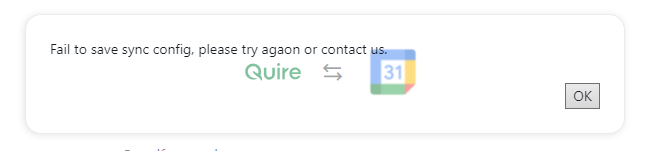
- Google Calendar Instant sync will give unknown error (with broken background and typo) instead inform that it is about user permissions.
When adding task from mobile with assignee it will add task, refresh page and make task gone in weird way, instead give simply permission error like it is on web.
By the way, wouldn't it be better just to gray out (disable) functions that are not possible to use with current permissions?
Hi Grox, sorry about this 😭, I have escalated this issue to our team. Please know that it has been taken to a higher priority. Once I get an update from the team, I will let you know right away!
Peggy, May 5, 2022
Hello @peggy It appears that this fix may broke new sync at all 😱 I am unable anymore to sync more projects as admin, getting "Sorry, you're not allowed to access this feature."
Grox, May 5, 2022
Hey Grox, about point no.01, it has been fixed in the latest version update. Please kindly try again and if let me know if the issue persists. Thank you for pointing this issue out in the first place!
Peggy, May 3, 2022
Hi Grox, this issue has been fixed. Could you please give it another try? Thank you. Sorry for the inconvenience.
Peggy, May 5, 2022
Hi @Grox, thank you for letting us know about this issue. I have escalated this to our developer team. I will let you know when there is an update.
About point no.2, could you please kindly share the detailed reproducing steps of the issue happening? I have tested with a team member‘s account (permission: Limited on the project level, Guest on the organization level), however, the mobile app had blocked the member from adding a new task with a pop-up error saying that "I don't have permission to set assignee".
Awaiting your reply. Thank you.
Peggy, Apr 29, 2022