
While using markdown like this:
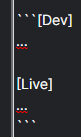
It is expected to work like in all other softwares using markdown, giving same result like with enter after opening tag:
[Dev]
...

[Live]
...
However, it cuts first word and causes this:
...

[Live]
...
I saw now in https://quire.io/blog/p/Our-Very-Own-Markdown.html it may be syntax highlight related, but then it shall rather do it just for supported languages (words) only.
Hi @peggy
I get it, but couldn't it just check if word is actual language name? Or even if it is at least regular word (not starting with special symbol)? We use many things that start with [ or <, and it is a bit misleading if in other apps it works even without enter.
Grox, May 8, 2022
Hi Grox,
I am sad to say that we don't have any updates for this and it won't be added to our pipeline for the future as well. The solution that I could suggest is to add a line break between ``` and [Dev]. Sorry if this isn't a perfect solution.
Peggy, Jun 6, 2022
Hi Grox, for our markdown, we follow the markdown guide. The text added after ``` allows you to color highlight for whatever language your code is. You can check out more information here: https://www.markdownguide.org/extended-syntax/#syntax-highlighting
For example, if you type below:
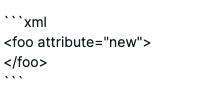
It will turn into this:
<foo attribute="new">
</foo>
Peggy, May 6, 2022
@peggy
Grox, Jun 3, 2022