
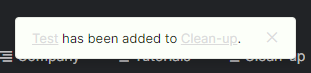
- Barely readable on dark mode.
- Covering sublists, while there is space above.
- It actually appears for bookmarked projects? Is there any option to disable it? I bookmark some projects just for menu, I don't need to see notification that I just added task, because I know it.
Hello @Raisag I rather meant if it could be considered as feature to add option to disable it?
Grox, May 17, 2022
Hi @Grox, Unfortunately, this notification cannot be disabled. We displayed this notification to let project members know that they have successfully added the task to the sublist.
Golda, May 17, 2022
Hi @Grox, I am afraid that this is not in our consideration. Just wanted to let you know that the popup message will disappear on its own after a few seconds. Thank you.
Golda, May 18, 2022
Hi @Grox, I have informed our Developer Team about this issue and our team is currently looking into it. We are sorry for the inconvenience!
About question no. 3, are you referring to the toast message that appears after you transfer tasks to a bookmarked project?

Golda, May 10, 2022
Hello @Raisag I meant about the one I posted. When I have any of project in bookmarks, and then add any task, this message appears with sound. It is not necessary for me at all. As mentioned, I bookmarked only to have it in menu. Is it possible to be disabled?
Grox, May 10, 2022
Hi @grox, Our team has fixed the pop-up message. Now it will not cover the sublists anymore. You may try and see if it works for you. Thank you.
Golda, May 13, 2022
Hello @Raisag Visual is fixed now. Only question left is then what makes it displayed. Since some projects have and some not. And I could not see any logic.
Grox, May 13, 2022
Hello @Raisag It clarifies it. Would be there be option to disable it? It is rather disturbing for me than giving any valuable information.
Grox, May 16, 2022
Hi @Grox, The toast notification will appear when you add tasks to the sublist and cannot be disabled. However, we are currently considering adjusting the notification location so that it will not cover the sublists. I will keep you updated, and you can try it if this works for you.
Golda, May 11, 2022
Hi @Grox, The notification will pop up when you add a task to a sublist. But there will be no notification when you add a task that has been added to the sublist before. We will only show the notification to the newly added task.
I'm guessing this is the situation that you are currently encountering.
Golda, May 16, 2022