
Hi @Raisag, What you suggested did not work. But thank you for clarifying what "deferring" means, it helped me figure out how to fix it. I still don't know why the comments disappeared in the first place after transferring the task to another project. But at least I was able to return them. It seemed that they would not re-appear after transferring back to the original project (like another task I did), because I changed its status in the other project, not the original. And no matter what I did (like changing statuses again), the comments would not re-appear. So I transferred the task back to the other project (where I deferred it), changed the status there (back to "to-do") and then transferred the task back to the original project. That seemed to do the trick, as all the comments re-appeared, even after I set it to "complete" again in the original project. I hope I explained it clearly enough to help someone with a similar problem. Again, this does not explain why the comments disappear after transferring a task to another project, I don't think they should; otherwise, what's the point of transferring? You can just create the same task in another project. Anyway, I thank you for your help and suggestions, and would like to add that I absolutely love Quire, it's super helpful!
Irina, Aug 11, 2022
Hi @Bryson_Management, When the task activity log shows that you deferred a task, it means changing the task's status from another status to To-Do.
For example, you have set the task status to In Progress, then you changed the status back to To-Do. Your task activity log will show that you deferred the task. This cannot be undone because the activity log only shows the record of the actions done to the task.
Also, when you defer a task (change the status), it shall not remove the comment.
To help you further, you may try the below steps:
- Please go to your Project Recent Activities and find the transfer task activity. In your project, navigate to the Overview tab > scroll down to Recent Activities.
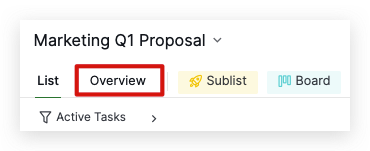
- Click the transfer task activity link and reload the URL to see whether the comments re-appear.
- You may try to log in to your browser with private mode and do the same steps to see if the comments appear.
Please try these steps and let me know the result. Thank you.
Golda, Aug 10, 2022
Hi @Bryson_Management, I'm sorry for the inconvenience this has caused 😭 . I tried to reproduce this issue, but I was not able to. In order to help you further, we will need the task URL so that our team can troubleshoot.
Because this is a public forum, you can send it to support@quire.io and our team will continue to assist you.
As we need to access your project, please kindly write in the email stating that you give our developer team permission to access your organization or project.
On another note, when you duplicate a task, the comments from the original price won't be copied.
Thank you very much.
Golda, Aug 9, 2022
I transferred a task to another project, hoping it will also transfer all the comments posted for that task, since I did not check the box "to transfer WITHOUT comments for the original task". However, the task appeared to have no comments in the new project, so I transferred it back 'cause I did not want to lose the comments/posts. When it appeared in the original project, the comments were back, so I duplicated the task (to transfer it to the new project) and leave the original (with comments) in the original project as completed. After that, the posts disappeared again, from both original and duplicate task. The right panel just shows the "history" of the task, with a recent entry saying that I "deferred" the task. I don't know what it means, or how to do it, I simply transferred it, not "defer" it, but this is when, I noticed, the comments were gone. Please help.
Irina, Aug 6, 2022
Hi @Bryson_Management, I'm glad to hear that the comments have re-appeared.
Yes, when transferring a task, the comments should also be transferred. Regarding your task comments that were not being transferred, I have brought this issue to our Dev Team's attention, and our team will try to research and reproduce it. I will make sure to keep you posted when I receive any updates from our team.
In the meantime, if you have any further questions, please do not hesitate to reach out to us. We will be happy to help! Once again, we are sorry for the inconvenience and have a great day!
Golda, Aug 12, 2022
I use quire for work in a medical office, and unfortunately, cannot share access due to HIPAA. I realize that you probably won't be able to help me in this case. But I would really appreciate it if you could at least tell me what "deferring" a task means and how I can undo it. Maybe I can try and fix it myself. Like I said, I have only an activity log left for the task showing that I deferred the task, and the comments seemed to have disappeared after that action. Thank you!
Irina, Aug 9, 2022