
How can I do this?
Hi @j4nelson, I would like to double-check your feedback. Are you looking to assign a task to a member with an email address? If so, you can click the assignee icon and type the email address directly. If the member is new to Quire, he/she will automatically join the project once they accept the email invitations.
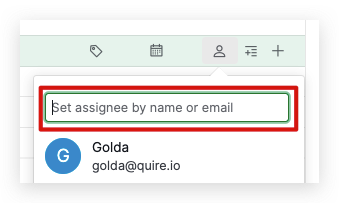
If this is not what you are looking for, please let me know and I will be happy to assist you. Thank you.
Golda, Aug 16, 2022
Hi @j4nelson, You can create a task and assign your team member directly from your mailbox! Not only assign your team member, but you can also set a date and add tags and set priority for each task. We have a complete guide about Email to Quire that you can check here.
If you have any questions, feel free to let me know. Thank you.
Golda, Aug 23, 2022
I would like to assign by sending an email/task to a team member directly from my email mailbox.
Jennifer, Aug 23, 2022
Thanks for the reply.
Jennifer, Aug 23, 2022