
How do I view/delete existing Share links for a project?
There should really be a "Manage Sharing" link in Project menu. Also there should be a clear notification at the top of the project that it's being shared.
Hi Golda, ok I found the Shared Links thank you, just not easy to find this way. And the reason to show the notification at the top is in case you forget the project has been shared with client (could be weeks later), and add new tasks/comments to it that you may not want to be seen by those outside of your team.
Serge, Sep 1, 2022
Hi @globaldev, I understand your point of view, and I will bring your feedback to our Product Team and take it into consideration. I will notify you when our team has any updates.
add new tasks/comments to it that you may not want to be seen by those outside of your team
Regarding this feedback, do you mean you would like to add a description when you share a link? I have attached some screenshots if you want to add a description for this link so that your team members can know more information about it.
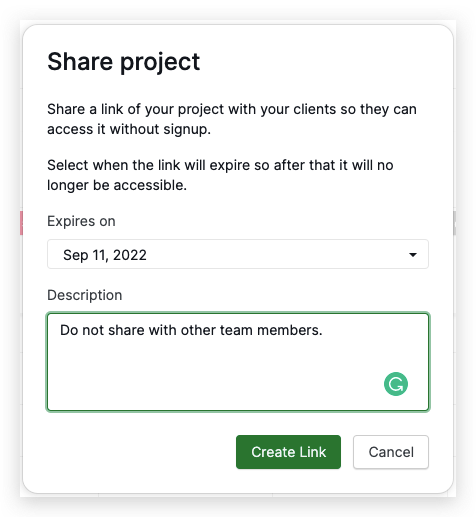
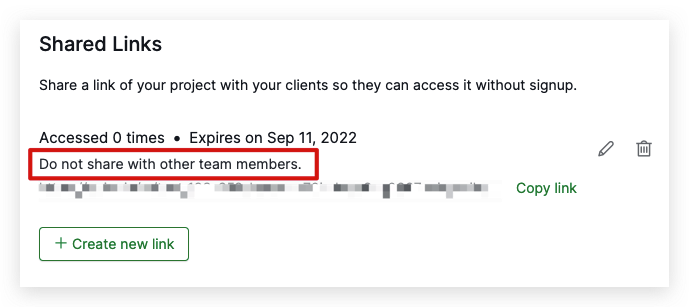
Please let me know if this is what you are looking for. Thank you.
Golda, Sep 1, 2022
Hi @globaldev, You can find all the shared links of your projects by going to your project dropdown menu > Edit members > scroll down to the Shared Links section.
Thank you for your feedback. Could you please let me know the reason why you want a notification at the top of the project that it's being shared? This way, our team can understand your feedback better.
Thank you.
Golda, Aug 30, 2022