
How do you force sync projects across platforms and apps? I have updated a task in the Windows APP but the mobile app and mac app don't show the updates.
Okay I tried to replicate the issue and I couldn't replicate it. Thanks.
Dr. Marion Mouton, Sep 17, 2022
Hi @marion.mouton,
Kindly try the following steps:
In your Windows, kindly select one task and add a due date and an assignee. --> In your Mac and Mobile app, check whether the task's due date and assignee are updated
In your Windows, please create a new task. --> Please check whether the new task has a task ID in the detail panel.
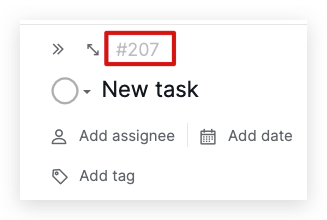
Please try these steps and let me know the result. Thank you, and I'm looking forward to your reply.
Golda, Sep 5, 2022
Hi @marion.mouton, When you update your project to one platform, it will automatically sync to the other platforms. I want to double-check your feedback, were you connected to the internet when you updated your project?
When you are not connected to the internet, you can still add tasks to the current project or the ones that you had access to while you have an internet connection. As long as the page is cached on your side, we will immediately sync anything you've changed when the internet connection is restored.
Golda, Sep 2, 2022
Hi @marion.mouton, When you drag and drop tasks to subtasks, it shall also sync to other platforms. There is a possibility that you were not connected to the internet.
To check whether you have an internet connection, you can try to create a new task. Without an internet connection, the new task will not display the task ID in the detail panel.
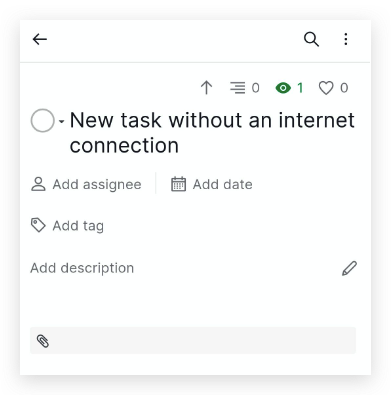
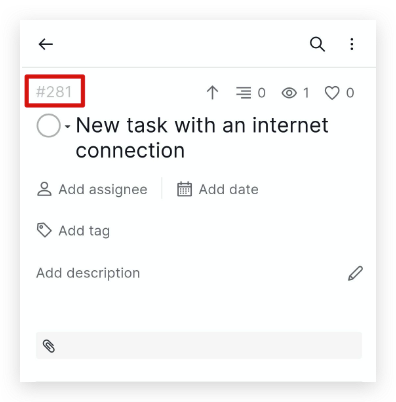
Please try it again, and I'm looking forward to your reply. Thank you.
Golda, Sep 8, 2022
I will try that however the issue was dragging and dropping to make a task a subtask. @Raisag
Dr. Marion Mouton, Sep 8, 2022
Hi @marion.mouton, If there are no further questions, we will close this feedback thread. If you have any further questions in the future, please leave a comment and we will reach out to you! 🙌
Golda, Sep 16, 2022
I was connected to the internet on my windows machine. I was able to select all tasks and drag and drop them to a make them a subtask. On the windows machine it showed correctly. On my Mac and android app they didn't show as a subtask. I had to go to my Android app and make them a subtask to reflect the changes. @Raisag
Dr. Marion Mouton, Sep 2, 2022