
#553: Quire Feedback
Status: Completed
On this page https://quire.io/blog/p/Our-Very-Own-Markdown.html It says the following:
LINE BREAKS To generate a new line, you press SHIFT+Enter.
However this does not seem to work for me. It seems to only enter a normal line break. No difference from just pressing enter. Having 2 or more of these will not add a bigger vertical space like I want, it only look like 1 in the parsed representation.
I also want to add a line break in a table-cell but can't seem to be able to do that either.
Created by Oscar Jonsson Aug 12, 2017
Hi Oscar, You can press Enter to break a line. Shift+Enter works too. I will update the info in the blog. 😃 And when you press 2 Enters (or Shift+Enter), you do get a bigger vertical space like this: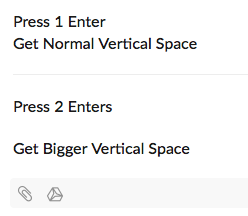 As for breaking a line in a table cell, let us think about it. Thanks!
Crystal, Aug 14, 2017