
My task keeps on changing how it looks making it impossible to press things. Also any time I scroll down it instantly pops back to the top.
Via Quire Android
Hi @Raisag. I reached out only through the feedback on this page. I was contacted through email by ye. The problem only started with the last quire update. I have tried these steps a number of times to no avail. I have also cleared my cache and tried changing a number of setting again to no avail. Any help would be much appreciated
Peter Flynn, 2022年9月22日
Sorry to hear about that. We will have more investigation for it and keep you updated. Before that, you can go to account settings and change the display mode to basic or advanced as a workaround.
Jerrychen, 2022年9月22日
Hi that actually seems to have fixed it. It was set to auto and just jumping between basic and advanced.
Peter Flynn, 2022年9月23日
Hi @Peterflynn555, In the mobile app, you can change the display mode to (auto), Basic, or Advanced. You can go to Account > Account Setting > scroll down to Project Preferences. If currently, you choose (auto), you can choose either Basic or Advanced as a workaround to see if anything changes.
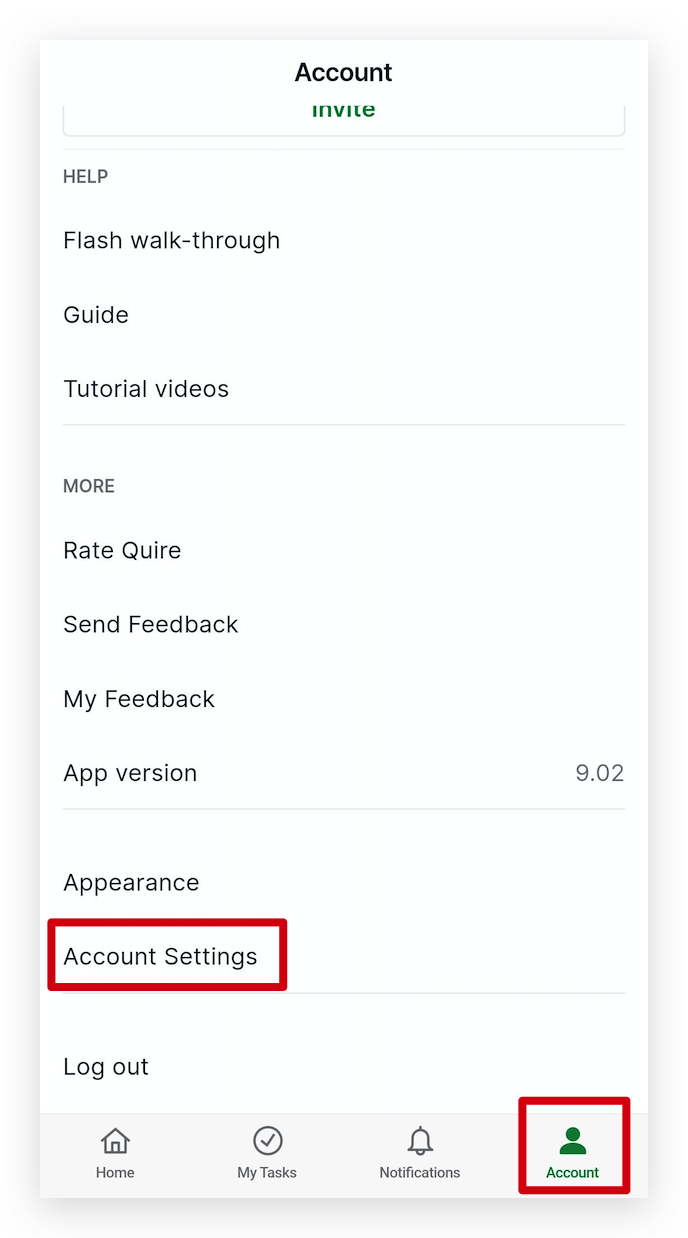
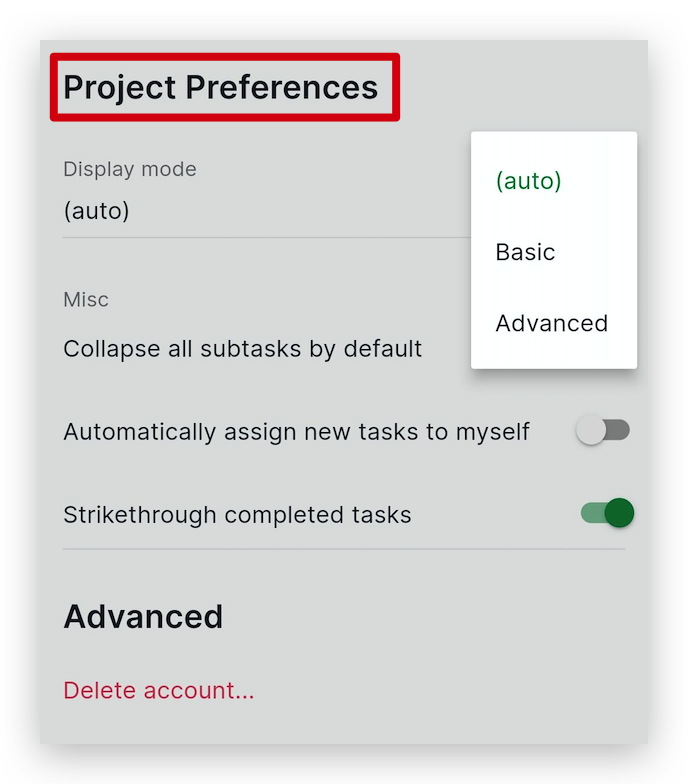
At the moment, our team can't reproduce this issue. Our team is trying to investigate to identify the problem, and we would like to ask you if you are willing to manually install the APK file with the downgraded version of the Quire app. By doing this, our team can further troubleshoot the issue.
If you are willing to do this, we will send you the file for you to download. Please let me know what you think. Thank you.
Golda, 2022年9月23日
Hi Jerry, thanks for your reply, just in case it wasn't made clear this is through the app(9.02) so I don't have display mode to change.
Peter Flynn, 2022年9月22日
Hi @Peterflynn555, I'm glad to hear that the issue has been solved! If you have any questions in the future, please let me know! Thank you.
Golda, 2022年9月26日
Hi @Peterflynn555, I believe you also reached out to us through our email, but I will share the steps that you can take in this feedback thread.
You can follow the below steps and let me know the result after you try:
Please let me know if the issue is solved. Thank you.
Golda, 2022年9月22日