
Hi Quire team,
when installing the GitHub App and after selecting the project(s) on GitHub which I want to link to Quire, the saving fails. When selecting the GitHub repos, one of my repos is already preselected (maybe because I linked that repo to Quire some time ago, but that link broke somehow at some point in the past).
Yes, I just tested with a new commit and I still get the notification from Quire that it cannot access the repo, despite the fact that a link to the commit is added as a comment to the task in Quire.
Johannes Brust, Sep 27, 2022
Hi @johannes.brust, Please go to https://github.com/settings/applications, and check whether Quire is in the authorized apps list. When Quire is not on the list, Quire cannot access your repo. You can try to connect Quire to your GitHub again if it's not on the list. Please let me know the result. Thank you.
Golda, Sep 26, 2022
Hi @johannes.brust, I tried to reproduce this issue, but unfortunately I wasn't able to 😭. To further troubleshoot, could you please share a screenshot of the notification? Thank you, and I'm sorry for the inconvenience.
Golda, Sep 28, 2022
Hi, after following your proposal I don't get the notification about the forbidden access anymore. 👍 But the GitHub app is still not listed under authorized apps under My Apps in Quire (just so you know, I don't really care as long as the app is working 😜 ). Thank you for your support!
Johannes Brust, Sep 28, 2022
Hi @johannes.brust, Thank you for the screenshot.
You can try to follow the following steps to see if the issue persists:
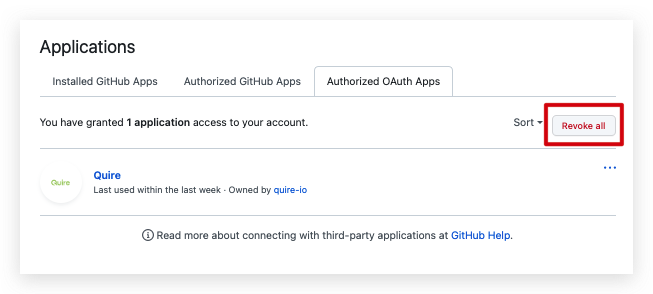
Please go to https://github.com/settings/applications and try to revoke all Quire app.
Reset the GitHub repositories in Quire. Please go to https://quire.io/apps/github > Install > Specify a project > Allow > Uncheck all repositories > Save.
Recheck the GitHub repositories. Please go to https://quire.io/apps/github > Install > Specify a project > Allow > Check the GitHub repositories > Save.
Please try the steps above and let me know if you still get the access forbidden notification. Thank you.
Golda, Sep 28, 2022
Hi, just a quick update. Saving now is "successfull", at least that's what it says, because the GitHub app is not listed in the authorized apps afterwards.
Johannes Brust, Sep 25, 2022
Hi @johannes.brust, Thank you for reaching out to us. I have notified our team about this issue, and I will let you know once our team has fixed it. Thank you, and sorry for the inconvenience.
Golda, Sep 23, 2022
The connection seems to work somehow though. I added the necessary tags to a commit message and the expected automatic actions took place on Quire. But I got a notification in Quire that it is not able to access my repo.
Johannes Brust, Sep 25, 2022
Hi, Quire was in the authorized apps list.
Johannes Brust, Sep 26, 2022
Hi @johannes.brust, I want to double-check with you. Do you still receive the notification in Quire about not being able to access your repo?
Golda, Sep 27, 2022
Hi, sure!
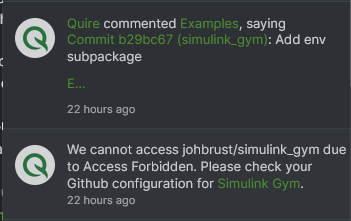
Johannes Brust, Sep 28, 2022
Hi @johannes.brust, I'm glad to hear that the issue has been resolved!
Regarding the GitHub app is not listed under My Apps, I will notify our team and let you know when we have any updates!
Thank you.
Golda, Sep 29, 2022
I could imagine that this is all caused by some broken link between Quire and GitHub. I don't exactly remember when I first linked the project to the repo, but it was some time ago. I then didn't have time to work on that project and never used the link. When I now started to work on the project again, the GitHub app was not "installed" anymore and I did setup it again (with the described problems). Somewhere in Quire the connection was still available, because when I reinstalled the GitHub app the correct GitHub repo was already selected/checked. Couldn't you just reset the Quire GitHub app for me?
Johannes Brust, Sep 28, 2022