
I encountered a problem to see favourited tasks under favourites in my tasks, when they are a second level task and the main task on level one is not favorited. then the suptask does not appear. Only when favouriting the upper task too, then I can see it. First this should not happen that favourites can get lost respectively are not shown. Second I would prefer not to have listed the upper task as an favourite then as it gets too much distracting information.
Hi Karlheinz, It is a bug and we have fixed it. You should have no trouble favoring a subtask so it shows under Favorites in My Tasks, without the need to favorite its parent task. 😃
Crystal, Aug 22, 2017
By the way - it was just uploaded a newer version of Quire (I had to refresh which I was asked to do in the help-window on the bottom which appeared for that reason). After doing so the right column was empty - no more details accessible. I had to log off and in again but with this detail column we are discussing right now it also needed some time to load again. I guess it was just because of much data traffic on your servers, but wanted to tell you about it. For me that seems to be solved now.
(deleted-MyzM), Aug 23, 2017
But there seems to be another bug - the heart is shown under my tasks, but in the subfolder "favourites" it is missing.
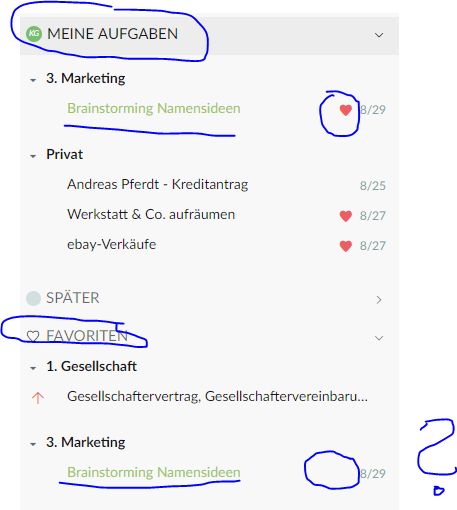
Also in the task details in the middle column and detail column on the right I cannot see the heart and where to set it anymore (I think since Quire 2.0). There should be another option to set it than only by right clicking on the task in the middle row - if it was only to see if it is set or not.
(deleted-MyzM), Aug 23, 2017
⭐️ We have closed your thread in order to optimize the performance of the Quire Feedback Forum. Please see our Quire Feedback Official Guideline for more information.
Peggy, Apr 28, 2021
Hi Karlheinz, Like how we do not show bookmarks icon under Bookmarks folder, we do not show the favorites icon under Favorites folder. I do see favorites in both main and detail panels. Did you press Ctrl (or Alt for Mac) to see task IDs? If so press it again to see favorites in the main panel.
In main panel:
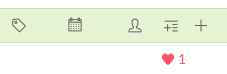 In detail panel:

Also, you can right-click on a task to favorite it.
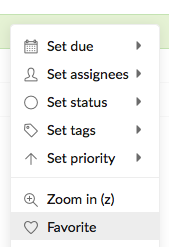
As for the issue with right detail panel being empty, it should be fixed. If you run into this issue again, please share a screenshot of the issue with us. Thanks.
Crystal, Aug 24, 2017
Works great now. Thanks for that fast reaction.
(deleted-MyzM), Aug 23, 2017