
In the case of a task/project going past the due date; is there a way to add a new task/project completion date while keeping the original date? This would help us to easily gauge how often we are going over and hone our project estimating times for new task/projects.
This does help a little however we will want to easily track this in a spreadsheet/csv which I think the export file provides. However, after downloading the file I now have another question. How to I add a start date. For the project that is in progress, there is still not start date. See attached image for details.
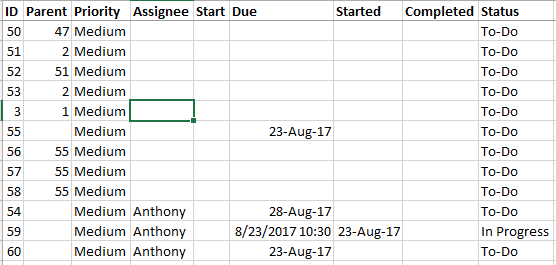
Anthony Glass, Aug 24, 2017
I guess I am asking for clarification between the fields Start, Due, and Started.
Anthony Glass, Aug 24, 2017
⭐️ We have closed your thread in order to optimize the performance of the Quire Feedback Forum. Please see our Quire Feedback Official Guideline for more information.
Peggy, Apr 28, 2021
Hi Anthony, Let’s say you have a task with a due date of 8/4, and you change it to 8/31. You can click on Created by Crystal… to see how often you miss the deadline:
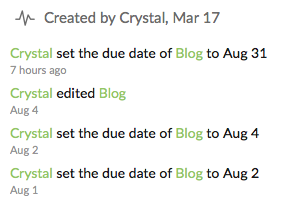
Hope it helps. 😃
Crystal, Aug 23, 2017
Hi Anthony, Start date is the date you schedule to start working on a task; Started date is the actual date you started working on a task (= the date you change its status to In Progress); Due date is the date you schedule a task to be completed by. Hope this is clear. 😃
Crystal, Aug 24, 2017