
Hi Vikramjit, I want to make sure I understand your question correctly. You mentioned when you zoom in on a section, it leaves the section header on the main page. Currently, when you zoom in on a section, both the first-level section and the selected section are displayed.
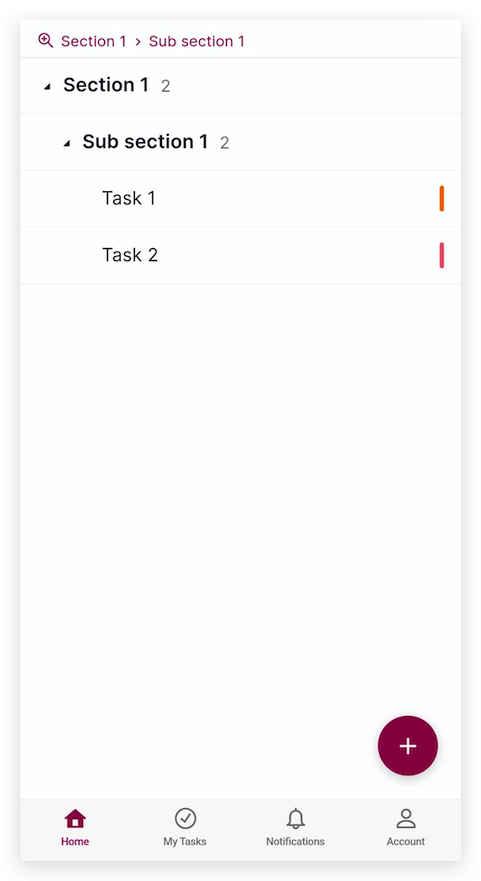
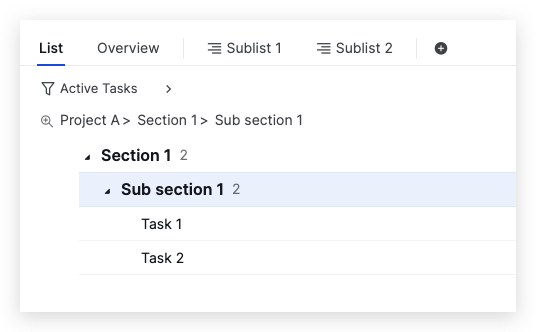
I have attached screenshots from both the mobile app and the web app. In the screenshots, I zoomed in on Sub section 1, which is nested under Section 1. You can see that both the mobile app and web app show Section 1 (the first-level section) and Sub section 1 (the zoomed section). I want to confirm, is this what you are referring to?
Mobile app
Web app
Golda, May 15, 2023
Hi Vikramjit, Our team has fixed this issue in the latest mobile app update. Please update your mobile app to version 9.62 and see if the issue persists. Thank you.
Golda, May 15, 2023
Yes. This is what I'm referring to. Zooming in on sub section 1 should only leave Task 1 and 2 on the main page as they are already visible on the top header. Otherwise, it's not really zooming, is it?
Vikramjit Bora, May 15, 2023
Hi, Our team has fixed the issue of zooming in on a section on the web and mobile app. For mobile app, kindly update your mobile app to the latest version (v.9.64). Thank you.
Golda, Jun 1, 2023
Hi @Raisag I don't think this issue has been resolved. It's still the same on both mobile and the web app.
Vikramjit Bora, May 15, 2023