
Hi, I can't find how to manage push notifications for iOS and MacOS. I am currently getting notifications every time a collouege adds, edits, comments, completes or undo any of said things on any task I'm assigned to or mentioned in. This is infuriating and not acceptable. How can I manage what notifications Quire is Allowed to send, and how often? For Email I can set notifications to daily/hourly/per activity - I need similar control for push notifications.
Thanks. That was helpful Do I have to do this manually for every project? can I set a personal notification standard for every new project?
Jonatan Ericson, Jun 13, 2023
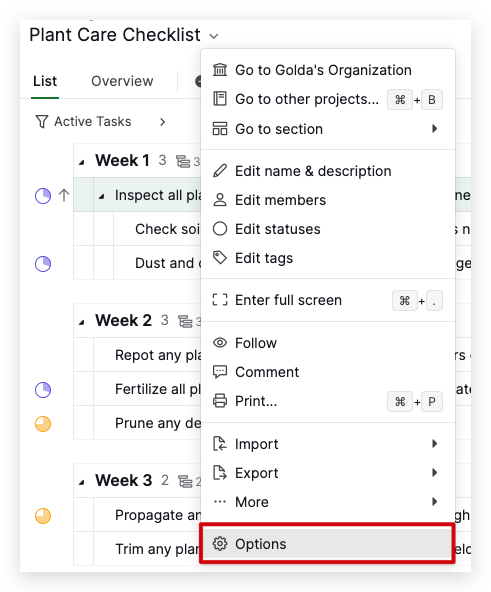
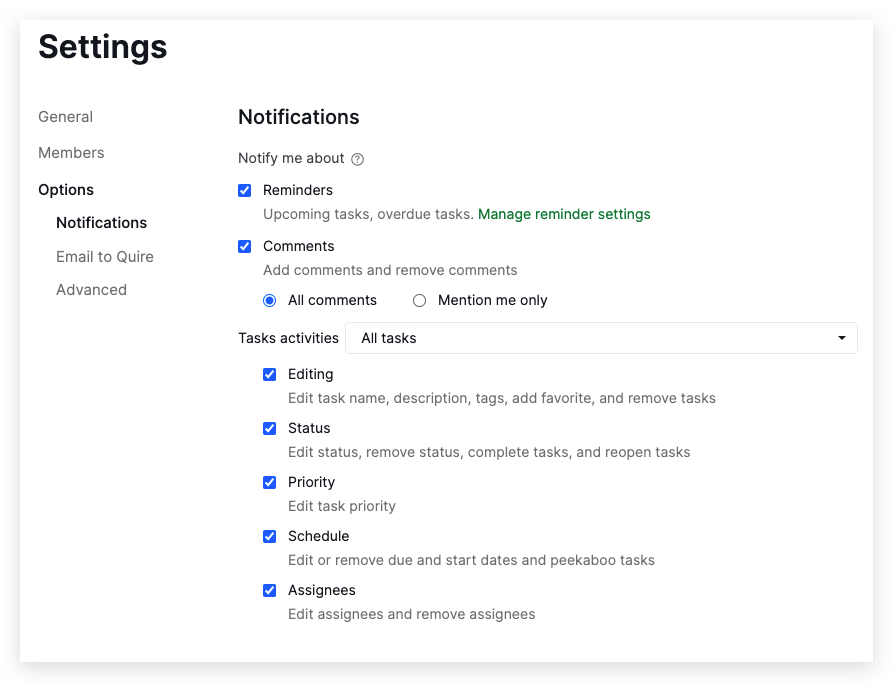
Hi, You can go to the Project settings to manage your notifications in Quire. In the Notification section, there are several categories that you can customize according to your preferences. As for comments, you have the option to select Mention me only, which means you'll only receive notifications when someone mentions you in a comment.
I have attached some screenshots below. I hope this resolves your question.
Golda, Jun 13, 2023
Hi, Currently, you will need to set the notification in every project manually. Thank you.
Golda, Jun 14, 2023