
Hi. A while ago I requested an estimate to be included in the CSV export. You added this very quickly, which is great. Would it be possible to add the actual time spent? Even better would it be possible to have a column containing the calculation estimate minus actual too?
Hi, Your feedback has been passed to our team for further discussion. While we can't promise a quick implementation, our team is definitely looking into it. Thank you for your suggestion!
Golda, 2023年7月25日
@Raisag Thanks for addressing this so quickly. I've tested it but I can't get it to work like you've displayed in the screenshot.
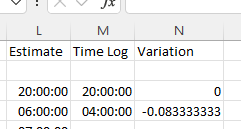
I've tried changing the format to hh:mm:ss but it doesn't seem to work when there's a negative number. Also, the current calculation is Time Log - Estimate, shouldn't it be Estimate - Timelog? I've attached a screenshot of what I see in the export.
Thanks
Marc O'Neill, 2023年7月26日
@MarcO_Neill I'm Peggy from the Quire team.
About the calculation turning out to be a negative number, this might be a limitation of Excel.
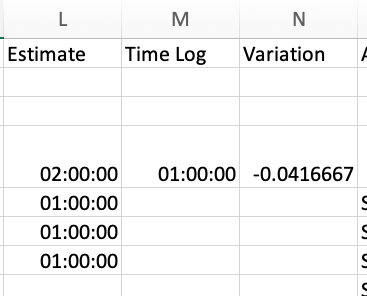
Please try the below settings to change the results.
- Change the cell format to
[h]:mm:ss;-[h]:mm:ssRight-click > Format Cells > Custom > and enter the format[h]:mm:ss;-[h]:mm:ss - Then go to the Advanced settings and change the calculation to use 1904 date system Select File > Options > Advanced in the navigation panel > In the 'When calculating this workbook', select 'Use 1904 date system'
From this:
To this:
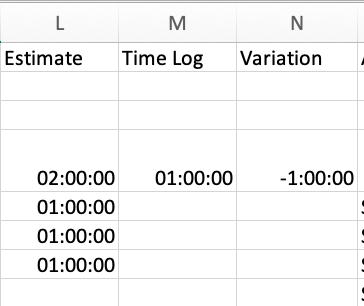
Please give this a try and let us know if it works!
Peggy, 2023年7月27日
Hi, Our team has made improvements to the project CSV export, and it includes the following:
Please try and let me know if you have any issues. Thank you.
Golda, 2023年7月26日