
In our project management,we notice and need maintaining an agile environment is essential for ensuring productivity and focus. When dealing with inactivity, we employ several strategies to streamline the process and keep the project on track. These strategies can automate or some reports filters can include:
Archiving by filter : When an assignee, task, or project is inactive for a significant period,
Creating Report Alerts: Setting up alerts for when tasks or projects become inactive for a significant period,
Bulk Filtering and Cleaning: Regularly using bulk filter selections to identify inactive tasks or projects can streamline the cleanup process. This helps in quickly archiving or deleting these items, maintaining a focused and organized project environment.
We feel Implementing these strategies—archive, alert, and data clean—promotes a more agile project management approach, enhancing efficiency and allowing teams to concentrate on their most critical and active work.
Via Quire iOS
Hi, Thank you for your feedback.
- Bulk Filtering and Cleaning: Regularly using bulk filter selections to identify inactive tasks or projects can streamline the cleanup process. This helps in quickly archiving or deleting these items, maintaining a focused and organized project environment.
Regarding this suggestion, are you referring to having a separate page or screen for inactive tasks to be displayed?
I've shared your feedback with our team for further review. In the meantime, I'd like to share a workaround to help you achieve the desired result below:
To find inactive tasks, apply a filter to sort by Commented Date or Updated Date in ascending order. This will display the oldest tasks according to the filter you set.
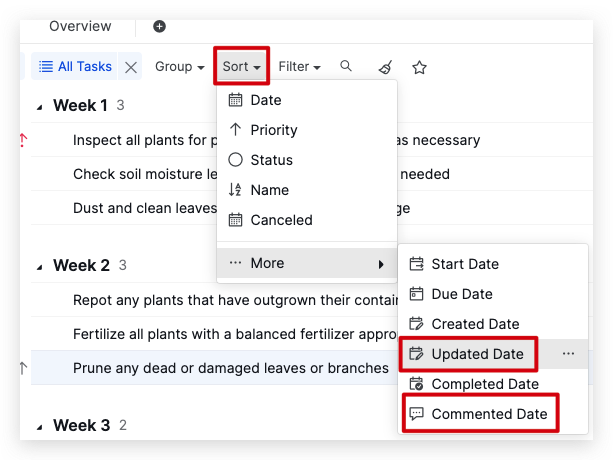
Then, you can multi-select the inactive tasks and use the Peekaboo feature to archive them.
Please give it a try and let me know if you have any questions. Thank you.
Golda, Jun 4, 2024
Hi, We have added a Filter by Updated date. With this filter, you can quickly identify inactive tasks and archive them using the Peekaboo feature.
Feel free to try this newly added filter, and let me know if you have any questions. Thank you.
Thank you it works 👍🏻
MD @NOBLE, Jun 12, 2024
Hi, We have added a Filter by Updated date. With this filter, you can quickly identify inactive tasks and archive them using the Peekaboo feature.
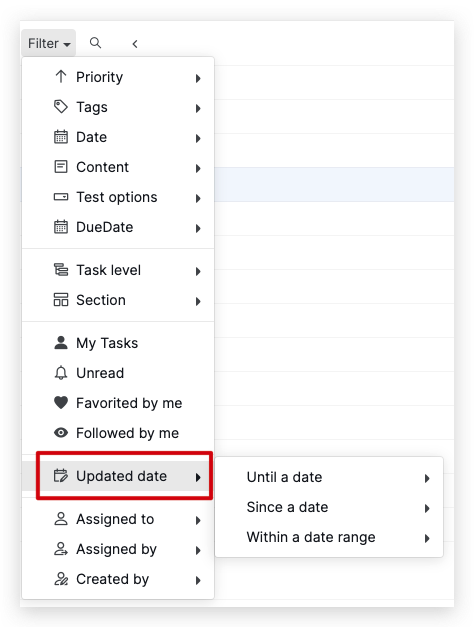
Feel free to try this newly added filter, and let me know if you have any questions. Thank you.
Golda, Jun 7, 2024
Hi, Regarding your suggestion about archiving inactive tasks, you can also apply a filter to Group by Update per week.
This way, your tasks will be grouped by week, allowing you to identify inactive tasks based on the date easily. Then, you can multi-select the inactive tasks and use the Peekaboo feature to archive them.
Please try this workaround and let me know if it works. Thank you.
Golda, Jun 5, 2024