
I have one user who has now "Normal+" in organisation view.
While making clean-up in project-level permissions I noticed he is listed also as "Normal" in one project. It was either before he was granted "Normal+" or when there was some old issue with lack of permission in this project regardless organisation permissions.
When I try to delete him from project, I get popup with "Reassign the tasks that they will lose permission over", while he is not losing permissions in fact.
I would rather not risk clicking OK, while he is not visible in dropdown list to be selected, since it's over 100 tasks.
Is it safe to click OK? Can this popup be removed when he has permissions on organisation level?
Hi, thank you for your inquiry. I understand that the dialog displayed when removing a member from project permissions can be confusing if the member has organization-level permissions. We will enhance this workflow and keep you posted with any updates. Thank you.
Golda, Jul 23, 2024
Hi, We have resolved this issue. You shall not see the dialog to reassign the tasks if the member has organization plus permission. Please refresh your Quire page and let me know if the issue persists. Thank you.
Golda, Aug 1, 2024
Hi, To clarify, is the issue resolved after reloading the page?
After reloading the workspace, the new role data should be reflected if you change roles or add members. We make sure such changes are updated promptly. If the issue persists, please let us know.
Golda, Aug 2, 2024
Hi Seems to be also cache-related as after full reload is fine (with Ctrl+F5 wasn't): #6083 (comment)
Grox, Aug 2, 2024
Hi @Raisag While I was able to remove one user with admin permissions finely now, I still can't do it for Normal+ users with Normal permissions on project, still getting popup:


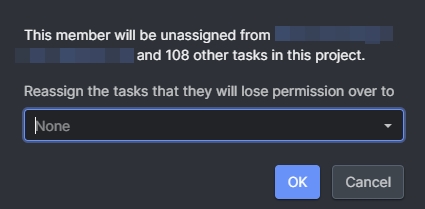
Grox, Aug 2, 2024
Hi, thank you for letting us know. Our team is working on this issue and will update you once it's fixed. We are sorry for the inconvenience.
Golda, Aug 5, 2024
Ok, it seems to be related indeed about refreshing browser cache. Tho such features should be cache-cleared on your side, unless you do it just at main releases
Grox, Aug 2, 2024