
We have had a new way pushed with no prior notice
This impacts how I have custom macros set up for colours, bold italics etc
So there are extra processes to try to get a colour, the options are very basic and is no yellow (is gold) and no red (is pink)
Surely this should of been pre-mentioned or given a choice
I am sure for new users WYSIWYG is going to be good for ease of use, but I have used quire and setup around it now for nearly 4 years and feel betrayed - Code still kinda works in subject but not description so surely can be done so can do either way
Well, this is more critical - it is impossible to click links anymore in regular way
Grox, Feb 12, 2025
Hi @Grox
This two issues have been fixed in our latest version (Quire v. 1667). Please refresh your browser to see if the issue has been fixed.
Vicky, Feb 13, 2025
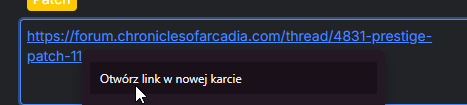
They are valid links, as via context menu on right click they wrok
Grox, Feb 14, 2025
Why now have we lost the colours again? All updates was looking more and more of a comprimise, Now when you copy in any of the colours they all go white? Yellow Orange RED All are just white now on description and titles
Hi ICF,
We're sorry for the inconvenience. Our team is currently working on a fix and we will keep you updated on the progress.
Golda, Feb 20, 2025
Hi Grox,
Thank you for pointing out to us. Unfortunately we cannot reproduce this issue from our end. Perhaps you can give us the task URL so that our team can debug better? If you don't feel comfortable sharing it in this public feedback forum, please email to support@quire.io.
Again, we're sorry for the inconvenience.
Vicky, Feb 14, 2025
It is also not possible to select anything from code blocks in comments 😞
Hi Grox,
The cannot select text in comments and cannot click on links are known bugs. Our Dev team is working on them right now. We will keep you updated!
Vicky, Feb 13, 2025
It is also impossible to use custom colors anymore on task names, so all colors we use as headers on sections are showing in pickup like nothing is set, I can imagine it can be quite confusing
Grox, Feb 12, 2025
Also this is quite critical imo - before when you were editing task description and swapped to other task, you got popup do you want to save. I often used to it cancel desc after I realized it is not needed. Now it just saves without question, so I can imagine many tasks ending with cut words
Grox, Feb 12, 2025
About choice it would be maybe option to have switch near description as I would prefer symbolic editor as well for some Regex operations I do, tho can imagine some of my team members would prefer this one, maybe even I would use it sometimes for checklists for example
Grox, Feb 12, 2025
Please allow for switching to the markdown editor, this new editor does not work for our team at all.
Peter, Feb 13, 2025
Unfortunately even on 1668 clicking on old links in description doesn't work. WYSIWYG is not seeing them as links when clicking link, but they are links.
Grox, Feb 14, 2025
Hi ICF,
This issue has been resolved. However, please note that any color changes that were made before we fixed the issue cannot be recovered. As a workaround, you can copy another task with the original color to a new input, which will transfer the old color to the new task.
Golda, Feb 21, 2025
Hi ICF,
Regarding text color, could you try performing a hard reload on your browser and try again? Let me know if the issue persists.
But also on Description we still cant copy in now, it just writes it back out as code so for example \**Yellow** this worked yesterday just turned white, now doesn't change at all? (Worked here on my browser but not the quire "app"
I'm not sure I fully understand your question. Could you explain what you mean?
Golda, Feb 21, 2025
Hi ICF, This issue has been resolved. However, please note that any color changes that were made before we fixed the issue cannot be recovered. As a workaround, you can copy another task with the original color to a new input, which will transfer the old color to the new task.
It seems still to be changing a new one to white when clicking it (may of not have received a update yet)
But also on Description we still cant copy in now, it just writes it back out as code so for example **Yellow** this worked yesterday just turned white, now doesn't change at all? (Worked here on my browser but not the quire "app"
ICF, Feb 21, 2025
Hi ICF, Regarding text color, could you try performing a hard reload on your browser and try again? Let me know if the issue persists.
But also on Description we still cant copy in now, it just writes it back out as code so for example \**Yellow** this worked yesterday just turned white, now doesn't change at all? (Worked here on my browser but not the quire "app" I'm not sure I fully understand your question. Could you explain what you mean?
I just got an update and seems to be back to how it was, thank you for the quick turn around
ICF, Feb 21, 2025
Why now have we lost the colours again? All updates was looking more and more of a comprimise, Now when you copy in any of the colours they all go white?
Yellow
Orange
RED
All are just white now on description and titles
ICF, Feb 20, 2025
It is also not possible to select anything from code blocks in comments 😞
Grox, Feb 13, 2025