
Neither `code one-liner` nor
multi-line code block
work
Another issue is with pasing into code blocks. I have this piece of code: begin a b end
now if I try to open a code block and pase it in: quote
a
b
end
Peter, Feb 21, 2025
`some code`
Peter, Feb 14, 2025
The code was:
public class Main { public static void main(String[] args) {
System.out.println("Hello World");
}
}
Jason, Feb 14, 2025
Peter, Feb 14, 2025
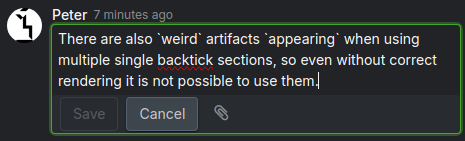
here you can see it in edit mode, try it yourself
Peter, Feb 14, 2025
Ah gotcha! Thank you I will pass to our Dev team!
Vicky, Feb 14, 2025
Hi Peter,
This issue has been fixed. Now using backtick for code works also.
Please try again.
Vicky, Feb 18, 2025
Hi all,
We now support a shortcut for inline code:
Ctrl+Efor WindowsCmd+Efor Mac
Thank you.
Golda, Feb 27, 2025
For 3, it should _not_ end the code fence if the backtick is escaped. Minor issue overall, but you should be able to write
backtick \backtick` inside of a backtick section. But as it is now, the middle escaped one ends the section and you need to try to trick it to do what you want.
Hi Jason,
Code conversion happens when the opening backtick is followed by a second one to close the code. Escaping a code fence with a backslash is not supported.
Golda, Feb 24, 2025
Actually there is still something else strange, when editing the above looks like this:
But once the message is saved it moves that ` to the end for some reason. If I edit, it then returns to the middle.
I'm not sure what you mean here. Could you please provide a screen recording for us to check?
Golda, Feb 24, 2025
Another issue is with pasing into code blocks. I have this piece of code: begin a b end now if I try to open a code block and pase it in: quote a b
end
Hi Peter, this issue and the task link that contain code blocks issue are a known glitch and our team is currently working on a fix.
Golda, Feb 24, 2025
So instead of writing " As are variables " I end up writing " Asare variables ".
Peter, Feb 18, 2025
Hi Peter,
Let me pass this feedback to the team.
Vicky, Feb 18, 2025
Another issue is that the code block does not render at the end of a `message`
Peter, Feb 18, 2025
Why? I posted a bunch of other issues above.
Peter, Feb 18, 2025
Great! I will close this for now. Feel free to reach out if you have any questions.
Golda, Feb 21, 2025
Hah, it seems to be even worse, as it breaks other code blocks I might have in the text (as you see above).
Peter, Feb 18, 2025

I am going to close this thread now as the issue is solved (kinda...). Feel free to report other bugs to us!
Vicky, Feb 18, 2025
When I type something with single backticks, then after closing a backtick and writing a space, the cursor appears before the space.
Hi, our team is still unable to reproduce this. Is this happening in the latest version?
Golda, Feb 18, 2025
So instead of writing "
As are variables " I end up writing "Asare variables ".
Yes, this is still happening.
Peter, Feb 18, 2025
Hi,
We've passed to our team and will keep you updated!
Golda, Feb 18, 2025
Yes, the code blocks work better now (still more janky than they were working before). I do not see the issue mentioned in the comment above anymore.
Peter, Feb 21, 2025
Another issue is with titles of tasks that contain code blocks: #6304 <code>example</code> code in title
Peter, Feb 21, 2025
Hi Jason,
- We've passed to our team
- If there is a space before the closing backtick, it will not be rendered as code
- We're unable to reproduce this on our end. Please see the below video.
Golda, Feb 21, 2025
For 3, it should _not_ end the code fence if the backtick is escaped. Minor issue overall, but you should be able to write backtick \ backtick` inside of a backtick section. But as it is now, the middle escaped one ends the section and you need to try to trick it to do what you want.
Jason, Feb 21, 2025
Doesn't seem to really be working for me. I typed ```java on the following line, then pasted in some java code, and this is what it did:
public
Jason, Feb 14, 2025
Hi Jason,
Currently the backticks for codeblock should work. However, after typing ```, you have to type Enter. Please try again.
Vicky, Feb 14, 2025
Hi Jason,
For now we have disabled the Markdown so you can only use our new editor to create code or codeblock. You can select the text and apply the style you'd like.
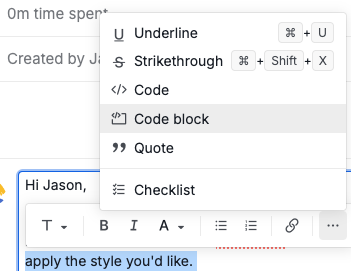
But we understand the frustration, so we decided to enhance this. Please stay tuned.
Vicky, Feb 13, 2025
Hi Jason,
After typing ````` , you have to follow by an Enter , then it will turn into a codeblock.
Please note that for now, only codeblock works, typing `a` for code does not support yet.
Vicky, Feb 14, 2025
There are also `weird artifacts \appearing` when using multiple single backtick sections, so even without correct rendering it is not possible to use them.
Peter, Feb 14, 2025
Hi Peter,
Sorry for the inconvenience. Is there a way for you to help us provide a screen recording? Without a screen recording, it's too difficult for us to reproduce the issue.
Vicky, Feb 14, 2025
When I type something with single backticks, then after closing a backtick and writing a space, the cursor appears before the space.
Peter, Feb 18, 2025
Why? I often write code block in parenthesis (
like_this) inserting a space (like_this) makes it look ugly.
Hi Peter,
We've fixed this in the latest update (Quire ver. 1674). Please reload your workspace. Thank you.
Golda, Feb 20, 2025
Another issue that I noticed just now is that I can not start a code block right after a non-space letter. "`A` does not work".
Peter, Feb 18, 2025
First case occurs often, as one wants to type a period after a code block like a.Then write another sentence, but the space after the period is missing.
Peter, Feb 18, 2025
Another issue is that the code block does not render at the end of a `message`
Hi Peter,
Hi Peter,
I cannot reproduce this issue. Can you retry to see if it works now?
Vicky, Feb 18, 2025
I think you typed a space after `, then it works
Peter, Feb 18, 2025
Peter, Feb 18, 2025
Hi Peter,
This is how it's supposed to work now. You have to press a space after the backtick for the code to autosave.
Vicky, Feb 18, 2025
Why? I often write code block in parenthesis (`like_this) inserting a space ( like_this`) makes it look ugly.
Peter, Feb 18, 2025
Another issue that I noticed just now is that I can not start a code block right after a non-space letter. "`A` does not work".
You will need a space before the backtick in order for it to render as code.
Golda, Feb 18, 2025
Peter, Feb 18, 2025
Another issue is with pasing into code blocks. I have this piece of code: begin a b end now if I try to open a code block and pase it in: quote a b
end
Hi Peter, this issue is resolved (ver. 1677). Thank you.
Golda, Feb 25, 2025
Another issue is with titles of tasks that contain code blocks: #6304 <code>example</code> code in title
Hi Peter,
This issue has been resolved. Please note that formatting styles (e.g., code or color) will not be rendered in the task link label. Thank you.
Golda, Mar 4, 2025
When I type something with single backticks, then after closing a backtick and writing a space, the cursor appears before the space.
Hi Peter,
Our team couldn't reproduce this issue. Does it still occur in the latest update (ver. 1675)? If so, please share a screen recording with us.
Golda, Feb 21, 2025
A couple issues I'm still noticing:
- Pressing space after creating a
backtick sectionis ignored and you have to press it twice - Maybe unlikely to happen, but if the backtick section ends with a space the whole thing is ignored `backtick `
- You can't have backticks with escaped backticks inside a la
backtick \backtick`
Jason, Feb 21, 2025
Actually there is still something else strange, when editing the above looks like this:
But once the message is saved it moves that ` to the end for some reason. If I edit, it then returns to the middle.
Jason, Feb 21, 2025