
Bonjour et merci pour cette application vraiment très efficace.
2 choses que j'aimerais changer :
- Trier les commentaires des taches du plus récent au plus anciens
- Clique gauche sur le statut = permutation : to do > in progress > done (remplace le click droit)
Hi,
Trier les commentaires des taches du plus récent au plus anciens
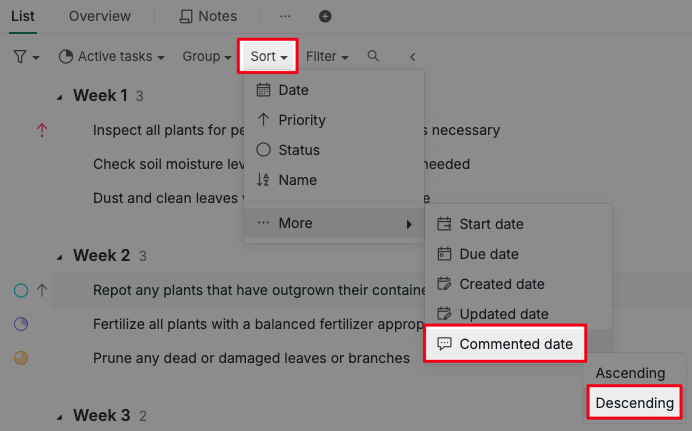
If you are referring to sort task comments from newest to oldest in your task list, you can do this by applying a filter: Sort > Commented date > Descending.
Clique gauche sur le statut = permutation : to do > in progress > done (remplace le click droit)
I'm not entirely sure about your question. If you're referring to clicking the status icon to open the status options, you can enable this in the project settings:
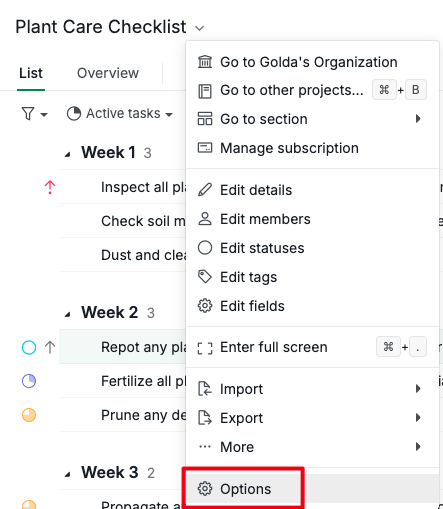
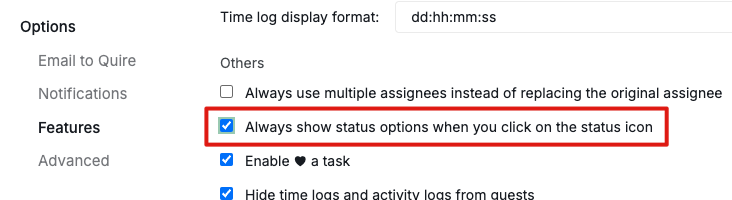
Go to Project dropdown menu > Options > Features > enable Always show status options when you click on the status icon.
Golda, Mar 18, 2025
Sorry, I m talking about 2 things, 1st is the statue of the task. I prefer left clic for the next progress: "do to > in progress > done "( better than right clik) The second one it's about the comments (on the bottom left) I prefer to see the newest on the top.
Good job for this app, more I use it more I like.
Vince T, Apr 25, 2025
Hi,
Thank you for clarifying your feedback.
Do you mean that when you left-click on the status icon, you'd like it to automatically change to the next higher percentage status? If so, it seems you are looking for the Automation feature, but it's not available in Quire yet. I'll bring your feedback to our team for further consideration.
As a workaround, you can go to your Project settings and enable
Always show status options when you click on the status icon. This way, when you click on the status icon, all status options will be shown for you to choose from. To adjust this, click the dropdown menu next to your project name > select Options.You can adjust this in the Project settings as well. On the same page, go to Features section and set Comments to Newest at top.
Hope this helps!
Golda, Apr 25, 2025