
I want to see tasks that match a tag, but as a filter, not as a search.
Hi David,
First click on the upper-right filter icon, click on Customize, and then select Filter by tag.
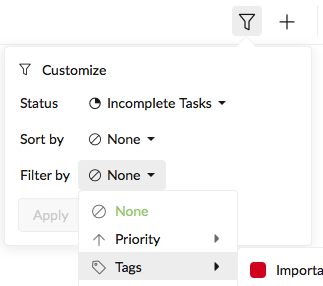
Crystal, Oct 5, 2017
Hi Miklos,
By typing #tag name in search bar, the results will already be filtered out list of tasks.
Or I suggest you could bookmark your filters, by clicking on the star sign. This way it’s faster for you to reach to your most used filters.
Peggy, Mar 28, 2019
Dear All, I see this is an old topic, but everything is still the same. The comfortable solution would be a checkbox in the search box, at least for me.
Miklos Bartfai, Mar 26, 2019
Hi David, We will make filter more obvious, and intuitive. Any idea or suggestion is welcome. 😃
Crystal, Oct 6, 2017
Hi Peggy, Bookmarking the filters are ok, when you have only a few tags. With a lot of tags, it cumbersome. When searching for tags, the immediate results are "filtered", but not the task board. My suggestion was to have a checkbox in the search box, when it is checked, it's filtering the task board, so only matching tasks are shown.
Miklos Bartfai, Mar 28, 2019
Wow, that's obscure.
David, Oct 5, 2017
Hi Miklos, you could press Ctrl+F to find search tasks with certain tags in board.
Peggy, Mar 29, 2019