
Ask (one toggle + one filter):
Add a quick toggle: Hide blocked tasks (tasks with unmet predecessors). Add a filter: Dependency status → Ready / Blocked / Has dependencies / No dependencies.
Why: Cut noise, keep focus on tasks that can start now. Prevents false “overdue” feelings on items that are actually blocked. Parity with modern PM tools.
Minimal AC: A task is Ready if it’s not Done and all its predecessors are completed. Toggle/Filter works in List, Board, Table, Timeline, Calendar. Blocked tasks are hidden (or shown) consistently across views and search. Visual hint on shown items: small “Blocked by X” chip with quick jump to blockers.
Nice-to-have: Sort by “unblock impact” (how many tasks it frees). Saved view presets (e.g., “Today: Ready only”).
Hi,
Thank you for sharing your feedback.
Add a quick toggle: Hide blocked tasks (tasks with unmet predecessors).
We currently don’t have a task blocking feature for dependencies. Some users have requested this before, and we’ll be sharing your feedback with our team for further consideration.
Add a filter: Dependency status → Ready / Blocked / Has dependencies / No dependencies.
We don’t have a dedicated dependency status field. Instead, they are reflected directly in the tasks themselves. From what you described, it sounds like you’re looking for automation where a task automatically moves into a Ready status once all predecessors are completed. We’ll make sure to pass this along to our team.
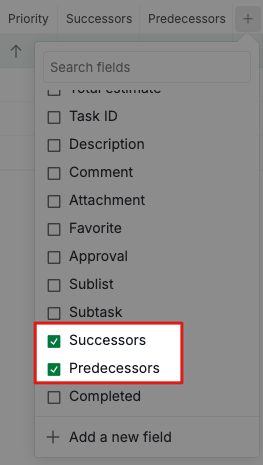
As for identifying tasks with or without dependencies, you can achieve this in the Table view by toggling the Predecessors and Successors fields. This way, you’ll be able to see which tasks are set as predecessors or successors.
If you have any further questions or this isn't what you're looking for, please let me know.
Golda, Aug 21, 2025
Replying to Golda: Hi, Thank you for sharing your feedback. > Add a quick toggle: Hide blocked tasks (tasks with unmet predecessors). We currently don’t have a task blocking feature for dependencies. Some users have requested this before, and we’ll be sharing your feedback with our team for further consideration. > Add a filter: Dependency status → Ready / Blocked / Has dependencies / No dependencies. We don’t have a dedicated dependency status field. Instead, they are reflected directly in the tasks themselves. From what you described, it sounds like you’re looking for automation where a task automatically moves into a Ready status once all predecessors are completed. We’ll make sure to pass this along to our team. As for identifying tasks with or without dependencies, you can achieve this in the Table view by toggling the Predecessors and Successors fields. This way, you’ll be able to see which tasks are set as predecessors or successors.
Hi Golda,
Thanks so much for your fast reply!
Actually, the only thing I would like to have is to hide dependent tasks whose “predecessors” haven't been completed, yet.
It makes no sense to me to see a task on my to-do list if it's not ready to be worked on because it's dependent on another unfinished task.
I'll be happy to see this implemented! 😃
Thanks in advance.
Dmitry Novikov, Aug 21, 2025
Hi,
We wanted to let you know that we’ve shared your feedback with our internal team. While we can’t provide a timeline for when this will be available, we’ll be sure to keep you in the loop with any updates. Thank you.
Golda, Aug 27, 2025
Hi,
Quick update on this one. Your feedback is available now.
Go to Filter > Dependency and choose Unblocked. That hides any task whose predecessors aren't done yet, so your list only shows the ones that are ready to work on.
Golda, Jun 26, 2026