
Hey everyone!
Like many of us, I use Quire every single day, and it's an essential part of my workflow now.
The one thing I wished for was a more integrated desktop experience - something that felt like a native app on my computer. So, I decided to build one!
I've created a simple unofficial desktop client for Windows that wraps the Quire website. My main goal was to make accessing Quire quicker and more seamless, especially when I'm juggling multiple tasks.
Here’s a quick rundown of the features:
✅ Runs in the System Tray: Quire is always available with a single click, without cluttering your taskbar.
✅ Global Show/Hide Hotkey: This is my favorite feature! You can set a custom keyboard shortcut (the default is Ctrl+) to instantly bring the Quire window to the front or hide it away, no matter which application you're in.
✅ Customizable Startup: You can configure the app to launch minimized directly to the tray or to open up immediately on startup.
✅ Clean & Native Feel: It includes simple back, forward, and reload controls in a minimal custom title bar for easy navigation.
✅ Consistent UI: The app ensures a clean and unified look by applying the Ubuntu font throughout the interface.
This was a fun project born out of my love for the platform, and I'd be thrilled to share it with the community. I'm happy to provide the complete project files for anyone who wants to try it out, take a look at the code, or even help improve it.
Let me know what you think! 😃
Cheers!
Download link: view?us (Google Drive)
Abdugafur Ali, Oct 9, 2025
или если есть исходный код, я мог переписать под macos
Abdugafur Ali, Nov 10, 2025
@Dmitry_Novikov Hello! So, anything new?
Abdugafur Ali, Nov 4, 2025
v.1.0.9: the Home button works natively now.
Dmitry Novikov, Aug 27, 2025
Hi,
Thank you so much for creating this desktop client and sharing it with the community 🙌. It’s inspiring to see users building solutions that make workflows smoother and helping others along the way. We really appreciate your contribution!
We’ve tested it on our side and found it really great to use. About the global show/hide hotkey, you mentioned Ctrl+ as the default, could you let us know what the complete shortcut is?
Golda, Aug 27, 2025
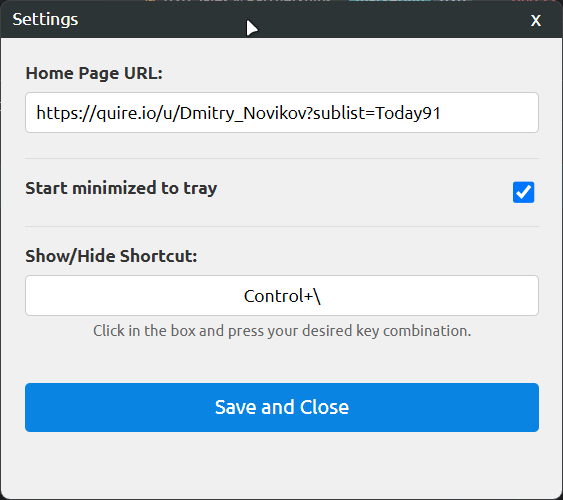
Dmitry Novikov, Aug 27, 2025
Just right-click the tray icon and choose "Settings".
Dmitry Novikov, Aug 27, 2025
Replying to Golda: Hi, Thank you so much for creating this desktop client and sharing it with the community 🙌. It’s inspiring to see users building solutions that make workflows smoother and helping others along the way. We really appreciate your contribution! We’ve tested it on our side and found it really great to use. About the global show/hide hotkey, you mentioned
Ctrl+as the default, could you let us know what the complete shortcut is?
Hi Golda,
Thank you so much for your recent reply to my post. I was actually thrilled to hear from the team!
I'm looking to enhance the app by integrating native Quire notifications for a more seamless user experience. Is there an API, webhook, or another method that would allow a third-party app to receive these notifications?
Any documentation you could share would be a great help.
Dmitry Novikov, Aug 27, 2025
Hi,
We do provide an API that you can explore for integration. You can find the documentation here: https://quire.io/dev/api/. Thank you.
Golda, Aug 28, 2025
Hi, Sorry to keep your waiting. The old version is outdated. Please expect a new one soon 😃
Dmitry Novikov, Oct 9, 2025
Hi!
"Sorry, the file you have requested does not exist.
Make sure that you have the correct URL and the file exists."
Abdugafur Ali, Oct 1, 2025
Отвечаем Dmitry Novikov: > Replying to Abdugafur Ali: > @Dmitry_Novikov Hello! So, anything new? https://quire.io/apps/Quire_Desktop
Круто, спасибо! а есть версия для macOS?
Abdugafur Ali, Nov 10, 2025
Replying to Abdugafur Ali: @Dmitry_Novikov Hello! So, anything new?
Dmitry Novikov, Nov 4, 2025
v.1.0.8: added configurable Home button to title bar.
Dmitry Novikov, Aug 26, 2025
Replying to Golda: Hi, Thank you so much for creating this desktop client and sharing it with the community 🙌. It’s inspiring to see users building solutions that make workflows smoother and helping others along the way. We really appreciate your contribution! We’ve tested it on our side and found it really great to use. About the global show/hide hotkey, you mentioned
Ctrl+as the default, could you let us know what the complete shortcut is?
Hi Golda,
Thanks a lot for sharing your experience 😃
I've updated the app with a setting allowing you to modify the shortcut keys from the tray icon context menu.
I'm left-handed, so I used Ctrl+\
But you can change that now.
Here's the link: view?us (Google Drive)
Dmitry Novikov, Aug 27, 2025
@Dmitry_Novikov
Abdugafur Ali, Oct 1, 2025