
When I am starting to write in the comment box occasionally the text disappears and I cannot input any more text in the box. I have to refresh the page for the box to reset and take inputs again.
Hi,
Yes, please share a screen recording with us whenever you’re able to capture it, and our team will take a closer look as soon as possible.
Golda, Sep 22, 2025
This is very easy to reproduce. Here are two methods:
- Browse to a Quire ticket (like this one). Click on the comment box. The "Post" and "Cancel" buttons appear. Without typing anything, switch tabs in your browser or change the focus to another window. Return to the Quire tab and start typing into the comment box, still highlighted. Everything you type from that point on will be lost.
- Browse to a Quire ticket. Right-click on the comment box to paste some text. You can even add more text or modify the pasted one. All of this content will be lost.
I'm using Linux with the latest google-chrome-stable package (version 140.0.7339.207).
Francesc Zacarias, Sep 25, 2025
Hi,
We’re sorry to hear you’re experiencing this issue. To help us look into it further, could you let us know:
- If there are any specific actions you took before the text disappeared, and how often this happens?
- If possible, could you also share a screen recording so our team can better understand the issue?
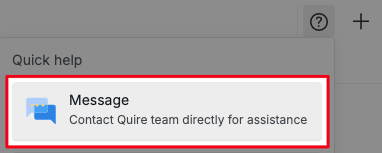
If the recording contains sensitive information, please email it to support@quire.io or use the Message option (click the ? button at the top of your workspace and select Message).
Thank you.
Golda, Sep 12, 2025
Hi. I'm typically just entering a new comment when I experience the issue. I will try to make a screen recording the next time it happens
Kwabena, Sep 16, 2025
Hi,
We're sorry for any inconvenience this may have caused. We’ve passed this issue to our team, and they are currently looking into it. We'll keep you posted as soon as we have any updates!
Golda, Sep 26, 2025
Hi,
We have fixed this issue in the latest update (v.1756). Please refresh your workspace and try again. If you have any questions, feel free to let us know. Thank you for your patience!
Golda, Sep 30, 2025
This happens to me often too.
Peter, Sep 25, 2025