
It is currently not possible to collapse (recursively, for all child tasks) a given branch in Quire.
There is Shift-Left which closes all branches from a given depth and downwards. But it happens on all branches - not just the selected, the current branch.
Then one can right click the expand triangle (on web version) - and a promising popup menu with "Expand all subtasks" comes up. That part works - but after having expanded them - and clicking this triangle again - it still invites to Expand all subtasks. But they are already expanded then. (The correct thing would be to have the command Collape all subtasks).
Given that some nested subtasks can be open and others closed - it seems that the option to have (at the same time) both options Expand all subtasks and Collapse all subtasks there. (A nice tweak is to grey out Expand... if all subtasks actually are expanded.
Then - for those of us who prefer keyboard navigation - a keyboard shortcut would be nice (like Ctrl-Shift-Left to close recursively).
In some places it is noted that Alt-Left/Right should open / close recursively - but in my Linux Chrome it only jumps the cursor up / down the tree - no opening / closing happening there.
I hope you can test, debug and fine tune this. It matters in big note taking projects. Thanks !
Hi,
If there are any updates, please let us know. Thank you.
Peggy, Sep 29, 2026
Hi,
Thank you for the detailed steps and the screen recording, they made it very easy for our team to look into this.
Our dev team has reviewed the issue. The open/closed (collapsed) state of tasks is only kept during your active session, so it is cleared when you log out. After logging back in, the tasks will be shown in the default expanded state. This is the expected behavior and not caused by your browser, OS, or device.
Thanks again for taking the time to report this, and please let me know if you have any other questions.
That said, our dev team is working on a way to collapse all subtasks of a selected branch at once, which should make it quicker to tidy up a project with many nested tasks. We'll share more once it's available.
Peggy, Oct 1, 2026
Hi,
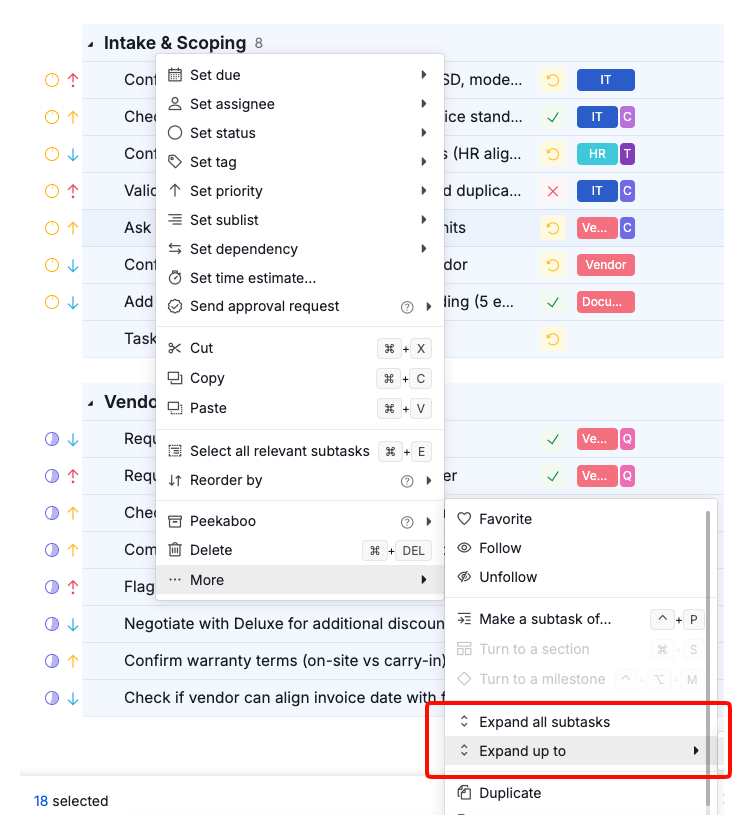
We've added a way to collapse all subtasks of a selected branch at once, and it's available now.
To use it: select the tasks, right-click, and choose "Expand up to xx level". See the attached screenshot of the context menu for reference.
If you have Quire open in any browser tabs, please refresh them to get the latest version.
Peggy, Oct 1, 2026
Hi again,
I tested a bit again and have found a very simple way to reproduce the error on my side:
1 - Make sure nested tasks/notes are mostly closed in 2 projects 2 - I switch between these - they maintain their open/close status 3 - I log out 4 - I log in 5 - All tasks/notes are not recursively open - in both projects.
I.e. in 5 above - the memory of open/closed status is fully forgotten - and everything is shown as opened.
I attach a screen recording illustrating this.
Asteinarson, Sep 30, 2026
So to reproduce the issue it is as simple as closing most tasks - logging out, logging in - and then all tasks in opened projects are opened on all levels.
It has been like this for a long time - my current version of Google Chrome is: Version 151.0.7922.173 (Official Build) (x86_64)
My OS is KUbuntu 26.04.
My system is a HP tablet PC with 16 GB of RAM.
Asteinarson, Sep 30, 2026
It's been a while and I was now considering using Quire.io for a new project - feature and bug tracking.
However this bug keeps me qrather hesitant. I was met with the "all folders (and their subfolders) open" on returning to a personal quire project.
The volume of this (old) documentation project is say 50 top level items and maybe 500 children totally.
Your suggested fix: "Expand up to 1st level" does actually reduce manual closing of folders - from around 500-1000 clicks down to say 50-100.
But 50-100 unnecessary clicks are contrary to the very thought of automation: We want to reduce repetitive work - not add a new load regularly of it on our users.
Asteinarson, Sep 21, 2026
For your questions:
1 - I never explicitely log out of quire - neither the web version nor mobile.
2 - Steps to reproduce: I do not know but it happens several times per week if I work with Quire in the browser. It may well be that I have quire open in several tabs.
I am in latest Chrome - on KUbuntu 26.4.
...
Really - if there was some temporary resolution to this I'd really like to continue with Quire. But honestly - being met with 50-100 non necessary clicks stemming from a non resolved bug - is not uplifting.
If your devs can propose a workaround that does not involve repetively clicking items, open menus,... many times - that would help.
Suggestion: add a query parameter to the url:
quire.io/w/JarnaAutomate/39?_temporary_workaround__directive=nested_close_all_branches
then nothing is "in the way" for others.
With patience and focused work we could resolve this.
Thanks, Arne S.
Asteinarson, Sep 21, 2026
Thanks for quickly looking into it. And I understand your explanation.
I'm sure for some - by default opening every branch on "fresh session" is the right thing.
But several of my projects involve a lot of branches, nesting deep. Notes, facts relating to sub projects years ago.
I do not want it "by default expanded".
Can you consider a setting for Quire:
"On fresh session do not open child tasks".
That would solve most of the friction I've experienced.
Asteinarson, Oct 1, 2026
Thanks, that takes it forward.
To make the fix "a single command" I would also ask for one of: A - Expand up to 0:th level (in the submenu). B - Or add "Collapse all subtasks"
A and B would have the same effect.
(Without A or B I still have to manually close each top level task).
Asteinarson, Oct 1, 2026
Another comment:
Normally I never log out of Quire (I just did for test/debug). So the issue appears by itself - without logging in/out.
I'm thinking about what it is that causes Quire to loose its state in the browser.
I now disabled "tab suspension" (memory saver) for Chrome. I will see if it does anything.
I would like it to keep its state (including open/closed tasks) as long as the tab is not closed.
Asteinarson, Oct 1, 2026
Hi,
Thanks for the details. The part about having Quire open in several tabs is helpful, and it's something our team can look into.
I'm passing that along, together with your URL parameter idea and the request for a collapse all subtasks option or another way to cut down the repetitive clicking.
In the meantime, could you check whether your tasks still expand on their own when you have only one tab open?
Golda, Sep 23, 2026
Update today - as I repeatedly stumble on this problem in the web version:
1 - That all branches on all levels rather frequently opens inadvertently is a bug of itself. It's not software behavior to ignore. (Compare to a car on a parking place - and when you're not there all doors open by themselves).
2 - My suggestion: "Collapse all subtasks" is the logical complement of what you already have in the UI: "Expand all subtasks". It fits there in the UI.
Your suggestion ("Expand up to 1st level") is a workaround (which still leaves a bit of manual work).
I am a paying customer. I think your role is to feed bugs and user experienced suggestions to the dev team.
Asteinarson, Jun 3, 2026
Hi,
1 - That all branches on all levels rather frequently opens inadvertently is a bug of itself. It's not software behavior to ignore. (Compare to a car on a parking place - and when you're not there all doors open by themselves).
Do you log out of Quire often? When you log out, Quire won't remember your previously collapsed state. If you're staying logged in and still seeing tasks expand on their own, could you share the steps to reproduce it? That would help us look into it further.
2 - My suggestion: "Collapse all subtasks" is the logical complement of what you already have in the UI: "Expand all subtasks". It fits there in the UI.
Noted, and we'll share this with the team for review.
The workaround I suggested earlier came directly from our dev team, so they are aware of this. It's not a perfect solution, but it should help reduce the manual work.
Golda, Jun 4, 2026
Hi,
Thank you for your feedback.
If you'd like to collapse or expand all subtasks under a selected parent task recursively, this can already be done by pressing:
- -> / <- to collapse or expand a group tasks by level
- O to expand/collapse the selected level
These actions apply to the currently selected branch.
Regarding the right-click option for Collapse all subtasks, thank you for the suggestion. I’ll pass this along to our team for consideration.
As for Alt + -> / <-, we currently don’t have that shortcut in Quire. Could you confirm if you might be referring to Shift + Left/Right instead?
If possible, could you also share a short screen recording of the behavior you’re experiencing? That would help us better understand and investigate the issue.
Golda, Mar 4, 2026
Hi,
As I said - arrow, and "O" controls the open / close state of exactly one node (Yes, if it hides the child nodes, but when reopening the node again it is so that each of its child nodes retains whatever open / closed / state it had before).
I attach a screen recording of what I experience - with some comments.
Asteinarson, Mar 5, 2026
Hi,
Thank you for clarifying your feedback.
To collapse all subtasks, you can use the Expand up to 1st level option. This will collapse all deeper subtasks and keep only the first level visible. After that, you can collapse the root task to hide the remaining subtasks as well.
Golda, Mar 10, 2026
I will try to limit myself to one quite tab on my development machine. And see if it makes any difference.
Asteinarson, Sep 24, 2026