
• how to get mobile version of quire.io on desktop PC's browser? what is URL? I'd like to have two browser windows on screen (one with quire opened) and desktop version of quire is too big and not comfortable for half of the screen.
• why export to CSV is sooow horrible? 😞 the structure of exported CSV file doesn't describe parent-child relationships
• why card of parent task shows number of subtasks but not a list of their names?
• how to find all tasks with attachments?
thanks and good luck.
Hi Rutax, 2. Yes, you can import an exported CSV file from Quire back to Quire via copy & paste.
Why not make them e.g. 5 times smaller (convert to bars for example) and put in free space (or have an option to put there) something useful, like list of subtasks or something else?
I have a rough idea of what you meant but it would be great if you could provide us with a visual example (screenshot). 😃 Thanks!
Crystal, Dec 4, 2017
- OK, it's easy 😃 Thank you for tip.
Rutax Lv, Nov 30, 2017
Dear Crystal, I just noticed that if I want to scroll (quickly) to have overview of all my tasks, I must either expand and collapse them one by one, or expand them all, and have a HUGE long list. Having another "subtask list quick preview" window in the right panel would allow overview of subtasks without expanding/collapsing. As I said - it's just an idea. Nothing better comes into my mind, when I think how could I have a quick overview of root tasks. May be there could be option like "expand only first sub-level"? Because "expand all" option really makes overview of tasks difficult, if there are many levels and a lot of sub-sub-tasks.
Rutax Lv, Dec 7, 2017
Thanks for tip. Right click on triangle wasn't so evident for me, because it's immediately replaced by Windows (browser's) context menu, and requires to hold a button actually. Are there any hotkey for that action?
Rutax Lv, Dec 11, 2017
- OK, I thought there's something more (tweaks) in mobile version.
Rutax Lv, Nov 30, 2017
Hi Rutax, Thank you for the explanation. You can right-click on the triangle (collapse/expand) icon of a root task, and choose to expand up to 1st level. Let me know if this helps!

Crystal, Dec 11, 2017
- Here is slightly modified screenshot with proposal to add some more information into task card:
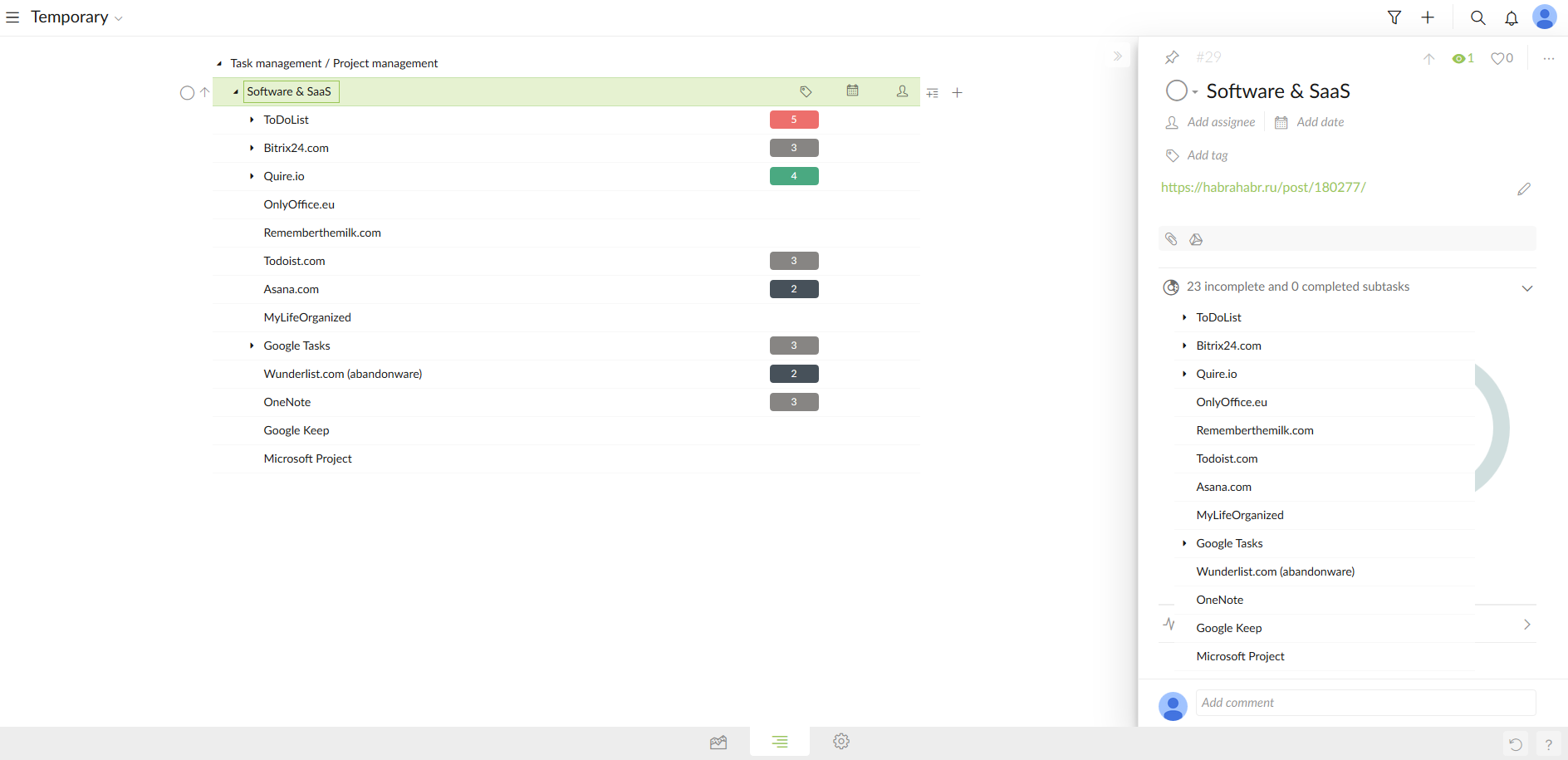
Rutax Lv, Dec 6, 2017
⭐️ We have closed your thread in order to optimize the performance of the Quire Feedback Forum. Please see our Quire Feedback Official Guideline for more information.
Peggy, Apr 23, 2021
Hi Rutax,
- Have you tried hiding the left sidebar and the right detail panel? By doing so, you would only see the middle task list view, which is just like what you would see on the mobile version.


- We do show parent-child relationships. Perhaps you can show us the structure you want to see in an exported CSV file? Best if with a visual example, thanks.
- Did you mean you want to see not just “X incomplete and Y completed subtasks” in the right detail panel of a parent task, but also the subtasks’ names? If so, why when you can already see them in the task list?

- You will see tasks with attachments in the task list after you press Ctrl (or Alt for Mac). Let me know if this helps.
Crystal, Nov 17, 2017
- relationships are shown as variable number of "ID" fields. That's pretty much terrible way to structure csv. Here is example of csv exported from desktop software.
Rutax Lv, Nov 30, 2017
Hi Rutax, Thank you for the screenshots. And yes, I understand what you meant by Windows-like copy progress bar. 😃 May I ask why you want to see the subtasks in the right detail panel (task card), while they are already there in the middle main panel (task list)?
Crystal, Dec 7, 2017
Hi Rutax, What OS (eg., Windows 10) and browser and its version (eg., Chrome Version 62.0.3202.94) are yo using? Perhaps you can provide us with your exported CSV file (leave out the sensitive data) for us to try?
Crystal, Dec 6, 2017
whatever structure allowing to build tree back from csv. The file I've uploaded offers this option. Can you import your currently exported CSV back to quire and restore structure of the tree? If you think of csv as one of options to rebuild tree structure of tasks - that's one of the solid ways.
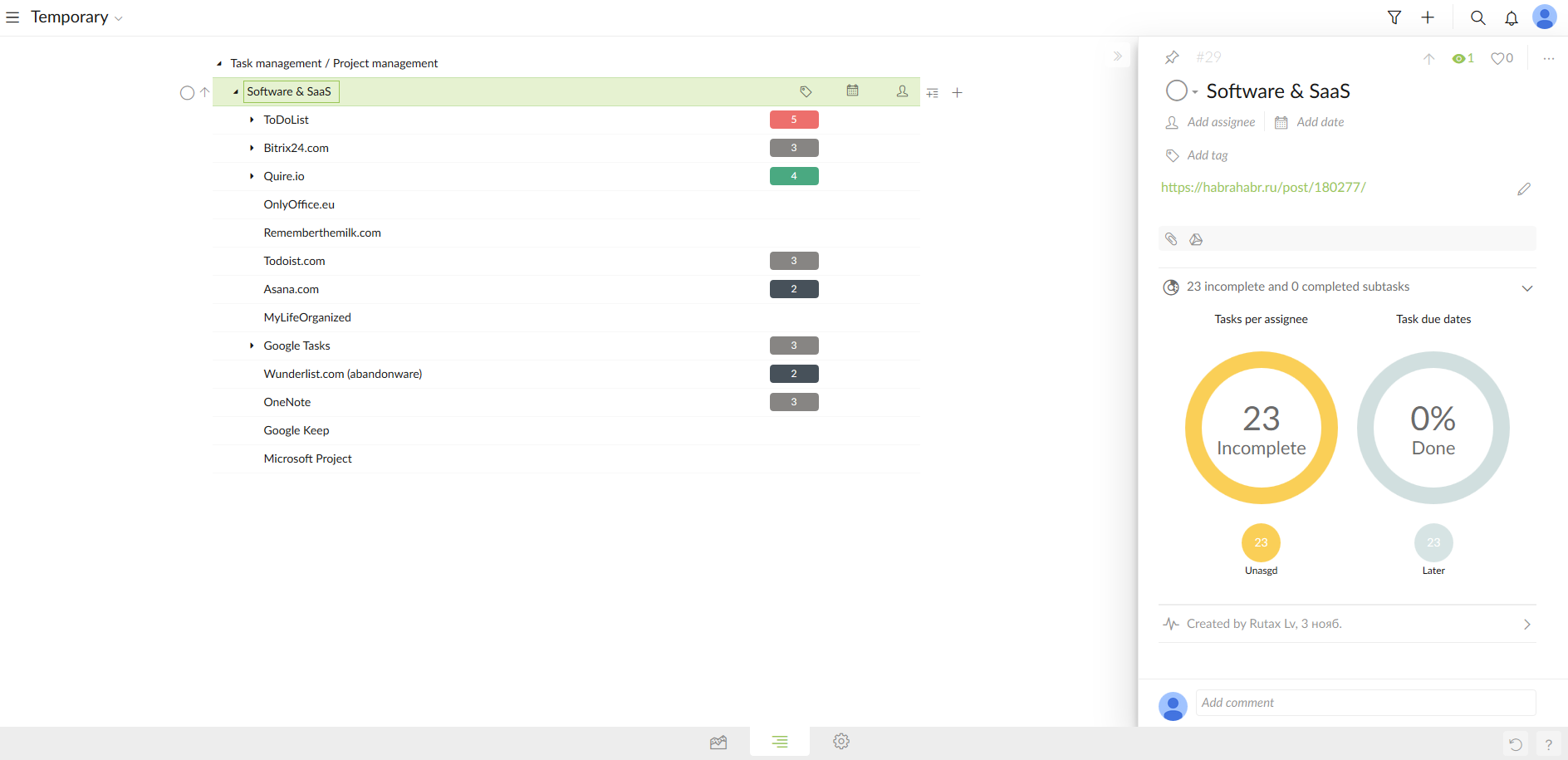
agains it's extra clicks 😃 Right now in parent task card I see huge yellow and gray circles, which (IMHO) do not provide much useful information. Why not make them e.g. 5 times smaller (convert to bars for example) and put in free space (or have an option to put there) something useful, like list of subtasks or something else? Just an idea.
Rutax Lv, Dec 1, 2017
sorry, I could not draw how to convert big circles (representing progress) into bars, cause I'm not an artist, but you understand that progress can be represented not only by circle, but also by a bar. Like standard bar in Windows copy dialog or something.
Rutax Lv, Dec 6, 2017
- I can't see subtasks if I didn't expand the list. When doing keyboard scrolling, it's easier to have quick look at the card, rather than expand each task and then collapse it to save space and continue scrolling.
Rutax Lv, Nov 30, 2017
- No you can't. Ok, Ok, may be you can, but I can't. Whole structure of tasks is lost when csv is imported back to quire.
Rutax Lv, Dec 6, 2017
Hi Rutax, You are welcome. 😃 2. Let’s say you have a parent task with ID number 12. You would like its subtasks to have ID numbers of 12.1, 12.2, 12.3, etc., in the exported CSV file to show their relationship? 3. If your tasks are collapsed, you can press shortcut Shift + Right Arrow keys to expand the entire task list. And Shift + Left Arrow keys to collapse it. It might help.
Crystal, Dec 1, 2017