
Tags are great in Quire and help to categorize to-do's. But it's not clear how to permanently delete tags that I don't need anymore, or to rename tags. (not "remove tags from to-do items", but actually delete tags from the system).
For example, I created a tag called "Christmas". Maybe I don't need it ever again, but it's always there. It would be nice to delete this tag. Or if I named a tag "To buy", maybe I wish to rename it to "shopping". A tag management feature in my account would be very useful.
Hi Crystal,
It looks like a corrupted picture/attachment, I wonder what happened. But I would recommend keeping RELATED FEATURES together. Meaning, let me manage tags where I am adding tags.
Imagine if you could turn on the lights in your room in one place, but then had to go to another room to turn them off.
What I mean is, you could provide a small button or a link "Manage Tags" right on the little popup where I am using the tags. It's much more intuitive than going to a separate screen trying to find that functionality - I honestly had no idea it was available there. Unless users explore your Settings -> General section, they'll never know how to edit the tags. I'm explaining how users think, and as users we like related things to be displayed closely together.
Best,
Alex
Alexander Rendar, Mar 12, 2018
Hi Crystal,
That's a very cool feature, but unfortunately it is also hidden under my options. Like I mentioned, that means I have to leave my project and start looking for the tag management feature somewhere else. There's no clear path from where you create and use tags to the place where you edit them, that's the problem. That's what I was trying to address when I said that related features such as creation and manipulation of items are best implemented in one place. Options are just that, they are optional features that the user may or may not ever access. :-) If you ever tried to find two related items in the supermarket but they were in different corners of the store, you know exactly how users feel sometimes :-)
Alexander Rendar, Mar 13, 2018
Hi Alex, I see what you mean. Perhaps you can give us a mockup (visual) example? It can better help us think about how we can enhance it.
Crystal, Mar 14, 2018
⭐️ We have closed your thread in order to optimize the performance of the Quire Feedback Forum. Please see our Quire Feedback Official Guideline for more information.
Peggy, Jul 19, 2021
Hi Alex,
Actually, you can delete a tag in the little popup by clicking on the “pen” icon and selecting Delete:
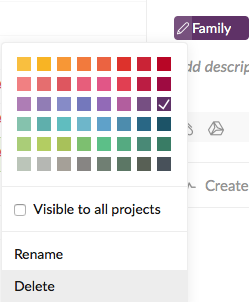 FYI, the image is corrupted because of cache. We are looking into it.
Crystal, Mar 13, 2018
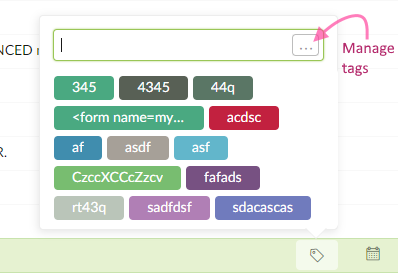
Sure, here you go.
This can either open the tag management popup here (if it can be presented in a medium-size popup window), or just link to the tag management you mentioned in Options. This solves the "logical disconnect" problem, and now related features are linked in a way.
Alex
Alexander Rendar, Mar 14, 2018
Hi @orkunakar , click on the arrow beside your project's name at the top, then choose Edit tags. Hope this helps.
Peggy, Oct 24, 2019
yep a manage tag list can be useful now I cannot see see under project options such "managing tags"
OrkunAkar, Oct 24, 2019
Hi Alex, You can permanently delete a tag in a project’s Settings -> General -> Tags.
Crystal, Mar 12, 2018