
I have multiple organisations (ESL School, Preschool, Primary School etc) and each has projects with the same or similar names.
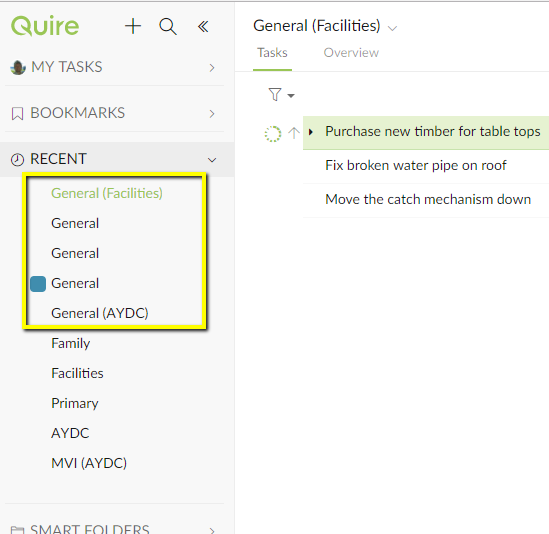
The problem is that in most places in Quire only the Project name is shown. So it can be unclear as to which organisation I am working on. (If the sidebar is popped out then that helps.)
I have attached two images to show what I mean. But i think the issue is prevalent elsewhere.
One is in the 'Recent' section. I like that section but as you can see from the screenshot it is not so helpful in this situation. I will rename my Projects by appending '([Organisation])' as you can see I have started doing.
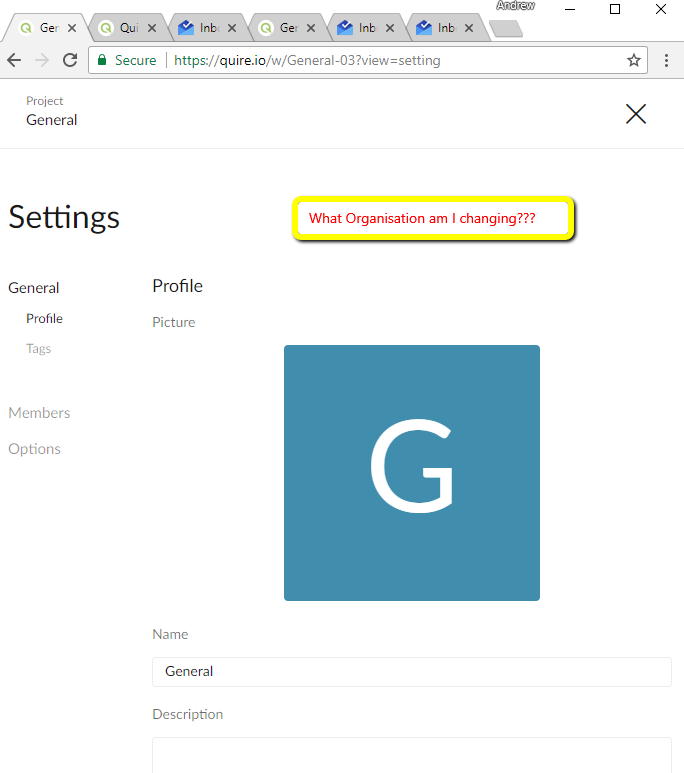
The second screenshot is another example. There is soooo much white space on that screen not having useful info seems wrong :-)
Anyhow, I can 'solve' my problem by retyping the Organisation in the Project name. But that seems a little silly.
Thanks
Hi Andrew, I see where you are coming from. Let us think about it! FYI, you can press Ctrl (or Alt for Mac) to see the organization name at the top in both “Tasks” and “Overview” views.
Crystal, Apr 25, 2018
Thanks for the tip Crystal
Andy, Apr 29, 2018
Good job Crystal. Many thanks. And the 'Ctrl' hint was a good one. It shows other things as well :-) The web interface is really nice. I am a software developer as well and have spent a lot of time trying to make interfaces 'work'. So I am fussy... but I have been finding myself saying regularly over the last week 'Hey, that is cool'. Some good functionality.
Andy, May 2, 2018
Hi Andy, You should see the organization name on top of the project name in the project's Settings page now. 😃
Crystal, May 2, 2018
Crystal, May 2, 2018