
How_to_use_this_template
📖 How to use this template
A checklist for taking one new feature to market: the brief, the promotion across every channel, and the results afterwards. The sample is a feature launch run over three weeks.
- Duplicate this project into your own organization (dropdown next to the project name, then
Duplicate)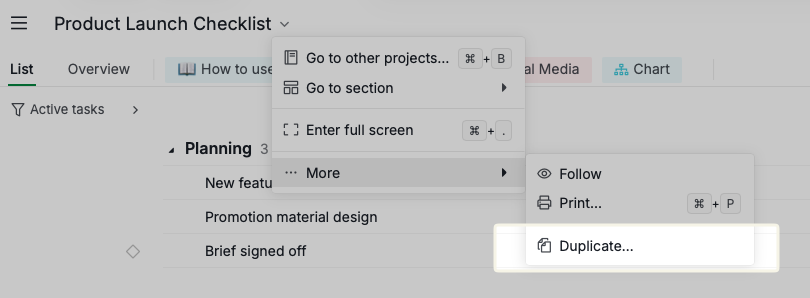
- Set your real launch date, then work backwards. Everything in Promotion has to land before it, and everything in Campaign Analytics happens after
- Delete the channels you do not use. Social media posts ships with six, and most teams do not publish to all of them
- Give every task in Planning a named assignee before you start producing anything
- Replace the sample tasks with yours, keeping the sections, the statuses and the tags
The three sections
- Planning — the brief with the product team, and the design work that follows from it. Nothing gets produced until this is settled.
- Promotion — one parent task per channel: email, blog, press, paid ads and social. Social media posts breaks down further, one child per platform.
- Campaign Analytics — what the launch actually did. Campaign result and Sales result.
The statuses
To-do → In progress → Validated → Scheduled → Completed, with Postponed for anything parked.
Completed is the only status that counts as done, so a post sitting in Scheduled still reads as open work. It has not published yet.
Tags carry the approval state
Design, Product Team and On going mark what kind of work a task is and whether it is moving. Awaiting approval, Approved and Revision needed track sign-off.
Worth knowing: these are tags, not Quire's Approvals feature. Filtering by Awaiting approval shows you what is waiting, but nobody gets a formal approval request. If you want real sign-off, set up approval categories in project settings and use those instead.
Nesting the channel work
Each social platform is its own task, and the ones needing more than one asset break down again: Instagram holds a post and a story, Facebook the same. Copy that pattern where a channel needs several pieces, and leave it flat where it does not.
Two things to know before you duplicate
- Timeline view needs the Professional plan or higher.
- If the duplicate fails, it is usually the status quota on your plan rather than anything wrong with the template.