
About_This_Template
📖 How to use this template
A blocked calendar makes you commit to when, then shows you how long things actually took. The sample is one week from a freelance translator's schedule, with estimates, logged time, and a Friday review that compares the two. Copy the shape, not the week.
- Duplicate this project into your own organization (dropdown next to the project name, then
Duplicate)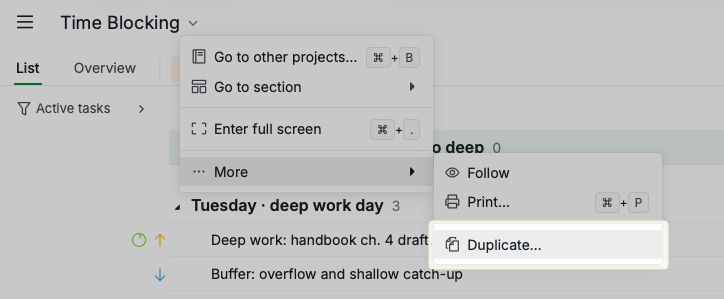
- Switch to Calendar view and set it to Week, which is the view this template is built for
- Open Friday's Weekly review: planned vs actual block and read its four subtasks, which explain what every field here is for
- Replace the blocks with your own week, keeping the sections, the estimates and the buffers
🧱 What is in here, and why
Days are sections
Every block sits under a weekday section. The calendar already knows what day it is, so the sections exist for the List tab. They make the week readable when you are reviewing it rather than living it.
Each section has a one-line note on the day's shape. Thursday is the client day. Tuesday and Wednesday are protected. That is a deliberate choice, not decoration.
Block Type tells you what kind of hour this is
A custom Select field with five options:
| Option | What it means |
|---|---|
| Deep Work | One thing, no interruptions, expensive to restart |
| Shallow Work | Real work, but survivable if interrupted |
| Admin | Email, invoicing, filing. Batch it |
| Personal | Meals, movement, the end of the working day |
| Buffer | Deliberately empty. Overrun goes here |
Filter the calendar by Deep Work and count. If you have fewer than three per week, the week is not a deep work week no matter what the tasks are called.
Note the buffer blocks. A week with no slack is a week where every overrun quietly pushes something else off the calendar. Tuesday has one.
Energy matches the block to the hour
High, Medium, Low. The rule is boring and it works: put Deep Work where your energy is high, and Admin where it is not. In this week that means drafting at 13:30 and invoicing on Friday afternoon. Yours will be different. Find out which, then stop scheduling against yourself.
Estimate and logged time are the honest part
Estimate is Quire's built-in field, set on every block. It is your guess.
Time log is Quire's built-in time tracking. It is what happened.
Both are native features, so there are no custom fields duplicating them. Look at Monday's draft block: estimated 3h30, logged 4h20, with a note explaining where the extra 50 minutes went. Tuesday's research block came in 15 minutes under. The stand-up has run 15 minutes over three weeks running, which means the estimate is wrong, not the meeting.
That gap is the only feedback loop time blocking has. Without it you are just decorating a calendar.
If you find yourself building a custom field for something Quire already does natively, delete it. Two custom fields is the right number for this project.
Dependencies, used sparingly
Time blocking is about slots, not sequences, so most blocks have no dependency and should not have one. Three places earn it:
- Thursday: prep → client call → write up notes → apply feedback. Walking into a client call cold is how a 60-minute call becomes 90.
- Friday: apply feedback → final proofread → deliver.
- Monday → Tuesday: the ch. 4 draft continues, and the terminology research feeds it.
If you find yourself chaining lunch to dinner, stop. You are modeling a workflow, not a week.
Approval, for the one block someone else closes
Most blocks are yours to finish. Deliver ch. 4 to client is not.
That block uses Quire's native approval with a Client sign-off category, and it currently sits at awaiting. While it does, the block stays visibly open on the calendar. When the approver acts, it closes for a reason instead of because the week rolled over.
Approval belongs on blocks whose output another person accepts or rejects. It does not belong on yoga. If your week has no such block, remove the category and move on.
Unscheduled is the honest backlog
Six items, each with an estimate and no date.
This is the holding pen. Something arrives, you estimate it, and it waits there until a real gap exists. The estimate is what stops you dropping a 90-minute job into a 30-minute slot and calling it planned.
Nothing here is committed until it has a start and a due time. That is the whole distinction between a list and a calendar.
🔁 The weekly review
Friday, 15:30, one hour, recurring. It has four subtasks and they are the actual method:
- Compare estimate against logged time on every Deep Work block
- Note which blocks got moved, and what moved them
- Send unfinished work to Unscheduled, not to today
- Check the buffers: used, or quietly deleted?
Two rules worth internalizing. A block that overruns by more than 25% every week is a bad estimate, not a discipline failure, so change the number. A block that gets moved three weeks running is in the wrong slot, so change the slot instead of your intentions.
♻️ Recurrence and upkeep
Every routine block repeats weekly. Completing one puts next week's occurrence in its place, which is why a finished day looks empty rather than crossed out.
When your routine changes, edit the recurrence on the block you already have rather than deleting it and making a new one. That keeps the series and its history intact.
The tags (Work, Client, Meeting, Research, Work Prep, Email, Meal, Meal Prep, Exercise) are samples. So are the statuses and the assignee. Rename all of it.
⏱️ About time blocking
The method, in five steps:
- Look ahead. At the start of the week, see what is actually on your plate.
- Place the hard things first. High-focus work gets slots before anything else is allowed on the calendar.
- Fit the shallow work around it. Admin and low-priority items go in the gaps, batched, not sprinkled.
- Review daily. What did not finish? What arrived? Neither goes into today by default.
- Adjust. Move blocks, change estimates, protect the deep work.
The failure mode is always the same: a calendar packed so tight that the first overrun collapses the rest of the week. Leave gaps. Keep buffers. Compare your estimates to reality once a week.