
How I can list (export) the status of the project inside an organization? All the projects
And also... an export of the whole status of an account
Thanks
Hi Carlos, Did you mean you want to export all projects in an organization at once to eg., an Excel file, and see the status of each task in the file?
Crystal, Aug 29, 2018
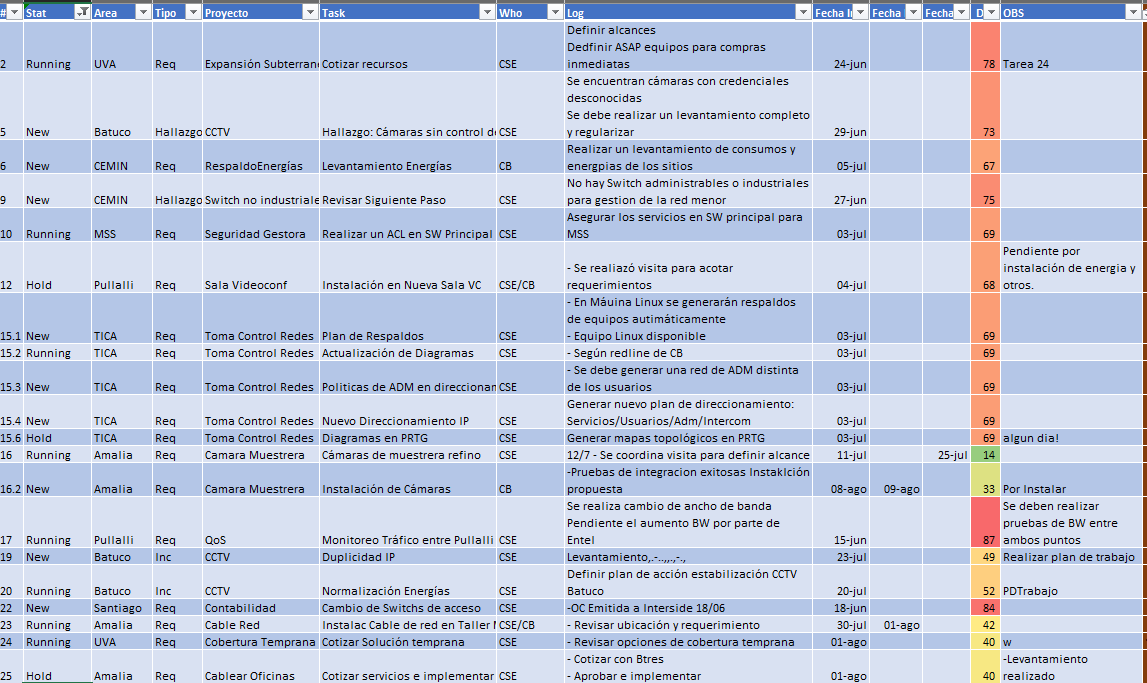
Hi Carlos, Got it. If you can give us a visual example of what you would like to see, that would be great. Thanks.
Crystal, Sep 5, 2018
Something like this (old excel tasks)
Carlos Sülz, Sep 10, 2018
@peggy thank you! This feature works better than I was asking for.
Marcos Matias, Oct 8, 2021
Hi Carlos, Got it. Thank you for the screenshot, it shall be considered.
Crystal, Sep 12, 2018
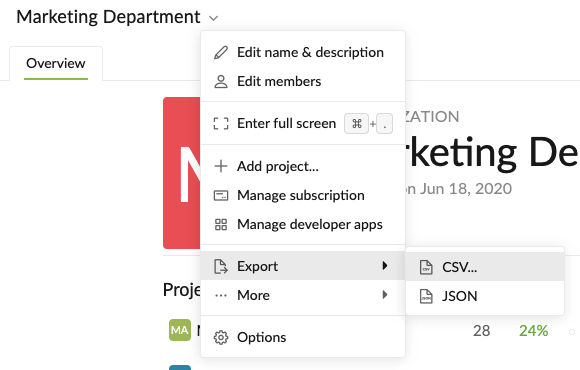
Hi Marcos - Exporting from a Smart Folder couldn't be done. However, you can try exporting your projects at the Organization Level, this way you won't have to export your projects one by one.
Click on the Organization at the sidebar, then navigate to the down arrow next to the Organization name at the top, then click Export. Hope this helps.
Peggy, Oct 8, 2021
Hi, thanks... I mean, something to make easy to show to my boss.. export the list of all my activities and projects.
Carlos Sülz, Sep 4, 2018
good suggestion. I was trying to get something similar to how export a Smart Folder (in other words, multiple projects at once) to a csv file.
Marcos Matias, Oct 8, 2021
Hey 👋 Exporting the entire organization into CSV or JSON file is now available 🎉 and can be found in the Professional subscription plan or higher tier plans.
You may find more information in the Quire Guide.
Peggy, Oct 21, 2021
Merged #955 to this task.
Peggy, Apr 20, 2021