
If I've set a Start Date and a Due Date on a task, I would much rather see the task in my "Today" view sorted by Start Date as opposed to Due Date.
The rationale is that if a task has a hard due date, and I want to be reminded to work on it every day, I want to be able to set a start date, and have it show up in my list of tasks to do for the day, every day, so I can finish it before the due date.
If the task doesn't show up until the day it's due, I may not have time to complete it.
I've given this some thought, and here's what I've come up with. First, let me say that the current configuration, where Start Date supersedes Due Date whenever a Start Date is available, works great for my workflow. However, I realize that my workflow isn't everyone's workflow, and that there are multiple paths to reach the same destination.
That said, if I were able to create an "All Tasks" smart folder (once the limit on the number of projects that a smart folder can span has been lifted, of course), then sort that "By Date" (where Start Date supersedes Due Date), then I've just replicated the "My Tasks" section of Quire. So where does that leave "My Tasks"? What is its purpose?
I propose that its purpose is to show tasks I've decided to work on today. If you've ever used Microsoft's "To Do" app, then you know about its "My Day" functionality. Quick side-bar, that's my favorite part of Quire - the way it consolidates all the good ideas of other task/project management apps into one. Okay, back to it. During the course of your morning project/task review routine, Microsoft's "To Do" app lets you "Add to my day". It doesn't move the task, it just flags it. Then there is a separate "My Day" list that shows all the tasks that have been flagged.
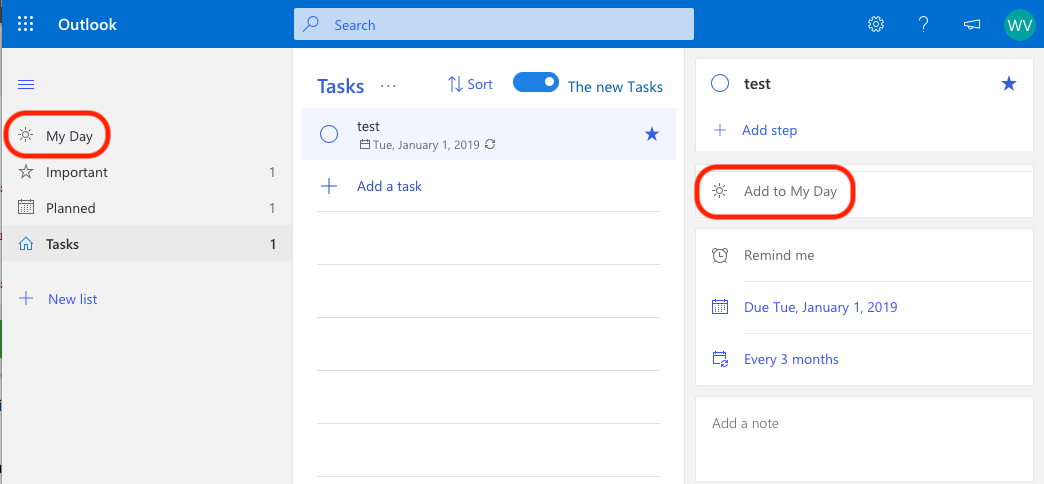
That way, you have one consolidated list to work off of for the day. Of course, flagging/tagging/labeling a task and then looking at a list of tasks with that label is not unique to Microsoft's "To Do". What does make it unique, however, is that the the added to my day flag gets reset every night at midnight. So when you wake up the next morning, you're starting with a clean slate. All your tasks still have their Start Dates, Due Dates, Statuses, and Priorityies, so you can easily use Quire's awesome sort/group/filter views to decide what to "Add to my day". Then those tasks that have been added to my day will show up in the left navigation column where "My Tasks" currently is.
I realize that doesn't actually address what @Gautthntemp was talking about, but I think it's relevant. While splitting the Sort by date view up into multiple views might be a good idea, I think that should be done in the center "task view" pane as opposed to left "navigation pane". But now, to actually address @Gautthntemp's question, if you're going to break up the Sort by date view, please break it up into 3 different views, not 2:
Sort by date- what it is currently, using the following logic (this is the ideal view for me)
if ( the task has a 'Start Date'); {
    then use 'Start Date' as the task's date for sorting
}
else if (the task has a 'Due Date'); {
    then use 'Due Date' as the task's date for sorting
}
else {
    put the task at the bottom of the list under a "No Date" section header
}
I realize that there is some additional (and spot on) logic in there about if the Start Date is in the past to then use today's date, and that if multiple tasks fall into that category to sub-sort them by Due Date. All great stuff, and like I said, spot on. Just didn't want to clutter up this post any more than it already is.
Sort by start date
if ( the task has a 'Start Date'); {
    then use 'Start Date' as the task's date for sorting
}
else {
    put the task at the bottom of the list under a "No Start Date" section header
}
Sort by due date
if ( the task has a 'Due Date'); {
    then use 'Due Date' as the task's date for sorting
}
else {
    put the task at the bottom of the list under a "No Due Date" section header
}
I know that was a lot. If you've made it this far, thanks for sticking with me. I hope this is useful in guiding further development of Quire.
Quick recap:
- lift limit on number of projects per smart folder
- convert "My Tasks" to "My Day", and include an
Add to my dayflag on tasks that gets reset at midnight - add 2 new sorting views (in addition to the current
Sort by dateview)Sort by start dateSort by due date
Wayne Villars, Dec 20, 2018
This is awesome! Thank you!
Wayne Villars, Dec 20, 2018
👍
Wayne Villars, Dec 19, 2018
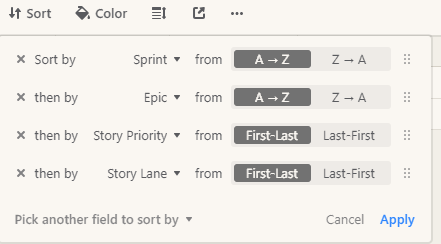
Hi Michelle, should we split this into 2 sort/group by as different people would have different need and reference. Then we could expand it into multiple sorts, I think 3-5 attributes usually would give a lot of depth.
Gautthntemp, Dec 20, 2018
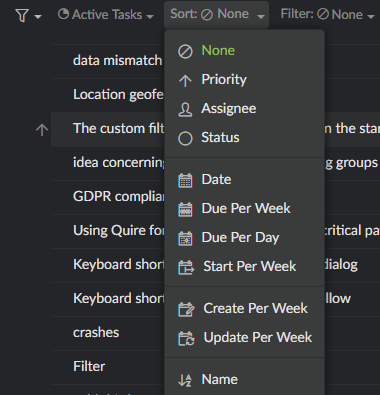
@waynevillars, I think you mention about Default Filter. I was mean about multiple custom sorting like this
Gautthntemp, Dec 24, 2018
Re: enhancing "My Tasks"
Awesome!
Re: the 3 sorting views
No, I did not mean that I want to see all at the same time. I was just suggesting that in the drop-down menu for filtering there be 3 distinct options:
- Sort by date
- Sort by start date
- Sort by due date
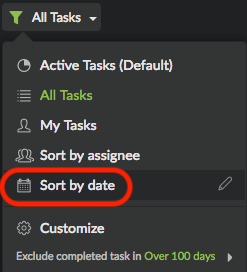
But again, for clarity sake, the current Sort by date function serves me perfectly. I only recommend the other two because I recognize that everyone has a unique workflow, and the other two sorting options might be useful for them.
Wayne Villars, Dec 21, 2018
Hi Gautthntemp, do you mean you would like to split the "Today" view under My Tasks into 2 views: sort by start date and sort by due date?
Michelle, Dec 20, 2018
Hi Wayne, yes, we shall take the "Start date" into consideration. So, that future tasks with a start date of 12/17 and a due date of 12/23 for e.g. will be placed under Today in My Tasks.
Michelle, Dec 17, 2018
Hi Wayne, thank you for the detail suggestion and screenshot, we shall consider it. We are actually aware of the "My Day" feature from Microsoft's To-Do and the similarities shared between My Tasks and Smart Folder. It is in our plan to move My Tasks to the middle main panel and also enhance it. 😃 Getting back to your suggestion on having 3 sorting views, do you mean you want to see ALL three of them at the same time in My Tasks? A mockup screenshot would be nice. Thanks!
Michelle, Dec 21, 2018
@gautthntemp, check this post out. It might encompass what you're referring to: #1531
Wayne Villars, Dec 24, 2018
⭐️ We have closed your thread in order to optimize the performance of the Quire Feedback Forum. Please see our Quire Feedback Official Guideline for more information.
If the request/feedback wasn’t answered, please leave a comment below, the Quire team will be notified. Thank you.
Peggy, Jun 24, 2021
Hi Wayne, this feature is available now. 😃
Michelle, Dec 19, 2018