
As far as I can tell you can only link to tasks in the same project?
Also, as far as I can tell you can only create a link within the task description, and not in the task name?
If so, it would be a great enhancement to allow 1) linking to tasks in other projects 2) linking to tasks in the task name
- is especially important in smart folders where you have multiple projects and it is natural to want to link to them...
Hi Peggy, 1/ Thanks very much! very handy! A suggestion I would make though is that links to tasks in other projects autocomplete in the same way that tasks in the same project do. This would both be much quicker/easier and also more consistent. 2/ Thanks again! While this works, it's not as convenient as in the description, so a suggestion would be to also allow autocomplete for links to tasks when entered in the task name in the same way as when entered in the task description. I understand this would be complicated by the fact that # is used to enter a label in the task name, but perhaps another symbol could be used?
Thanks very much!
Yozza, Feb 12, 2019
Hi Yozza, I will bring your 2 levels to autocomplete idea to our team, thanks for the suggestion! 😃
Peggy, Feb 14, 2019
Hi Yozza,
1/ Quire allows you to link to tasks from different projects. There are two ways to refer to tasks in a different project. First is typing #projectid/taskid and the other is copying and pasting the entire url of the task. You could see more here.
2/ linking to tasks in task name, I suggest you could just copy the whole url of the task, just like this, then you could add brackets [link name](url), this way it won’t show the whole url name. Hope this helps.
Peggy, Feb 12, 2019
Hi @ysoultane -
If you are linking a task from another project, there won't be an autocomplete menu for you to choose from.
You can only type out the project ID and task ID manually, like so #projectID/taskID.
See this guide for more details: https://quire.io/guide/refer-tasks/
Thanks!
Peggy, Dec 4, 2020
Hi, it doesn't work for me to select another project 😭 . Thanks 🚀
YANNICK SOULTANE, Dec 3, 2020
Hi Yozza, 1/ well, I see your point here. But there would be a small problem: the system won’t know which projects’ tasks you want to refer to? Sure, we could probably have a list (like right now) for you to choose from, but my concern is what if you have hundreds of projects with the same #ID, it would be very hard to find. 2/ we shall think about this. Thanks! 😃
Peggy, Feb 13, 2019
Hi Peggy, 1/ what I was imagining would be two "levels" of autocomplete:
First, typing "#/" will autocomplete projects. e.g.: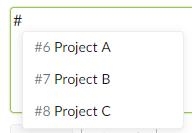
Then, selecting a project will add a second "/" and autocomplete tasks (the same as now). e.g.: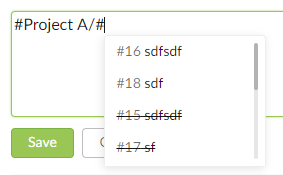
2/ Thanks! definitely not a priority, just a "nice to have" 😃
Yozza, Feb 14, 2019