
Currently you can only Peekaboo a task for fixed number of predefined days (1/3/7/14/30)
It would be really handy if you could Peekaboo a task until a custom date.
For example, something like this: 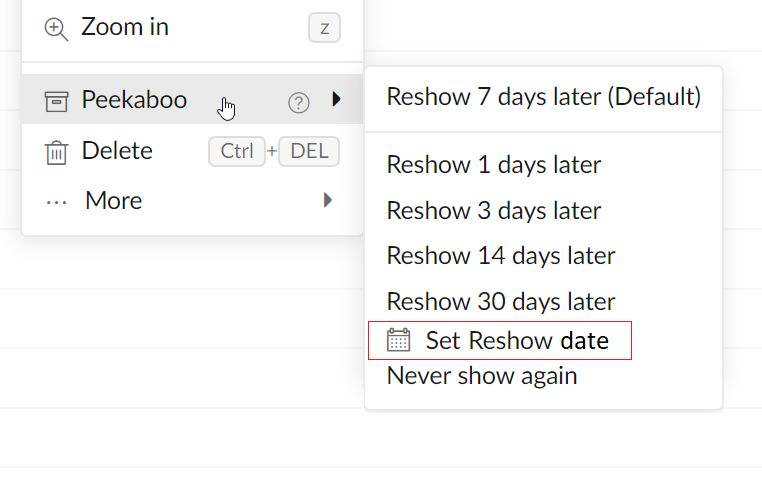
Thanks!
Edit:
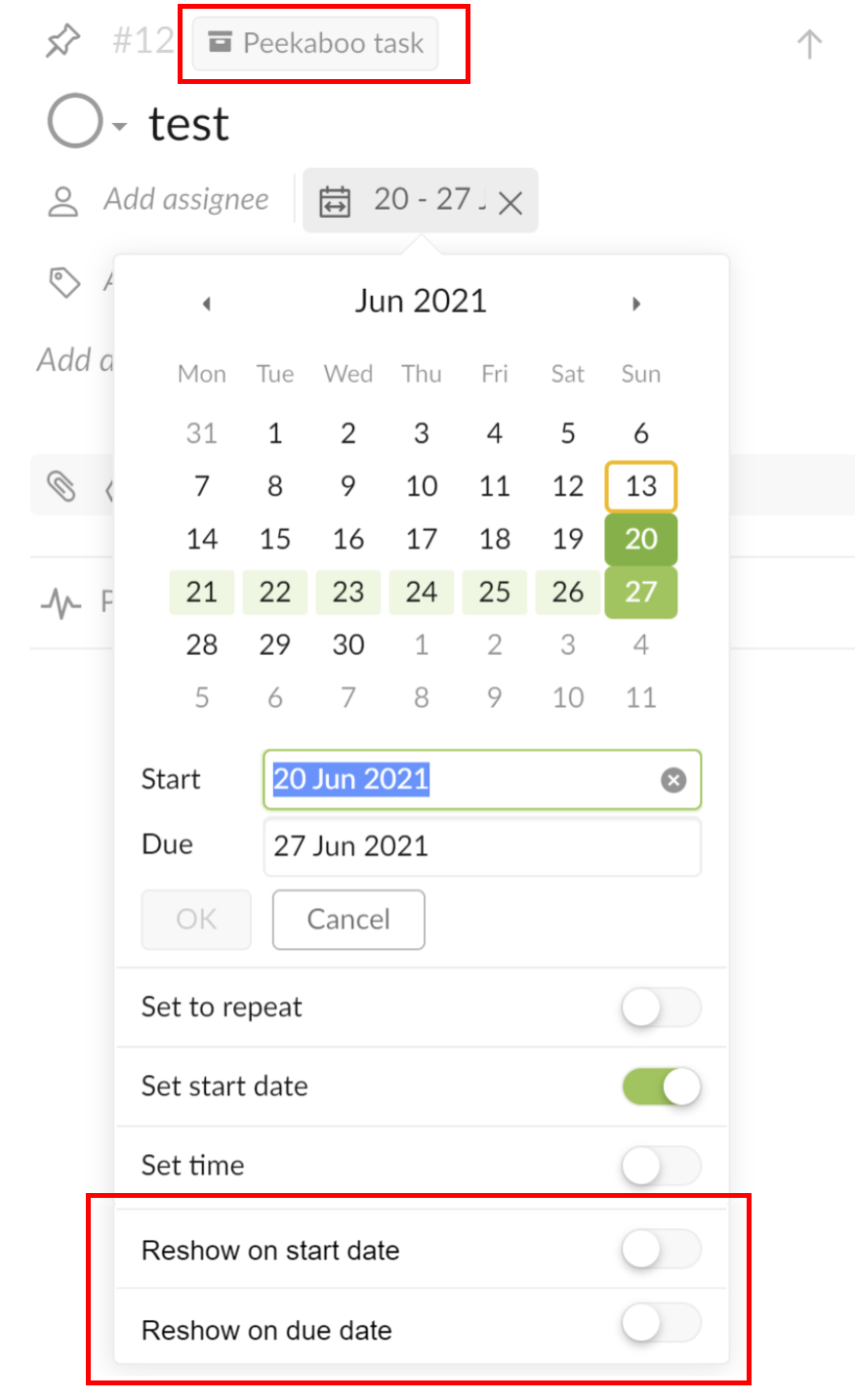
It would also be great to have the option to allow Peekaboo tasks to be reshown on the start date and/or the due date
This would mean I could hide tasks until they need actioning or until they're due.
This could be implemented as toggles on peekaboo tasks. For example:
It would also be nice to have Peekaboo as one of the predefined filters.
Vikramjit Bora, May 20, 2020
Hi Yozza, this is quite challenging for the UI design, thank you for your suggestion. Please let us think about it.
Peggy, Jul 19, 2019
I also really like the way @yozza0 proposed! It's simple and powerful. I think you can take some inspiration from this.
Cynk 7, May 20, 2020
Hi Yozza, thank you for your mockup. I will pass it to our designer team and think about this.
Peggy, Jul 23, 2019
Hi @yozza0 , our team will consider the feature of "set reshow date" for the peekaboo task. But this isn't our priority task right now. I will let you guys know if I have some updates. 😃
Peggy, Nov 27, 2019
Peggy please explain the difference between Peekaboo > Never Show Again and Delete. Are they the same thing? Or is there any way to search for or view Tasks that have been marked Peekaboo > Never Show Again?
Kjennings, Nov 6, 2019
Additional variant in line with the existing solution: "Peekaboo for x days" -> set days for Peekaboo yourself
Daniel Bachmann, Mar 4, 2022
Me too that woluld be great for seasonal items
Kjennings, Nov 6, 2019
Hi Girish - If you are looking to set a custom days for the Peekaboo-ed task to reshow, this function is not available yet. I will keep you posted if we have any updates regarding this function. Thanks.
Peggy, May 31, 2021
Hi Peggy , I am currently seeking function as per variation you have demonstrated visually in screen shot shared earlier on this thread , where by the options were like 7/15/30 days prior to peekabo dates
Girish Peswani, May 31, 2021
Hi Girish - Thank you for your feedback. Here's a guide for more information about Peekaboo: https://quire.io/guide/peekaboo/. I hope this helps.
Peggy, Jun 2, 2021
Hi Daniel, unfortunately, I'm afraid that we don't have an update for this request yet. Will keep you posted in this thread if we do! 😭
Peggy, Mar 8, 2022
Hi Kjennings, you can see Peekaboo tasks that have been hidden for any length of time (not just those that have been hidden for ever) by selecting "Peekaboo Tasks" as your task filter:
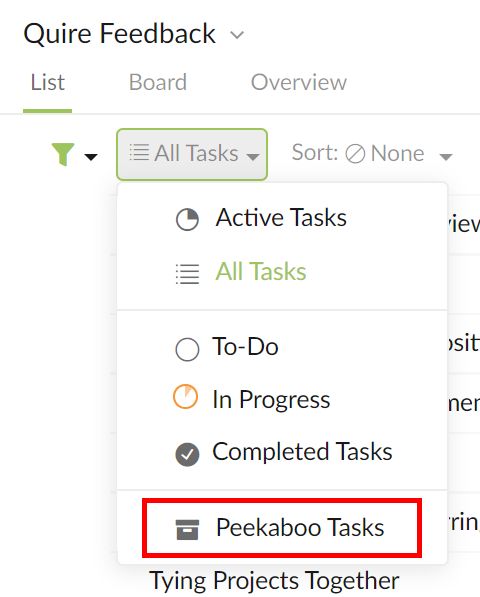
Peekaboo simply hides/snoozes/archives tasks. Delete removes them completely.
Yozza, Nov 6, 2019
Hi Peggy, I was thinking it could be something simple like this:
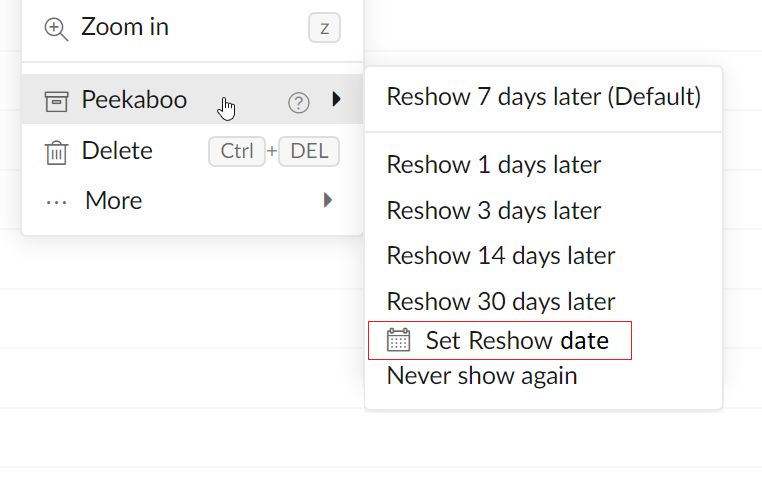
?
Yozza, Jul 20, 2019
Hi Peggy, just FYI, Gmail for example implements this for it's snooze (the same thing as peekaboo) feature in a way similar to what I proposed above:
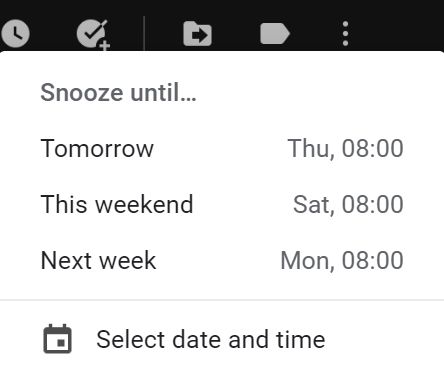
This seems very clear and clean to me!
Yozza, May 20, 2020
I second that suggestion! Our staff would love it if we could peekaboo something for any length of time!
Emily, Jul 31, 2019
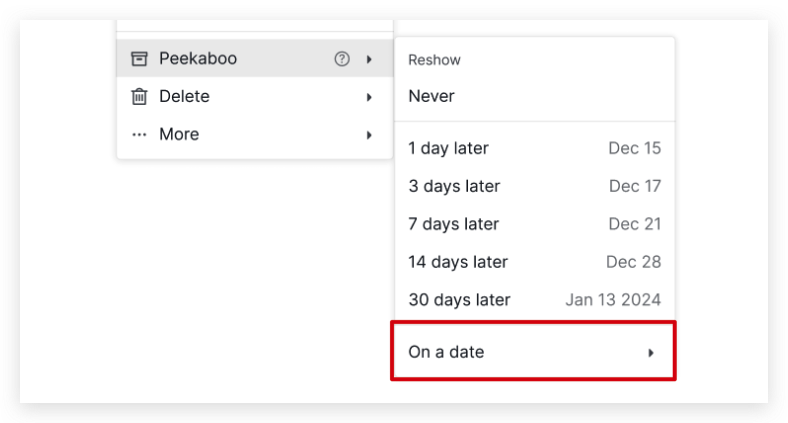
Hi all, Now you can select a specific date for the tasks to reshow when you peekaboo your tasks! Select On a date in the Peekaboo menu to show the date picker. Check out our handy guide here for more details 🙌
Golda, Jul 13, 2023
To add to this: I'm interested in being able to peekaboo until the due date.
For example: my team has complete 90% of a task, but the final pieces must be completed on the due date, not before. I'd like this task to hide from my flow board until it can be finished on the specific day.
Thanks for all your work!!
CBroz, Oct 21, 2020
I appreciate your feedback , update and variation , but still unable to figure out how to enable the variation you suggested ?
Girish Peswani, May 27, 2021
Thanks @Raisag and team Quire!!!
🎉 🚀 😍
Yozza, Jul 14, 2023