
When I read this blog, the usage of Organizations, Projects and Tasks is explained exactly as I would like to use them.
Organization: 'An organization consists of projects. It is a company, department or team that works on projects in it.
But organization can also be a group of projects, or simply a part of your life called Work, Home, Volunteer, etc.'
Project: 'A project is made up of tasks. It is a goal, or a challenge that you and your colleagues, family or friends want to accomplish together.
For example, it can be a marketing campaign you and your team want to run, a cool app you and your designer want to make, a trip to Europe you and your friends want to plan, etc.'
Task: 'A task is an actionable item to be done. It can be broken down into subtasks, sub-subtasks, and so on.
But it can also be ideas, notes or sections that you want to jot down first and divide into smaller items later.'
This also implies that all other functionality, like reporting, Smart Folders etc., should be aligned with these principles, to enable us to fully utilize the very nice functions within Quire, to use them across Organizations and Projects without having the limitation on number of projects I can use in a Smart Folder filter or not being able to filter the My Tasks view on Organizational level. Users working in multiple Organizations, being a company, department or personal life want to split these and not have a very long list of projects, under a single organization. And moreover, splitting a task into subtasks doesn't make the parent task a project. Projects and Tasks should be split by default in an application like Quire by being different objects in the database.
GTD does explicitly not say anything on how you need to organize (in which structure) your projects and tasks. GTD is more about processing projects ad tasks.
Currently Projects do not have option to assign a due date. Having a start and due date would be great if that would be added.
Not sure what you are trying to say here. The name of a project does not add anything to the hierarchical structure
Nobody will be forcing you to use folders for each tiny project. You could still keep on working as you do now. if that works best for you. That's your own choice. If you want to work with a single Organization, with a single Project Folder (as you call it) and all of your tasks and subtasks below, that would still be possible. The difference between you and me, I guess is that I have multiple customers (in your philosophy each customer would be single project folder) with each 10 - 15 projects with 50 - 100 tasks and subtasks.
Why are you trying to force your way of working upon other people? I'm leaving room for every one to work as they want, as log as the application allows them to.
(deleted-IAMQ), Nov 22, 2019
But organization can also be a group of projects, or simply a part of your life called Work, Home, Volunteer, etc.'
You can do that but that will be more difficult for you and your team to filter and sort and manage. Plus you will be less able to distinguish between your personal life/work and your team life /work.
Alternatively, Making an org for your personal life/work And a separate one for your team will also give you the power to let them create goals inside of that Org while they leave your life and work untouched. It will allow you to preserve creative freedom over your goals while you give them creative freedom over theirs.
And as a manager of other people it is really important to understand how much employees NEED their own sphere of creative freedom in order to produce beautiful work for the team and feel significance.
(deleted-OmuA), Nov 22, 2019
Currently Projects do not have option to assign a due date. Having a start and due date would be great if that would be added.
Yes they do have the ability to assign due dates, but Quire Project Folders do not. Projects which are parent tasks DO have the ability to assign due dates.
A parent task is a project by GTD definition.
A project and a project folder are a different thing.
(deleted-OmuA), Nov 22, 2019
@joshuarobison.biz Working in real life projects means , in my case that for each project I have a template of around 100 tasks which I need to complete to finalize the project. So I know they belong to a specific project, I know that most of them I have to execute myself and I execute them one by one in the order they appear in. The inbox is not meant for this type of tasks. The Inbox is meant for temporarily storing incoming tasks, of which you still need to decide to which project they belong and who should execute them. Most of my tasks don't have a due date.
(deleted-IAMQ), Nov 22, 2019
Thanks for this @pascal.zweipfenning I see you've created a whole thread by which to continue our debate LOL.
This is exactly how you are using them and how Quire suggests to use their software.
I think it will be problematic though because of how it clashes with GTD.
① a project needs a due date. You cannot give due dates to project folders
② a project should be a well spelled out goal in the past tense ("11/25 I made a cake") A project folder does not allow for anything but a label
③ I have over 30 projects and each of them has about 5 tasks . Ain't no way Quire or Todoist is going to work right with 30 project folders with only five tasks. People gonna open a whole project folder for only five actions? Save yourself. A project should be a parent task as defined by GTD.
④ According to this blog article, there is actually a bit of bleed over in how GTD/Josh use Project folders.
Example
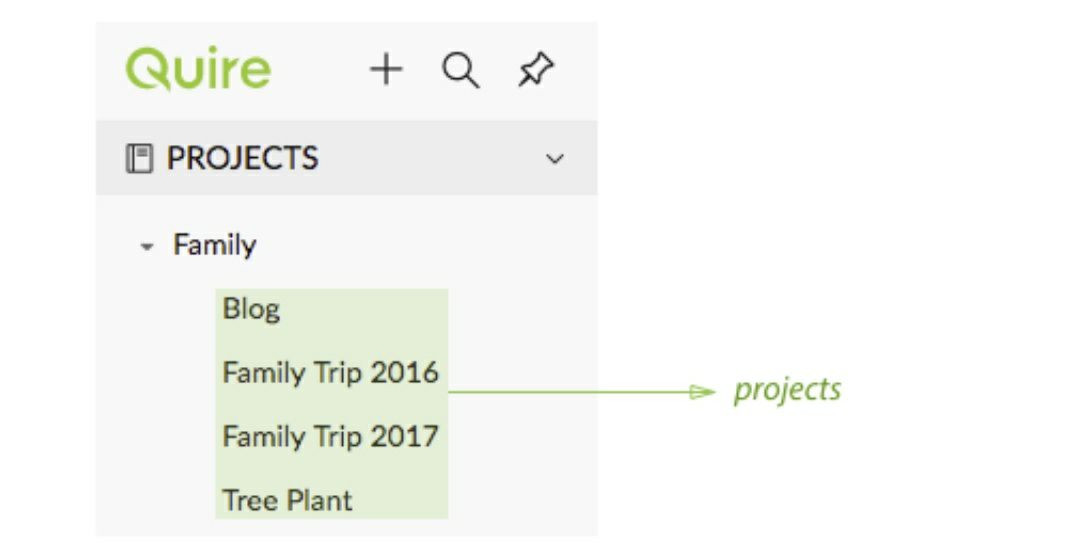
"Blog"
Is not a goal or a project as defined by GTD
This project folder stands outside Quire's above definition. This is the type of use I suggest using Project Folders for.
A blog consists of many projects.
A project as defined by GTD is
"A task which requires more than one step to accomplish."
A GTD project is a task therefore what Quire calls "projects" is not actually a GTD project.
(deleted-OmuA), Nov 22, 2019
@joshuarobison.biz That's exactly what I was asking you....
(deleted-IAMQ), Nov 22, 2019
But it can also be ideas, notes or sections that you want to jot down first and divide into smaller items later.'
YIKES!!! No wonder you have thousands of tasks . That is gonna be a monster.
Those should go in your inbox. They are not officially tasks until they become a proper task or project.
Oh dear.
(deleted-OmuA), Nov 22, 2019
@joshuarobison.biz I don't want to have to tag each and every task only because it is for a different customer or project for that customer. The hierarchical structure in Quire supports that split. Tags should be used a little as possible as they always become a mess. If I only tag the main tasks with the customer name, how I would I ever be able to filter all the atsksforthat specific customer, for which I'm waiting for? I only use tags for assigning a status like 'Waiting For' or the name of a person I'm waiting for.
Once again, Quire does not have Project Folders, they only have Organizations, Projects and Tasks. A parent task is not a Project, it is just one of the tasks (possible split into smaller subtasks) being part of the Project. All these tasks and subtasks together, should lead to the desired outcome. If you like to implement this in a single folder, fine, ith the number of tasks I have, that is not doable and not necessary in Quire. Have a look at Facilethings.com or GTDNext.com, they have the same setup. If you want to use the object 'Project' as a Project Folder, feel free, but please do not try to force your way of working upon others.
(deleted-IAMQ), Nov 22, 2019