
Hey guys. Please provide O365 integration and connectors.
Via Quire iOS
Hi @Jefim_Nikitin, thank you for your feedback.
We have shared your with our team, and we will keep you informed when we have any updates.
Also, we have integrations with Outlook Add in and Outlook Calendar, which you can explore here and here, respectively.
Feel free to share more details on the type of integration you are looking for with Outlook or Office 365. Thank you.
Golda, Dec 17, 2024
Not sure if this is moving forward or not, but some functionality that would help me is the following:
- I have installed the Quire Outlook App, but it does not work in Outlook. It does not show up on the message toolbar like a Todoist or Asana integration would, and though I can see it in the Apps option box, when I click on it, nothing happens. So, I cannot create a task from an e-mail that is sent to Quire from within Outlook. (I understand I can forward an e-mail to Quire, but that is different.)
- A bi-directional integration with Outlook, where Quire tasks show up on the calendar in Outlook/Office365, would be extremely helpful.
Michael, Apr 1, 2025
Hi,
Glad to hear reinstalling the app solved the issue! Regarding your request for two-way sync with Outlook Calendar, we’ll share your feedback with our team. However, please note that this feature hasn’t been prioritized yet, so it won’t be available in the near future. Thank you!
Golda, Apr 2, 2025
Hi,
I have installed the Quire Outlook App, but it does not work in Outlook. It does not show up on the message toolbar like a Todoist or Asana integration would, and though I can see it in the Apps option box, when I click on it, nothing happens. So, I cannot create a task from an e-mail that is sent to Quire from within Outlook. (I understand I can forward an e-mail to Quire, but that is different.)
When you click on Quire in the Apps option, you should see an option on the right side to create a task from this email. If you haven't connected your Outlook to Quire yet, you will be prompted to sign in.
Could you clarify if nothing happens when you click on Quire in the Apps option, and if you don't see any notifications? Also, have you tried revoking access and reinstalling Outlook-Add in?
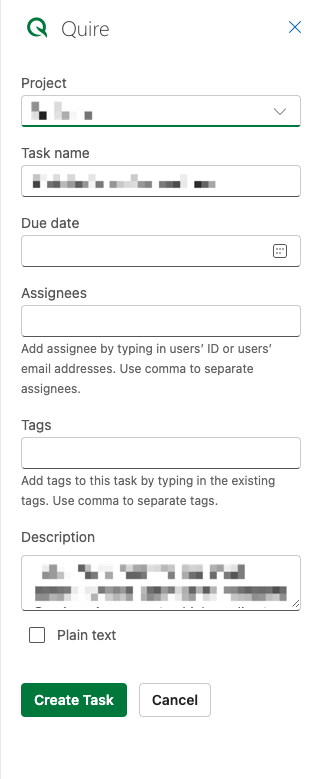
Regarding the integration with Office 365, this hasn't been prioritized yet. Unfortunately, two-way sync with the Outlook calendar is not supported at the moment, but I will share your feedback with our team for further consideration.
Golda, Apr 1, 2025
Thank you, Golda. No, when I click on the Quire app button within the Outlook interface, nothing at all happens. Yes, I'm familiar with what I should see, but nothing at all comes up. I'll remove it and reinstall it to see if that makes a difference.
Michael, Apr 1, 2025
FYI, I uninstalled & reinstalled the app from the Office365 admin integrated apps area, and then used the Outlook Web interface to activate it, and now I can see and use it in the Outlook desktop app.
Michael, Apr 1, 2025
outlook365
Jefim Nikitin, Dec 15, 2024