
Hi, a couple of UX suggestions for the "Task Detail" view in the Android app:
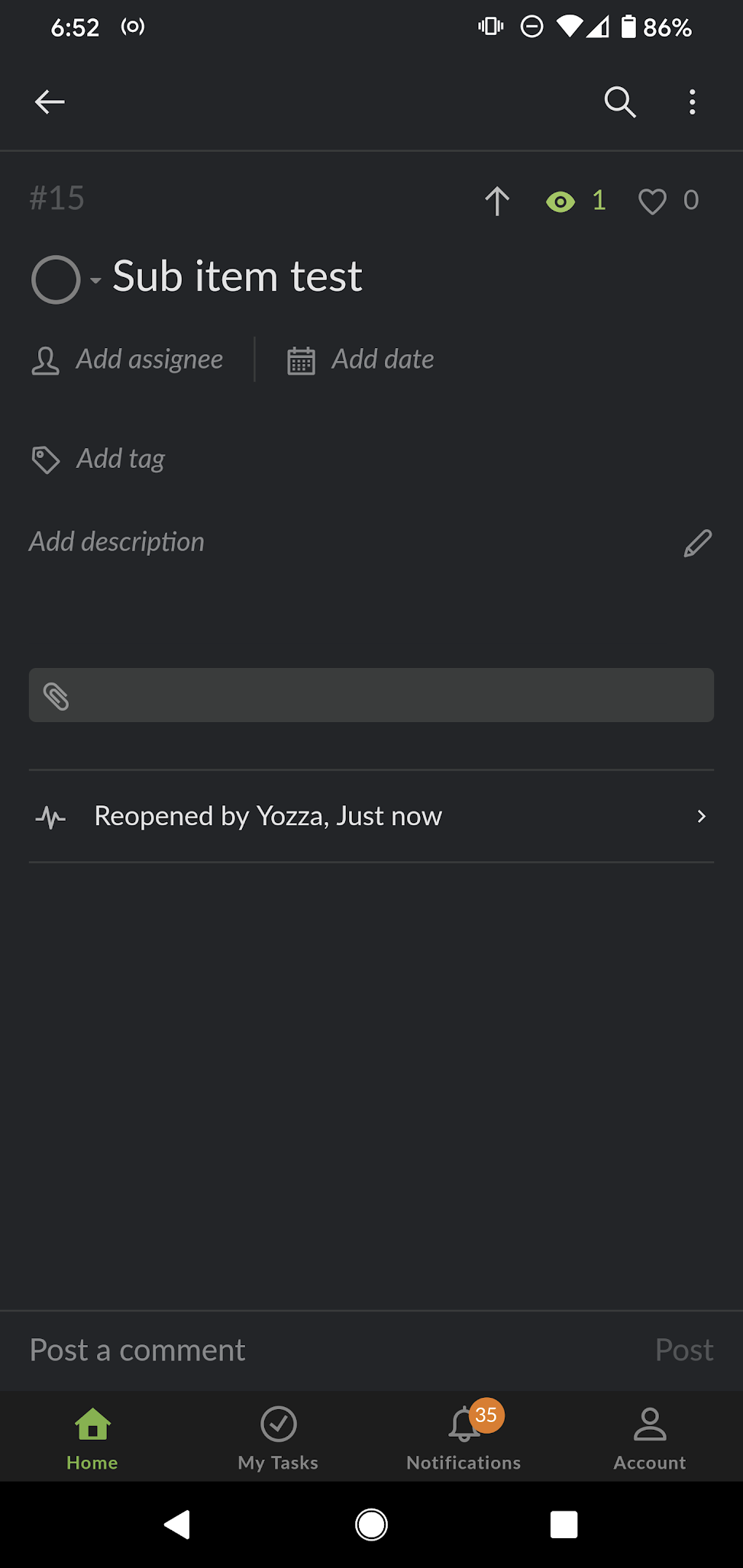
- Show the parent tasks
After digging around for a while I discovered that this can be done via the "advanced view." However, there are downsides with this: a) On the mobile app the advanced view is quite cluttered and I don't want to leave it on just for this. b) Unlike in the web client where you can see the task hierarchy to the left of the detail panel, there is no other way to see the task hierarchy while on the task detail screen c) When "arriving" at a sub task (e.g. search, notification, etc.) if you haven't already enabled "advanced view" there is no way to access parent tasks.
- Allow editing the task title "inline"
Currently you have to tap the task title to access the "task title edit" view. There are several downsides to this: a) Editing the title of a task takes three full taps from the project view. This is a lot for a basic function b) You lose the other context/details that are shown on the task detail view c) It is inconsistent with the web app where you can edit the task title inline d) it's annoying tapping the place in the title I want to edit, only to be taken to another view, where I then have to tap the place I want to edit again.
Thanks again for making Quire so awesome!
Hi @yozza0 - Re:
b) I also tried "shaking" my phone to switch between display modes, but I can't seem to get it working? I double checked and the display mode in Account Settings is set to (auto). Is there anything else I need to do?
I have tested with an Android phone on hand. Shaking to toggle between modes worked fine. Could you please try again and shake harder to see if it works this time? Thank you.
Peggy, Jul 15, 2020
ooh! Just tested this and it works perfectly! Thanks very much! 😂
Is there any update on my second suggestion: 2. Allow editing the task title "inline"? I think this would be a big usability improvement for the mobile app!
Also, does that setting (in your screenshot above) apply to all comments in the project, or only comments in tasks that they follow?
Thanks again!
Yozza, Jul 28, 2020
Hi @yozza0 - No problem! Yes, it would be great if you open a new thread for the second suggestion. I will keep an eye on this and let you know once I hear anything. Thanks! 🤩
Peggy, Aug 4, 2020
Hi @yozza0 - we don't have an update for the second suggestion yet. I will make sure to let you know if there's any news.
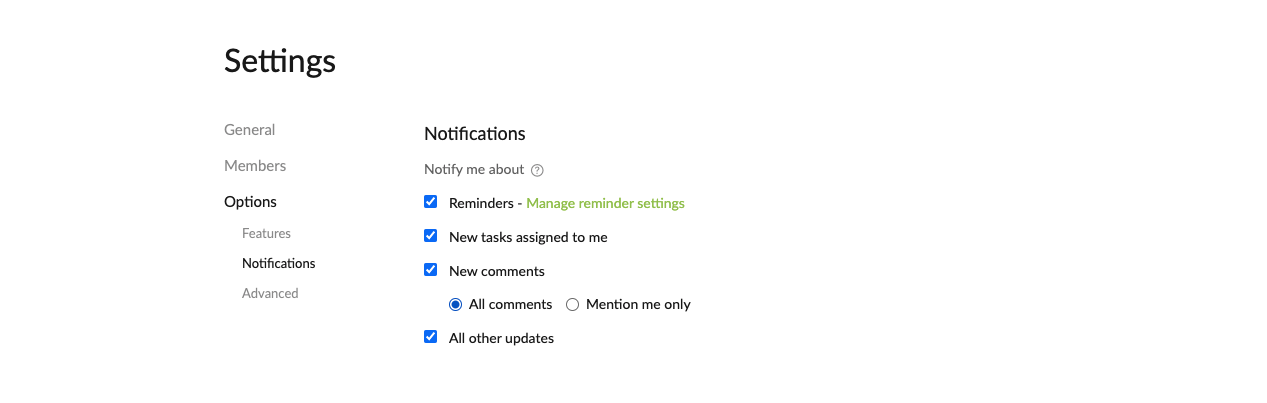
The setting (my screenshot above) is project-based and it applies to only the tasks that the member is following.
Peggy, Jul 31, 2020
Hi @yozza0 -
re: your first suggestion: Show the parent tasks You can pull down on the screen when in the detail panel to see the parent task. You can tap on the task's parent task, then be directed to that task. Check out this guide for more information: https://quire.io/guide/mobile-app-gestures/#view-the-tasks-path
I will pass the second suggestion to the team.
Peggy, Jul 13, 2020
- Show the parent tasks
oooh!!! That's perfect!! Thanks very much!!
That guide is very useful too! I didn't know about "shake" to change between basic/advanced modes either, will try that out! Thanks for sharing the link!
- Allow editing the task title "inline"
Great, thanks! Keen to hear their thoughts 😃
Yozza, Jul 13, 2020
- Show the parent tasks
a)
I had a play with pulling down in the task detail view, and I can indeed see the parent tasks. Fabulous!
However, as soon as I release my finger the screen slides back up. Is that the expected behavior? Is the idea that you need to keep one hand pulling the screen down and use the other to select the parent task?
b)
I also tried "shaking" my phone to switch between display modes, but I can't seem to get it working? I double checked and the display mode in Account Settings is set to (auto). Is there anything else I need to do?
Thanks again!
Yozza, Jul 13, 2020
btw @peggy, I notice you always @ me.
I had assumed that if you had commented in a task you would automatically follow that task and would thus be notified whenever there is a new comment. Is this incorrect?
Do I need to @ you to notify you?
Thanks
Yozza, Jul 15, 2020
ahhh ok thanks!
does that setting (in your screenshot) apply to all comments in the project, or only comments in tasks that they follow?
In any case, long story short, would you rather I @ you in future, or not? 😂
Yozza, Jul 23, 2020
Hi @yozza0 - in the latest app update, we have made some improvements regarding the task path shown in the detail panel. Please update your Quire app.
When you pull down in the detail panel, the task path will now stick at the top. Without using both hands, you can then tap on the parent task. Push up in the detail panel for the task path to hide again.
I will close this thread. Kindly let me know if there's any questions.
p.s. You won't need to @ me. I will read all the comments in the feedback forum. 💪
Peggy, Jul 28, 2020
Would it be useful/helpful if I created a separate task for the second suggestion (given this one is now resolved)?
Apologies, I should have made two separate tasks for these two suggestions.
Yozza, Aug 3, 2020
So I had a further play and managed to get it to work. it's not really a shake though. it's a single "flick" or "throw." shaking doesn't seem to work. now that I know what to do it's fine though, so no worries.
(If you're interested, I have a Pixel 4 XL and am using the latest Quire app)
Yozza, Jul 15, 2020
Hi @yozza0 - yes, you're correct. When I comment in a task, I will automatically becomes the follower of that task, you won't need to @ me anymore.
However, regarding receiving notifications, it depends on the project settings notification section. Only the members who ticks "All comments" will get notified about all comments. Hope this is clear enough.
Peggy, Jul 22, 2020
Thanks (on both counts) Peggy!
Yozza, Aug 3, 2020