
For someone like me with a lot of experience using this awesome app, this is not an issue because I'm always aware I can mark a task as complete with a simple click on the left circle. I'm using tasks as categories, so an accidental click has the potential to hide(and practically delete) something with dozens of tasks. This is potentially a problem when sharing a project with people with little or no experience - they can hide(=delete) important things just by browsing task organized on many levels and I wouldn't notice that - the open/collapse icon is only 10-15 pixels away from a dangerous button(the "complete" circle). Quire already added a safety feature when deleting a project(force type the project name). My suggestion is to add some sort of delay for complete button. It's incredibly easy to hide tasks+categories by accident. This can also apply to delete button. A practical solution I think it's user friendly and consistent with Quire look&feel: mouse press the circle for more than one second and release it after a visual cue like a loading animation.
Hi, thank you for your suggestions.
For tasks that cannot be completed, you can use Sections. Sections don’t have a status, so they can’t be marked as completed. You can also create hierarchical sections, just like tasks.
To prevent accidental task completions when clicking on the status, you can adjust your project settings. Click the dropdown menu next to your project name > Options > toggle on Always show status options when you click on the status icon
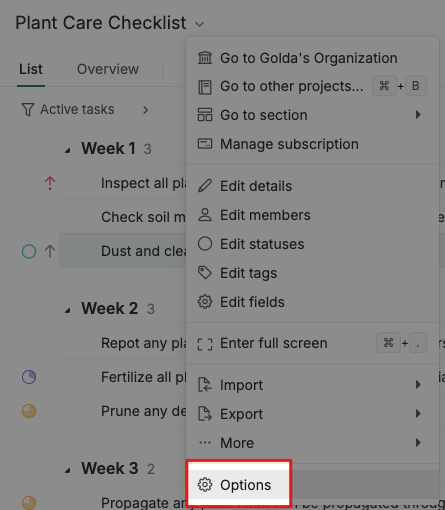
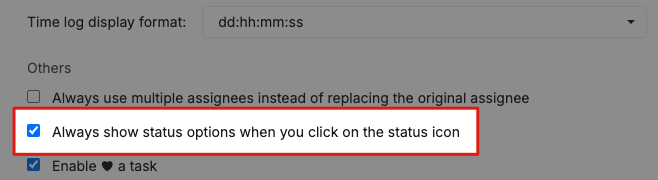
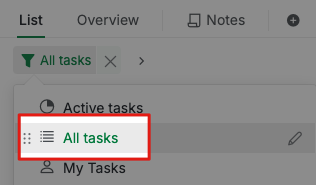
Please note that after tasks are marked as completed, your tasks are not deleted. You can still find them by using the filter icon and selecting All Tasks .
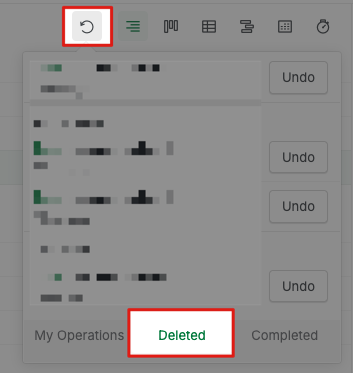
Additionally, if you accidentally delete a task, you can click the Undo button or find it in the Deleted tab. The undo icon remembers the modifications that were made within 6 days.
Golda, Apr 8, 2025
The option "Always show status options when you click on the status icon" basically solves it. (When that menu comes up - I realize I clicked / touched slightly off and can cancel).
The retention of deleted tasks I was aware of - but thanks for reminder.
Asteinarson, Apr 8, 2025
I just posted (separately) on this topic.
My suggestion is to make some sub trees "read only" or "documentation only" - i.e. so that they cannot be completed.
Asteinarson, Apr 7, 2025