
It should have info like Project Name (20% completed) Task (at least pending and upcoming tasks need to show) Task Assigned to User, Start and End Date also needed Task Project Two (10% completed) Task Task
Hi @ArunPrasadES - If you would like to see all the tasks (overdue, upcoming, later, etc) listed out for different projects in one place, you can use the Smart Folder feature.
- Add the different projects in to one Smart Folder.
- Use the filter bar to filter out all the overdue tasks, for example.
Here's a guide about Smart Folder: https://quire.io/guide/smart-folders/. Hope this helps.
Peggy, Oct 13, 2020
The current graph don't seems to be of any use for me, it should minimum have, the three colors, delayed, upcoming, later. Buy taking a look at this, i should be able to know, the organization is on track.
Arun, Oct 8, 2020
⭐️ We have closed your thread in order to optimize the performance of the Quire Feedback Forum. Please see our Quire Feedback Official Guideline for more information.
If the request/feedback wasn’t answered or the issue hasn’t been resolved in the newest version, please leave a comment below, the Quire team will be notified.
Peggy, Jul 8, 2021
Hi @ArunPrasadES -
At the moment, we have an overview page for each Organizations. You can access the overview page from the sidebar. It will list out all the projects underneath that organization and the percentage of completion of each project.
This is what Organization overview looks like:
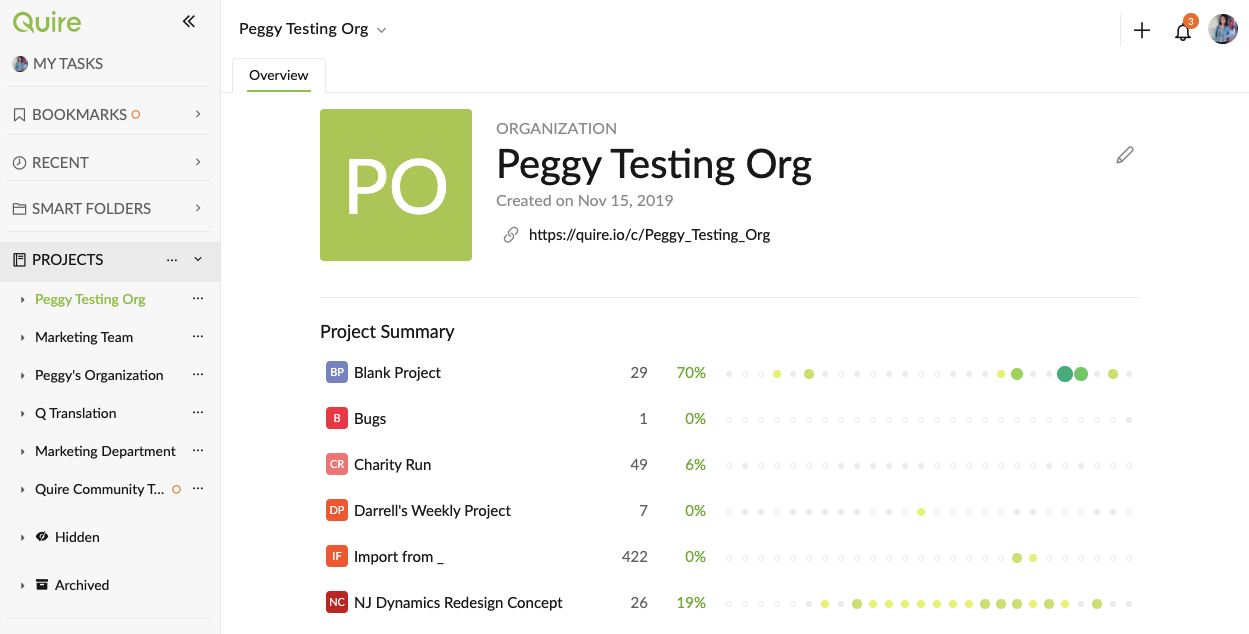
Just to double check with you, so that we are on the same page. Do you wish the overview page can list out more information, such as:
- tasks that aren't completed/ still pending from each project?
- which assignee that has the most incomplete tasks?
What else of information are you looking for on the Organization overview page? Please let me know, I will pass them to our team. Thank you.
Peggy, Oct 7, 2020
Thanks
Arun, Oct 13, 2020