
Invitation and Accepting is time consuming process, once a member is added, it should right away display in the developers task, also every time cant enter full email, use from the history. add some autocomplete for searching members
The members in a project under a organisation is in most cases common, ie, If i add a member to a project under organisation one, that same person is going to be assigned when i create a new project under this organisation, but this is not easy, suppose i have 20 projects under a org, i have to add enter email address 20 times. I am not talking about members under a organisation. I am talking about members across projects. The chances that the same person is go to work on the other projects under the same organisation.
Arun, Oct 17, 2020
This was not working, you can check
Arun, Oct 13, 2020
In the same organization, if I search for members in new project , they won't appear
Arun, Oct 13, 2020
Hi @ArunPrasadES - I tried to reproduce this issue on my side, however, it was working fine for me.
We had made some enhancements on inviting members to a new project. Please kindly refresh your Quire page to get the newest update version and try again. If the issue still exists, could you please kindly provide the steps to reproduce and screenshots for us? This way, we can have a visual understanding of what's happening.
Thank you in advance.
Peggy, Oct 15, 2020
Hi @ArunPrasadES - At the organization level, if you have already added all the 20 members, you can change the members' permission to Normal member. This way, they will can only see the projects that they have been invited to. (See this guide for more details: https://quire.io/guide/organization-permission/)
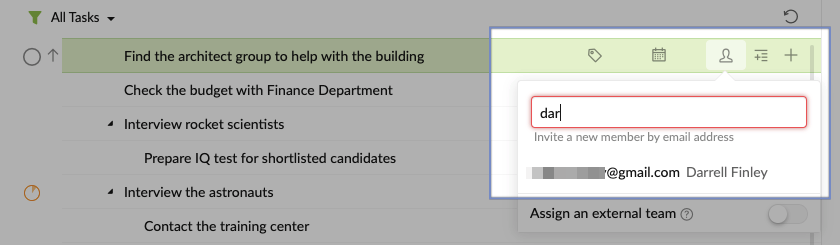
And at the project level, only add the members that you want. You can add them by typing in a few letters of their name or their email addresses, an autocomplete should popup for you to choose from.
Peggy, Oct 21, 2020
Hi @ArunPrasadES - Click on the assignee icon, and by typing in the assignee's email address, he or she will be invited to the project straight away. You won't need to invite him or her again in the project's member page.
Also, we do support autocomplete when you are typing in the email address, we will show the emails that had already been in the same organization or projects as you had.
Here's more information on our Guide: https://quire.io/guide/set-assignee/#assign-tasks-to-members-who-are-new-to-quire.
Peggy, Oct 12, 2020
The process is not up to the need, we are fast phased company, i can't always enter full email to assign some one new projects, there needs to be a simple user name searching option with autocomplete.
Arun, Oct 17, 2020
⭐️ We have closed your thread in order to optimize the performance of the Quire Feedback Forum. Please see our Quire Feedback Official Guideline for more information.
If the request/feedback wasn’t answered or the issue hasn’t been resolved in the newest version, please leave a comment below, the Quire team will be notified.
Peggy, Jul 8, 2021
I can't allow to add currently my staff to organisation directly, as they can see all the projects, If there is a way to add members with even more limited visibility is better i think , for eg i can add staff, but they wont see the projects, until they are assigned any task or added as a member in the project
Arun, Oct 17, 2020