
As a content creator, I've found that Quire fits a very useful niche for me. Other task management software (I tried Trello, Wrike, and a few other free trials) are designed assuming a well-explored workflow, but that's not my situation. I often start with one big idea with little to no idea about the specifics of what needs to be accomplished. Quire's capability of splitting those big ideas into smaller concrete tasks is invaluable.
Now my suggestions will be from the perspective of an individual, so keep that in mind as you read.
First, since Quire's best feature is to look at projects from a macro level perspective, I really think the tool would benefit from a visual, Prezi-esque display that allows collaborators to drag-n-drop tasks into different branches of the project. In addition, making those branches size larger with weighted tasks and colored more urgently with higher priority tasks would allow for the project master to get a instant visual indicator of what part of the project needs the most shoring up. This is obviously a big ask, but I think it really leans into the strengths of your tool.
Second, I would love a disorganized task hotbar that's linked to a widget on my phone. The way I see it, the 'breaking down an idea' utility of Quire is best used by people in upper management, content creators, or by normal individuals for their personal projects. In all three cases, these people will be generating tasks on all levels of the project on the fly. However, organizing those tasks to the correct places with the correct priority and deadline is something I'd prefer to do sitting down at my desk. Making tasks easy to write down on the fly should be the main priority of the widget. Making those tasks easily transferred into any section of the project should be a big feature of the computer app.
Third, I would love for the kanban board page to better incorporate regular unknown tasks. This is part of a content creator's perspective but I know I have to put out content weekly, monthly, quarterly, and yearly intervals, but I won't always know what that content is. Currently I have a board with columns for each type of regular content I need make with a list of open topics. But since the topics essentially have no due date nor priority (it's only once their slotted that they do), I have to keep applying the same dates & priorities over and over. This is another feature I find lacking in other task management software which I think you can take advantage of.
Fourth, I'd like shared columns across separate boards. This is a pretty minor QoL change but with my open topic columns, I'd love to be able to share them between my weekly, monthly, quarterly, and yearly content conveyer belt boards. That way, I can look at all the topics I'm thinking about any time a content slot opens up.
- Ok I see. If I create a custom filter for 'Project: None' I can easily access my unassigned tasks. That's very nice.
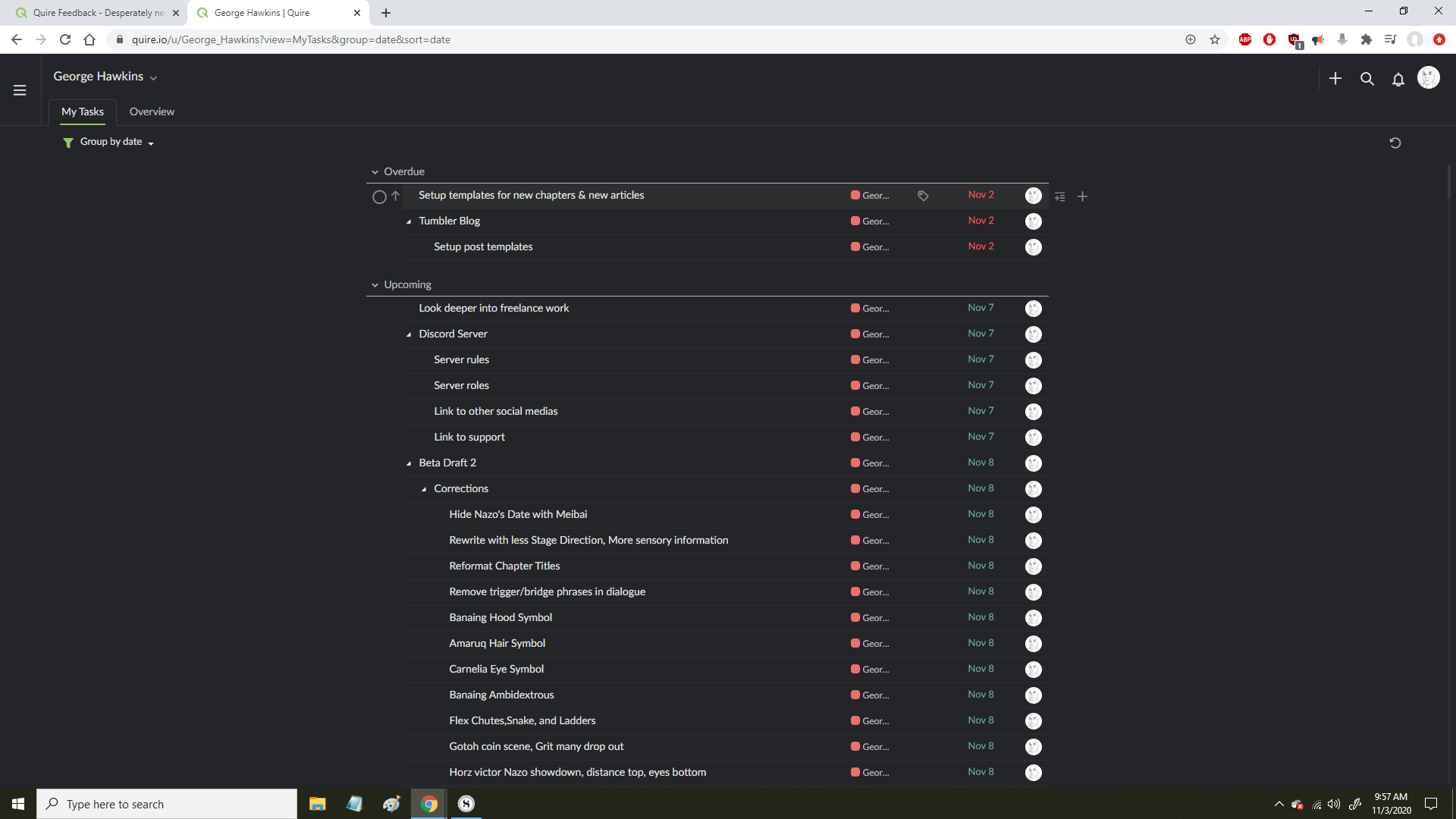
I will say though, I think it is unintuitive for the My Tasks (in it's default state) to serve as a deadline list while also containing the function of an inbox via menu settings. It might not be a problem for people who start using Quire as a To Do list first, but I started by creating largescale projects first. That meant I populated My Tasks with a whole bunch of scheduled tasks (attached) before even thinking that it could serve as an inbox of unassigned tasks.
My hotbar suggestion would be visually similar to minimizable tab that opens when a task is double clicked, except on the left. It would contain the inbox of disorganized tasks, and it would be easy to slide it into whatever list or board displayed in the middle. My Tasks would serve exclusively as a way to keep track of upcoming deadlines.
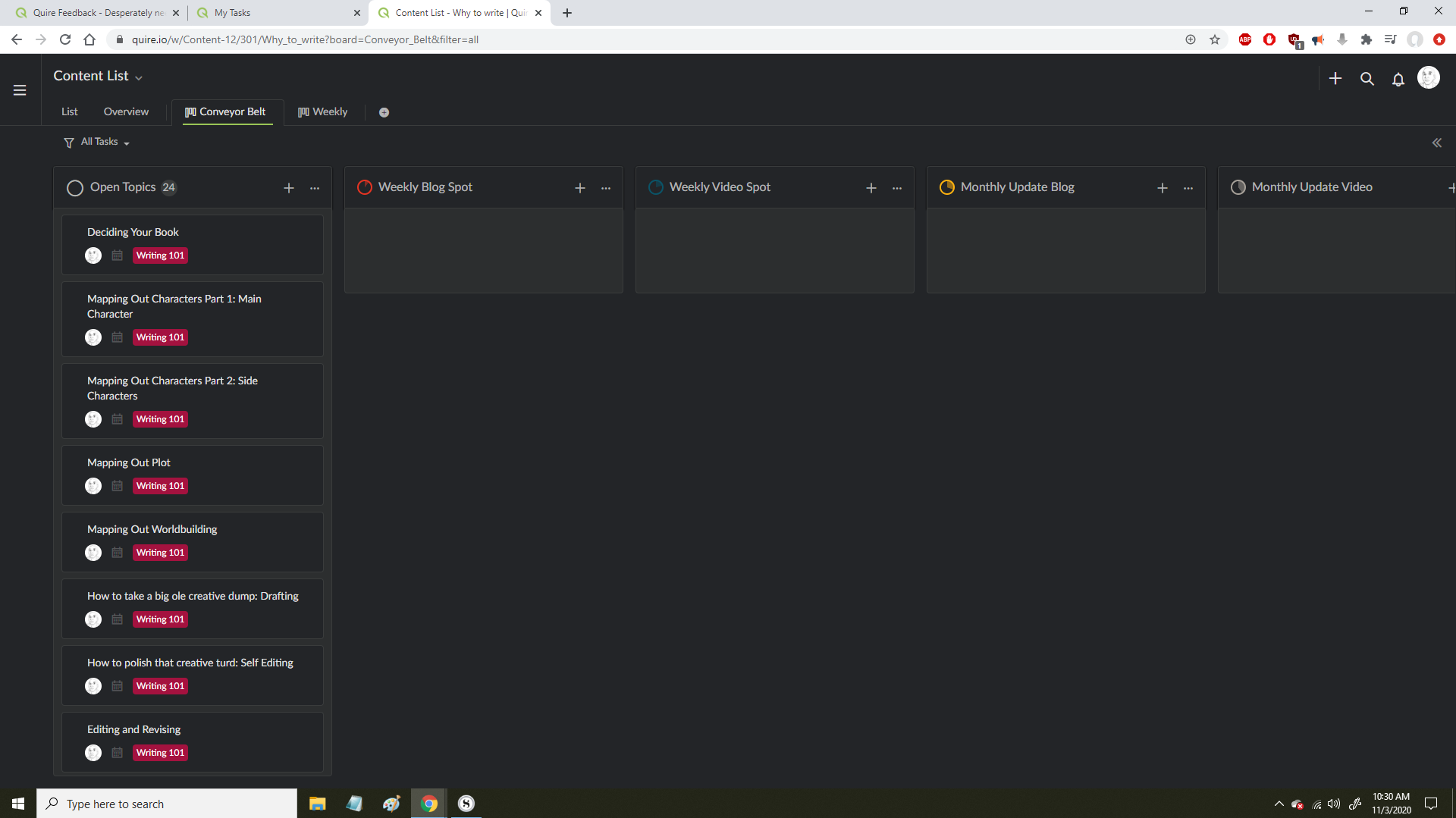
- I definitely explained this poorly the first time around. I attached my content conveyer belt board but since you've told me about the upcoming shared status feature, just imagine it's just the 'open topics', 'weekly blog', and 'weekly video' columns.
My workflow is choosing a topic, writing a blog, then making a video out of that blog every week. I want to give whatever topic enters my 'weekly blog' column a preset number of days to be finished. Then when I move it to the 'weekly video' column another preset number of days to finished. That way these topics will show up in My Tasks with a deadline without me having to reassign new dates for every stage. So I guess I'm asking for columns to have the function of auto-assigning deadlines based on the date when the card is added.
The ease of use is a benefit for short-cycle tasks like the weekly ones. With more long-term tasks like monthly/quarterly/yearly, having multiple development stages with regular timetables means I'm better in touch with my progress on those tasks. I hope that cleared things up.
- Yeah that sounds exactly like what I need.
George Hawkins, Nov 3, 2020
Hi @George_Hawkins -
Thank you for leaving a feedback and having such a nice thing to say about Quire. It means a lot to the team! 😍
Please see my responses to your request:
In my opinion, this is a really interesting suggestion. After reading your description, I am picturing something similar to a mind map, which was also brought up by several other users before. This is definitely something I can see the usefulness and importance of . I will let the team know about this suggestion.
Currently, we have a feature called My Tasks, which acts like an inbox. It's a place where you store the tasks/to-dos that just popped up in your mind. You can add tasks from any project just by hitting
m(for the desktop version). You can then later go to My Tasks and organize the tasks to their respective projects. Read more about My Tasks in our guide: https://quire.io/guide/my-tasks/. Having that said, for the Quire app on your phone, at the moment, the widget is currently available for Android users. You can add tasks to My Tasks without opening the Quire app. It's in our consideration to support the widget for iOS in the future.I'm sorry I was having trouble understanding the third suggestion that you have mentioned 😞 Could you please share some screenshots to help me visualize how you have set up your boards and the problems that you are facing?
We are currently working on enhancements for our Board view. In the future, when you create a new status in the board view, you will be able to see the newly created status in all the boards. I believe this is what you looking for.
Peggy, Nov 3, 2020