
I've requested a similar thing before, but this time I think I formulated it into something that the developers might be more open to.
I simply don't want the sorting and grouping algorithms to separate child tasks from parents. I want to be able to ignore all child parameters when it comes to sorting, and have parent-child trees intact. At least I'd like to try that, seems like it would definitely be better than not having that option.
Hi @IvanCajic You mean to apply filters on "root" (top level) tasks only?
rj, Nov 25, 2020
@IvanCajic Don't worry, you're not in the minority 😃 I also suffer from time to time when I jump from "filtered" view to "Active tasks" view in order to pick up a "whole picture" of nestings. However Quire does not point me out to the "target/checked" task (if the task is nested), so I need to seek it manually. Hence I guess that's the common issue.
rj, Nov 26, 2020
I'll check it out. I understand you, but I'm sharing a real problem that I have 😃 I also understand that we all don't use the service in the same way, so some people can relate, some can't. I'm probably in the minority in this case. Wish there was an easy way to explore how other people are using the app, maybe I'd see some good practices.
Ivan Cajic, Nov 26, 2020
@regemall yeah.. I want subtasks to remain in their tree structure.. otherwise my tasks are too messy..
Ivan Cajic, Nov 25, 2020
@IvanCajic I see and it sounds quite tricky because being in Quire paradigm we can't focus our filters on certain level of nesting. The only thing I can figure out right now is to navigate to subtasks using Subtask List (see here https://quire.io/guide/subtask-stats/)
rj, Nov 26, 2020
For an example:
If I've entered these tasks and dates on the unsorted view like so:
- Project BetaBlah wrap [Jan 13]
- Project AlphaBlah [Feb 1]
- Write Specification [Jan 14]
- Implement Thing [Jan 21]
- Important first bit [Jan 15]
- Chunk 2 [Jan 18]
- Just remembered X [Jan 16]
- Test and Review [Jan 30]
- Call Bob for Detail [ Jan 1 ]
I would want the date-sorted "keep trees intact" view to look like this:
- Project AlphaBlah [Feb 1]
- Call Bob for Detail [ Jan 1 ]
- Write Specification [Jan 14]
- Implement Thing [Jan 21]
- Important first bit [Jan 15]
- Just remembered X [Jan 16]
- Chunk 2 [Jan 18]
- Test and Review [Jan 30]
- Project BetaBlah wrap [Jan 13]
So, the whole tree for "Project AlphaBlah" is pulled to the top, because it has "Call Bob for Detail" due Jan 1.
Then, any objects of equal rank (tree depth) are sorted, so "Just Remembered X" ends up ahead of "Chunk 2".
Basically, if my next-due task is "Call Bob for Detail", it's useful to me to have the whole context brought up adjacent to it. First - so that I know I'm calling Bob for detail about Project AlphaBlah rather than something else. Secondly, during my call with Bob, I might need a link to a document which is in the detail pane of "Write Specification".
In this scenario, when I complete and check-off "Call Bob for Detail", I want "Project BetaBlah wrap" to pop up to the top, as it now contains the earliest due-date.
I don't think that "keep trees intact" should be a default, because I understand how it could confuse people. But I think a lot of people will want this behavior, and I believe what I've represented above is the most intuitive way it could work.
TA F, Jan 21, 2021
Hello, I was just about to write a request for exactly this feature!
Basically, my subtask names do not necessarily make sense to read without the parent above them to give me context.
- "Write the report"
versus
- "Project Blahblah Wrap-up"
- "Write the report"
So I'd like to keep the context visible, even if that literally meant just showing the names of the parents preprended automatically onto the front of the task name. Although, I think the slickest way to do this would be to keep the trees fully intact and operable.
In particular, I have 2 views I like for Todos:
- Sort by Date, group by Priority and
- Sort by Priority, group by Date
I'd really love to keep my trees intact. However, I have some further opinions on how it should work... For sorting purposes, a parent should take on the max/min value of the child. So, if I am sorting by Date with "keep trees intact", I would want the earliest due date present anywhere within the tree to be used as the sort key for that entire tree.
TA F, Jan 21, 2021
Hi @TAF - Thank you for your feedback. I will pass your example and use case to our team for discussion!
As I am aware, up until now, keeping the tree structure when grouped isn't in our plan. We will keep the tree structure when you only sort the list by date, but once you have grouped it by Date or Priority, the tree won't be intact anymore. The main concern is that if we keep the tree structure, you will get a repeated list of the same tasks in each group. We think it will be redundant and confusing for users.
For a workaround, you can try toggling on the Advanced mode (hit Ctrl for Windows or Alt for Mac). When you group the list by Date or other options, you will see the task path above the task name. It will help you get ahold of the context without switching back to the default filter.
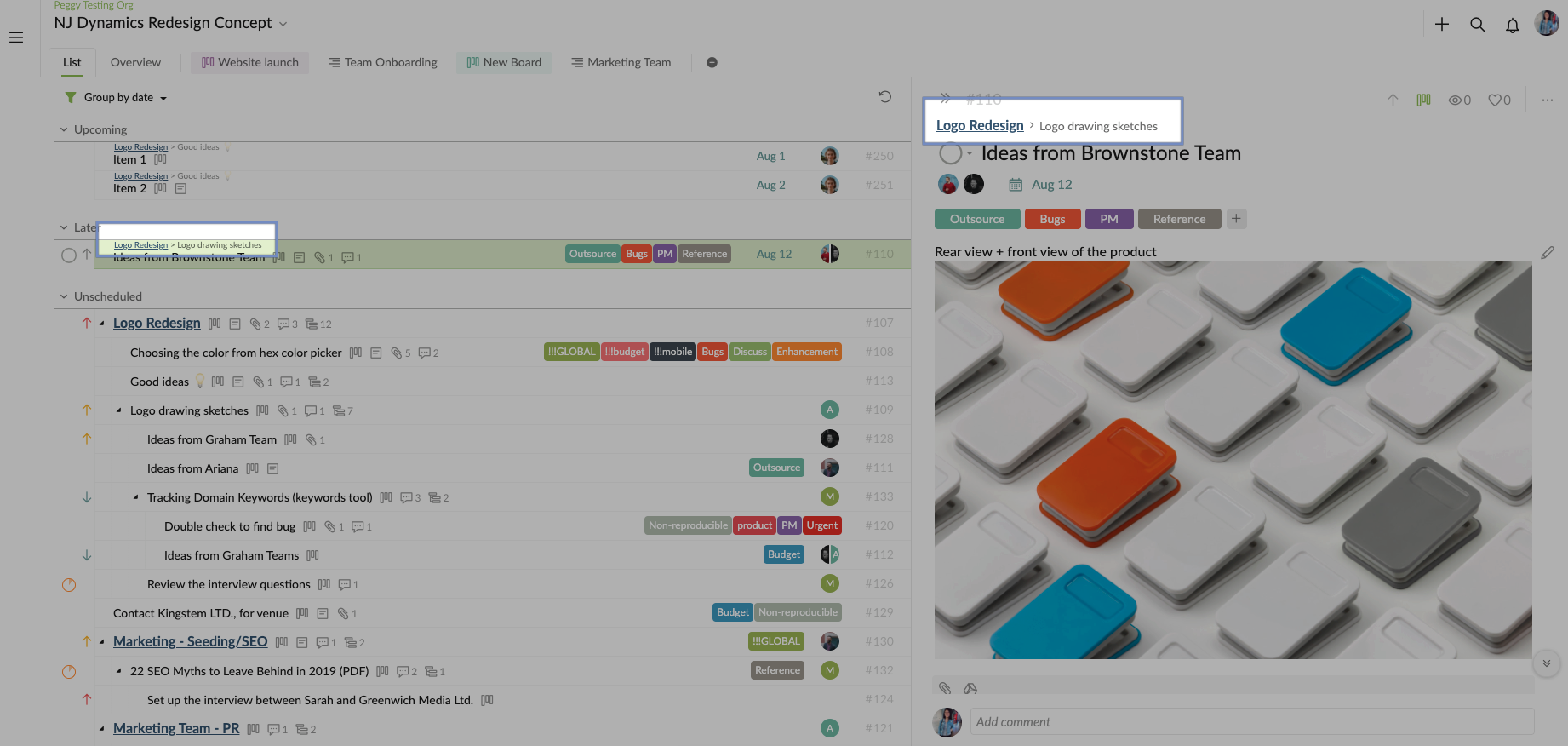
Visit this guide for more details on the Advanced mode: https://quire.io/guide/advanced-mode/
I hope my reply is helpful and I will keep you posted if I get an update from our team. Thanks again for your detailed feedback! 👍
Peggy, Jan 28, 2021
👍
Ivan Cajic, Nov 26, 2020