
Is there a way to view completed tasks by date completed, either in my tasks view or elsewhere?
I see I can select completed tasks, but when sorting by date, its date created, not date completed.
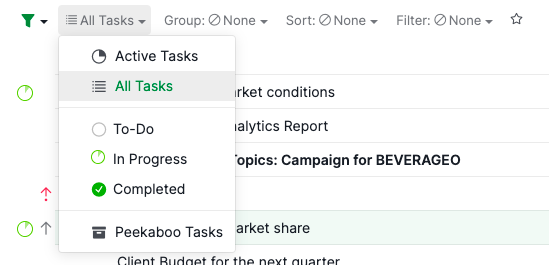
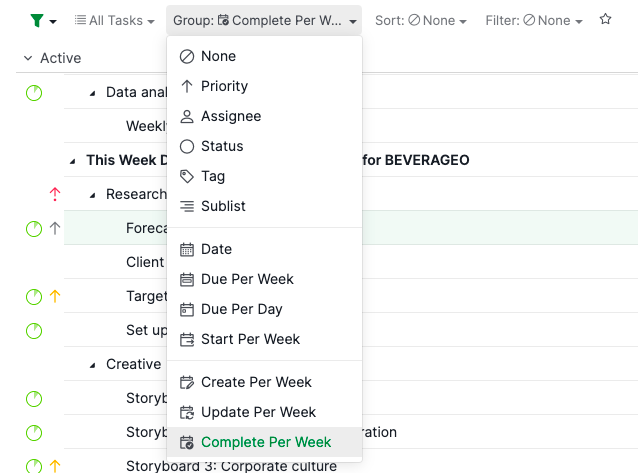
Thanks @peggy, your second comment helped me. I only had "Completed" tasks selected instead of "All Tasks", and the "Complete Per Week" option wasn't showing up in the "Group:" drop-down. Quire's great, keep it up!
Wayne Villars, 2021年3月20日
Aha, I see it now. Thanks, Peggy!
Mya, 2021年11月25日
hi @Peggy - I'm pretty new to Quire and just stumbled across this thread because I'm also interested in viewing tasks by their completion date/time. (This would make it easy to see what you got done on a given day, for example.) Do you have any update on this feature request?
Also, the "Complete Per Week" view you pointed out above: is that only available to Premium/Enterprise accounts? (I have a Professional account and don't see that feature.)
Thanks!
Mya, 2021年11月24日
Hi Mya - Welcome to Quire! 🙌 🙌
The 'Complete Per Week' can be found when you change the filter to All Tasks. Hope this helps.
Peggy, 2021年11月24日
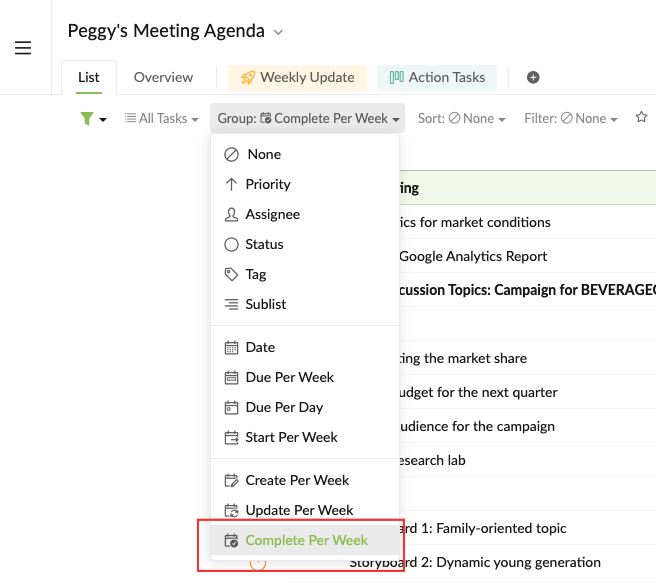
Hi @Max_Peters - Another way is to view the tasks group by "Completed per week".
Peggy, 2021年1月19日
Hi @Max_Peters - At the moment, when you sort the completed tasks by Date, the tasks will be ordered by their due dates.
The oldest due date will be at the top of the list and the tasks that don't have due dates will be at the bottom.
I will pass your feature request to our team and hopefully the team will add this into consideration. If I get updates, I will let you know. Thanks!
Peggy, 2021年1月15日