
Hi QUIRE, first of all, you are fantastic!
As you can see below, I'm using a 'folder like' structure to manage my subtask. Where I use symbol '+' for each level 'folder' level, the reason is I can see straight away in board view, that it is not actually a 'task' itself, but just a 'tasks folder', that's ok.
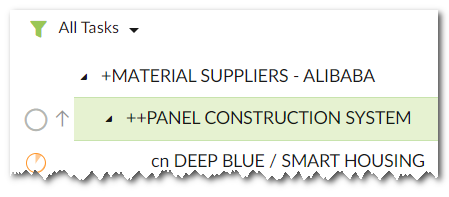
But then, when I'm in a 'List' view and I use a task filter, then I cannot see in what 'task folder (path)' my task is. Also, I cannot group by 'task folder'
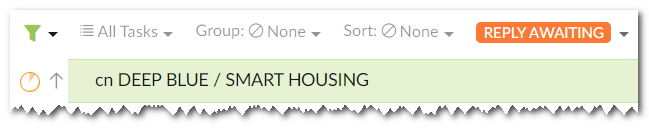
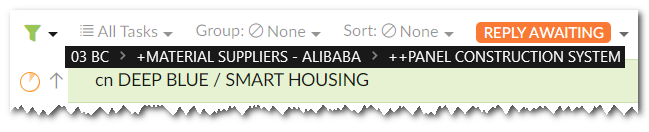
It would be great if it can show the 'task path' like demonstrated below. Even better, if the 'task path' is interactive, just exactly as is folder path in Windows Explorer
@peggy fantastic, that's exactly what I was after, resolved then:)
Aotea Zen Villas Wellington, New Zealand, Jan 18, 2021
Hi @Aotea_Zen_Villas_Wellington_New_Zealand - I believe what you are looking for is the task path that you will see when you toggle on the Advanced mode.
You can hit
Ctrlfor Windows orAltfor Mac to toggle on/off the Advanced mode.See this guide for more detailed information: https://quire.io/guide/advanced-mode/
I hope this is what you looking for, feel free to let me know if you have any other questions. I'm happy to help! Have a great day.
Peggy, Jan 18, 2021