
First for Tom and the TEAM,
Thanks for keeping Quire on the CUTTING EDGE
I have a question about Quire's AMAZING Peekaboo functionality. On this page https://quire.io/guide/peekaboo/ - Users are told that they can view ALL TASKS that have been set to Peekaboo by doing: "To see all the peekaboo tasks in this project, click on the filter icon under the navigation bar at the top, select Customize, and choose Peekaboo Tasks."
When I do that I do not not see the option to Peekaboo.
Does the absence of the Peekaboo option mean that I do not have a SINGLE task that is set to Peekaboo? If the answer is YES then it might be better to still show users the choice for Peekaboo and then return a response that says "No Peekaboo Tasks Found" This might be clearer than leaving us wondering why we cannot find the option to show Peekaboo tasks. As it is I am unsure if I am doing the right things or if I am in the wrong place or menu option.
Thanks again for keeping Quire on the CUTTING EDGE.
Hi @kjennings - The "Peekaboo Tasks" option is always there even if you don't have any tasks peekaboo-ed yet.
You can find the option when you click Customize in the filter icon. It's in the second dropdown menu from the left.
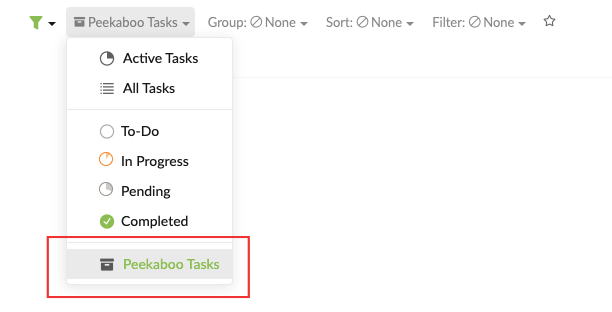
If you still can't find it, could you please share a screenshot of what you see in your project? It might be a bug. (You can attach the screenshot here or send it to support@quire.io for privacy concerns.)
Thank you for your help!
p.s. @paolo.veronelli Thanks for jumping in to help out other users in the Quire community! 👍
Peggy, Feb 17, 2021
after "customize" it's in the first menu
Paolo Veronelli, Feb 8, 2021